

Forum Replies Created
-
AuthorPosts
-
September 24, 2026 at 7:00 PM #2189263
@marii0
If we disable the denoiser and set the quality to the max, how much time do we save on rendering?September 14, 2026 at 12:04 PM #2187843The software does what it claims. Depending on the settings, it reduces render times by between 50 and 75%.
However, there's a trade-off in quality. In order to lower render times, the soft uses heavy denoising which, imo, smoothes the skin too much. Small details are also lost in the process, such as light reflections in eyes or on objects. It's not really suited to crisp 4K renders with lots of detail. For basic 3D renders though, I suppose it gets the job done. People with low-spec computers may find it useful for reducing render times.June 4, 2026 at 10:13 AM #2176691What a disappointment! Figures or scenes still don't load any faster than before. On my setup (RTX3090), rendering times have skyrocketed. If opening old scenes, assets using autofit won't load.
The lack of colors in the UI is also annoying. Everything is gray now.
Only benefits: clearing scenes or closing the app is faster now. Default HDRI map don't load every freaking time.February 15, 2026 at 1:17 PM #2163811It's Yeimi hair on Daz store
October 6, 2025 at 7:24 PM #2148113Rysel is Rachel Weisz, not Keira Knightley.
Margo = Margaret QualleySeptember 19, 2025 at 11:14 AM #2145841Thanks trader2h! Appreciate the info. Bummer it's not a Daz item and has to be converted.
September 13, 2025 at 7:14 PM #2145079What you call blemish/acne is actually a poor attempt of the AI to recreate freckles since your original character has freckled skin. Sometimes the result are not very subtle.
And AI is not good at doing hand/feet in general.September 13, 2025 at 10:05 AM #2145008@trader2h If using Krea, forget the prompt and tweak the settings. Lower the AI strengh and clarity and up the resemblance.
September 11, 2025 at 2:35 PM #2144750If you want to keep it simple, just sign up to any AI platform that offers image to image creative upscaling/enhancing. A good chunks of them have free membership to enhance a few images per day.
Set the creativity to a low setting so it doesn't change your image too much.
You can try site like Kreia, freepik, Leonardo.June 24, 2025 at 11:12 AM #2133480Good call! I already had this set but never installed it. Thanks trader2h!
March 14, 2025 at 3:49 PM #2121749Thanks for the input, Richard. Conversion between generations is always so cumbersome.
March 13, 2025 at 11:31 PM #2121663@Richard Y
I've used the method from the WP Guru shown in this video:
The clay model looks fine but once you apply a material, the iris appears as slightly distorted.
At the 14'04 mark the distortion is clearly visible on the eyes of the converted character.
The result was even worse when I used this method on HID Emmy and HID Violet.I don't think this method uses Transfer Utility. Maybe there's a better way to do the conversion.
March 12, 2025 at 10:05 PM #2121534From the few tests I've done, the fit suit method works fine but distort the iris
March 12, 2025 at 9:53 PM #2121532Looks like Dalila Hair For Genesis 8 and 8.1 Female to me.
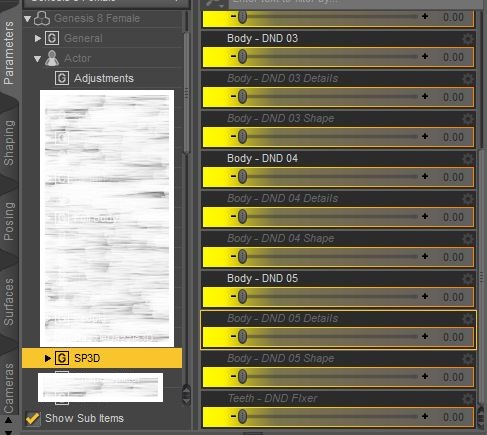
January 30, 2025 at 8:29 PM #2115897@Geekaveli Are you sure you have installed the whole package (There are 21 files in the data folder) or in the correct location?
your daz library > data\DAZ 3D\Genesis 8\Female\Morphs\SquarePeg3D\Body Types\DNDOn my system (DAZ 4.22), they are all showing up.
-
AuthorPosts

