Home Page › Forums › General Chat › Morph and data
- This topic has 14 replies, 6 voices, and was last updated 1 year, 8 months ago by
 gladson1976.
-
AuthorPosts
-
January 26, 2025 at 11:51 AM #2115221
Hello, how to find the morph of this file?
I put in the data folder and in Daz studio how to apply on G8FJanuary 30, 2025 at 9:15 AM #2115838Hello, Please Help thxxxxx
January 30, 2025 at 11:58 AM #2115844With genesis8F selected, go to parameters tab > Genesis 8 Female > Actor > SP3D > Body Types > DND
January 30, 2025 at 12:41 PM #2115848Hello, thx for your message
I will try your method
January 30, 2025 at 12:47 PM #2115849Guys, no need to edit all those freaking duf files...
The morph are there (even the teeth), they display fine in the parameter tab
With genesis8F selected, go to parameters tab > Genesis 8 Female > Actor > SP3D > Body Types > DND
Easy, peasyJanuary 30, 2025 at 1:47 PM #2115854I just looked at the advice @Outro and it works no need to go to the notepad 🙂
Thxxxxxx
January 30, 2025 at 4:14 PM #2115882I just uninstalled and reinstalled. Without editing the files it doesn't appear there for me!
And even with my fix there isn't any teeth. Maybe you installed a previous version before this bundle was available, and installed this version over the top of it?January 30, 2025 at 4:45 PM #2115884Hello, no I just installed the DATA, but I can't find the files
You just have to find SP3D in the Actor tab and you have itFinally for my part this is how I work with DS version 4.21 I avoid regular updates I have already noticed that the latest versions are often
unstableJanuary 30, 2025 at 5:09 PM #2115885This is what I have, there are't any teeth morphs there.
 January 30, 2025 at 8:29 PM #2115897
@Geekaveli Are you sure you have installed the whole package (There are 21 files in the data folder) or in the correct location?
your daz library > data\DAZ 3D\Genesis 8\Female\Morphs\SquarePeg3D\Body Types\DNDOn my system (DAZ 4.22), they are all showing up.
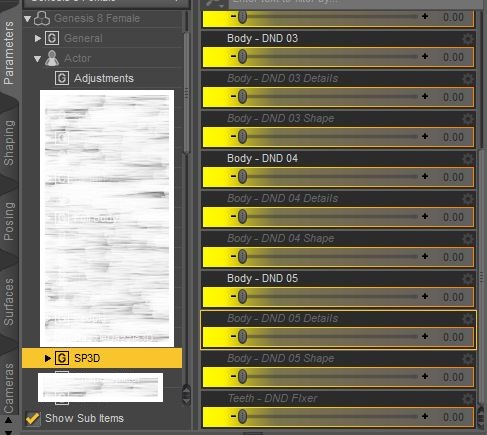 January 31, 2025 at 4:15 AM #2115939
It worked for both of you without use having to edit files, so the problem must be on my side.
I’ve installed them to the correct location, there are 21 files.
I deleted them and started again. Once installed, I reset my database, re-imported the meta data.‘Teeth DND Fixer’ and ‘DND 01 Shape’ are the only ones that appear, but they’re hidden.

The only way I can get all the other files to appear is by editing them in notepad. I’m not sure what that line in the notepad does. But I had noticed it on other morphs files when I opened them, figured I’d try adding it to these files and it worked.
After resetting my database, strangely, it also got rid of the compression morphs by the same vendor, SP3D. I had to find their location and edit the files in the same way to get them to appear again.
I’m not sure if its just this vendor. Or whether my Daz installation has become glitchy, if it has there’s probably a bunch of other morphs and files not appearing that I’m unaware of. I only noticed the compression morphs by SP3D where missing when I looked at my earlier screenshot.
Either way, I’ve found the teeth morph, and the body morphs appear now that I’ve edited those files.
If anyone else comes across the same problem where these morphs aren’t appearing after installation. Let me know. You'll probably have to try the same stuff I did.
January 31, 2025 at 11:48 AM #2116022Did you load Genesis 8 female after installing, or before? New additions to the data folder won't be reflected in a currently loaded figure. You'll need to reload Genesis 8 female or reboot DS.
February 10, 2025 at 12:01 PM #2117338I always close Daz when installing assets and then re-open it afterwards, because I heard installing things when it's open can corrupt files in your library. Is what it is... Weird, but it's working now.
February 10, 2025 at 2:02 PM #2117347I have been installing assets while opening Daz for 10 years now. It doesnt matter. You just need to reload g8f/g9f/whatever after installing stuff and right click>refresh the library folder/
February 10, 2025 at 5:05 PM #2117373@geekaveli .. no.. installing assets when Daz is open does not corrupt the library.. even if you have some other asset loading at the time you copy the files..
.. all you have to do is right click and refresh the library after you copy the files.. you will see the asset after that..
-
AuthorPosts









- You must be logged in to reply to this topic.
