

Forum Replies Created
-
AuthorPosts
-
September 24, 2026 at 12:11 PM #2189231
yeah, I wonder if the daz forum users have anything to say about it. That Richard dude will defense Daz vehemently, for sure.
September 14, 2026 at 9:53 AM #2187839I think I saw some standalone app on reddit.com/r/stablediffusion where you can put in your renders and it will run them through DLSS5.
August 22, 2026 at 5:26 AM #2185355its pretty meh. I think it was better if they make it a style change AI. 3d renders to pencil-charcoal drawing/oil painting/manga-comic style for example, but I dont know if local AI can do that. ChatGPT can do that pretty well and its free.
July 30, 2026 at 3:12 PM #2182922Rest in peace. Sad news indeed. It feels like the daz community keeps dwindling year after year. We are all that left.
June 5, 2026 at 4:29 PM #2176823I heard that you can use it along side with the good old daz 4 so it might worth a try I guess
June 4, 2026 at 5:24 AM #2176650Any new and notable features?
May 31, 2026 at 5:50 AM #2176301Sounds like you were out of vram. Everytime you hit render, daz uses a little bit more of Vram unti the program restarts I think. So the first time you render a scene there would be no problem, but subconsequence renders might have some issue.
Also usually when daz is out of Vram it would push the render to CPU, did you turn off CPU rendering?May 26, 2026 at 7:27 AM #2175843There are a few points that I think you should know.
Firstly, most of the ports are of low quality, likes seriously the porter just did not give a shit and did a bare-bone job at most. There are only a few peoples who consistently make high quality stuffs really.
Secondly even if they did a good job, when they ported the model to daz, it just looks off. Because they ported the model at the base sub-division (not their fault, Daz forbids the use of HD morph for non-Daz's artists) and when you apply sub-division to your character (which is on by default) the face warped/shrunk a little. Not too much of a different, but just enough to feels off.
Third, daz's expression system is built for the base g8.1/g9 face, so when you apply them on different models they just dont look right. This is likes your smile looks brilliant on your face with those dimples and all but the same smile looks ugly on my face cause I look like a troll, lol. This is why most artists make their own expressions for their own characters. You can try and sculpt the expression yourself but that is a lot of works.
Honestly in my experience, the base expression for the eyebrows, eyes blink, eyes movements are good enough. Its the mouth part and the moving of the jaw thats problematic. There are some good 3rd party products that you can use to help with it some what.
I like the face control morphs pack, and Bluejaunte's characters smile morphs are all very good and natural.April 10, 2026 at 7:58 AM #2171560Can you try loading up a default g8f/g8.1f, give them breastacular, and increase the breast size to XXL and then make changes in the smooth modifier tab? Oh dont forget to turn interactive update on in there.
April 9, 2026 at 8:12 AM #2171416under the mesh smoothing tab, change the collision item to something else other than genesis 8 and it goes away. You could set the environment options or tone mapper options as the collision item, they never interact with your genesis 8 anyway
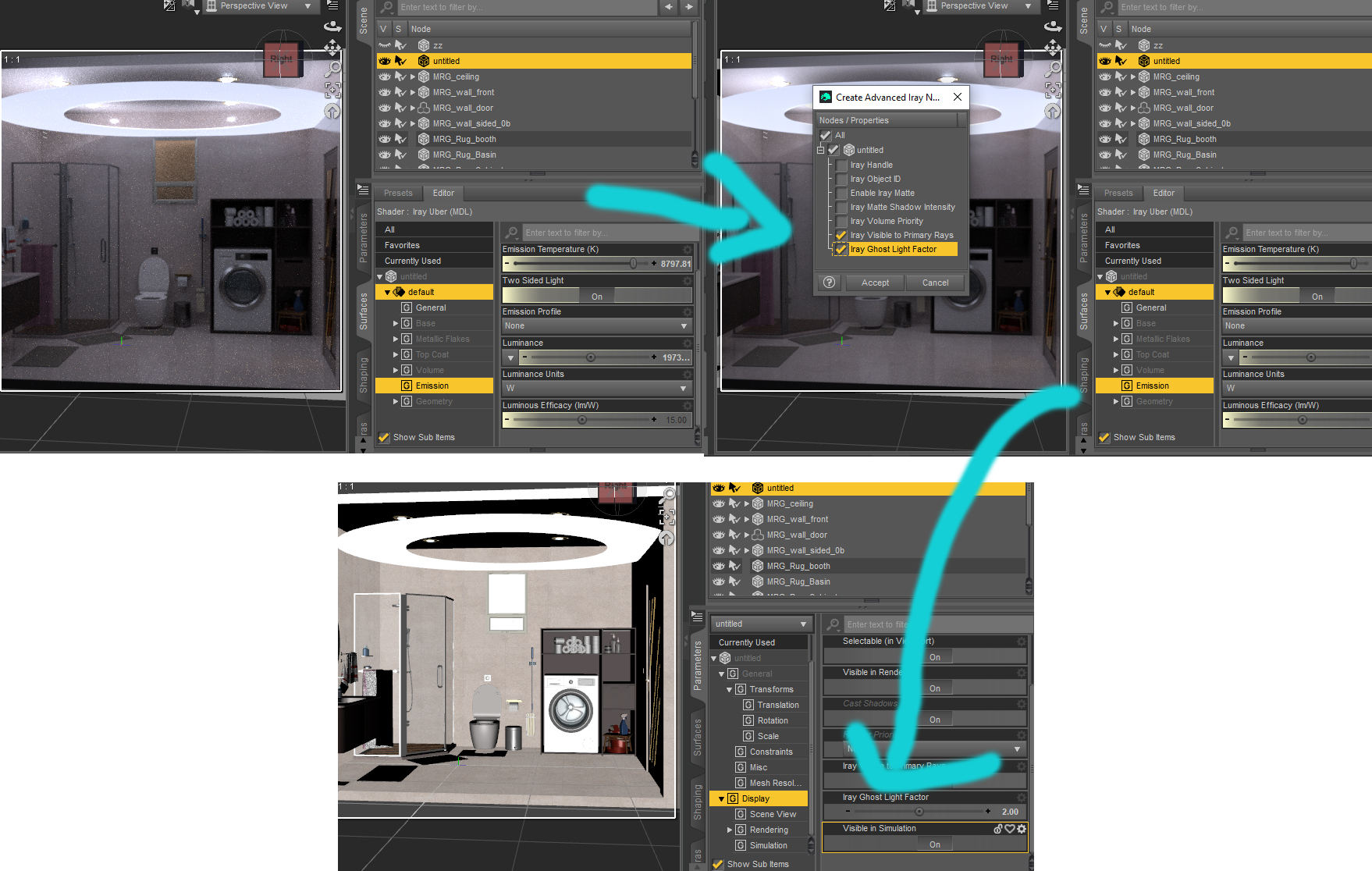
April 7, 2026 at 6:14 AM #2171148menu->create new primitive->torus, and then scale it down along the y axis. Give it emissisive property, and then use this script to give it ghost light property. Or you can use ready made ghost light products, there are plenty here.
script: https://limewire.com/d/CXlMF#aRQf33t0zu
 April 6, 2026 at 9:02 AM #2171040
You can try hiding the wall so the dome's light could get in, or create an iray section plane node and use it to cut through the wall, with the option clip lights off
Or you can try to have a ceiling ghost light above to provides light and some small light sources around her.
You can also try to make changes to the latex suit's roughness map: lower the glossiness where the light shine and add fake reflection to the suit(usually its a low res picture of a studio or furniture inside the house, plug in the diffuse overlay channelNovember 1, 2025 at 5:58 AM #2151158death HD is a good pale skin, you might want to check that out
September 16, 2025 at 7:53 AM #2145411She looks gorgeous
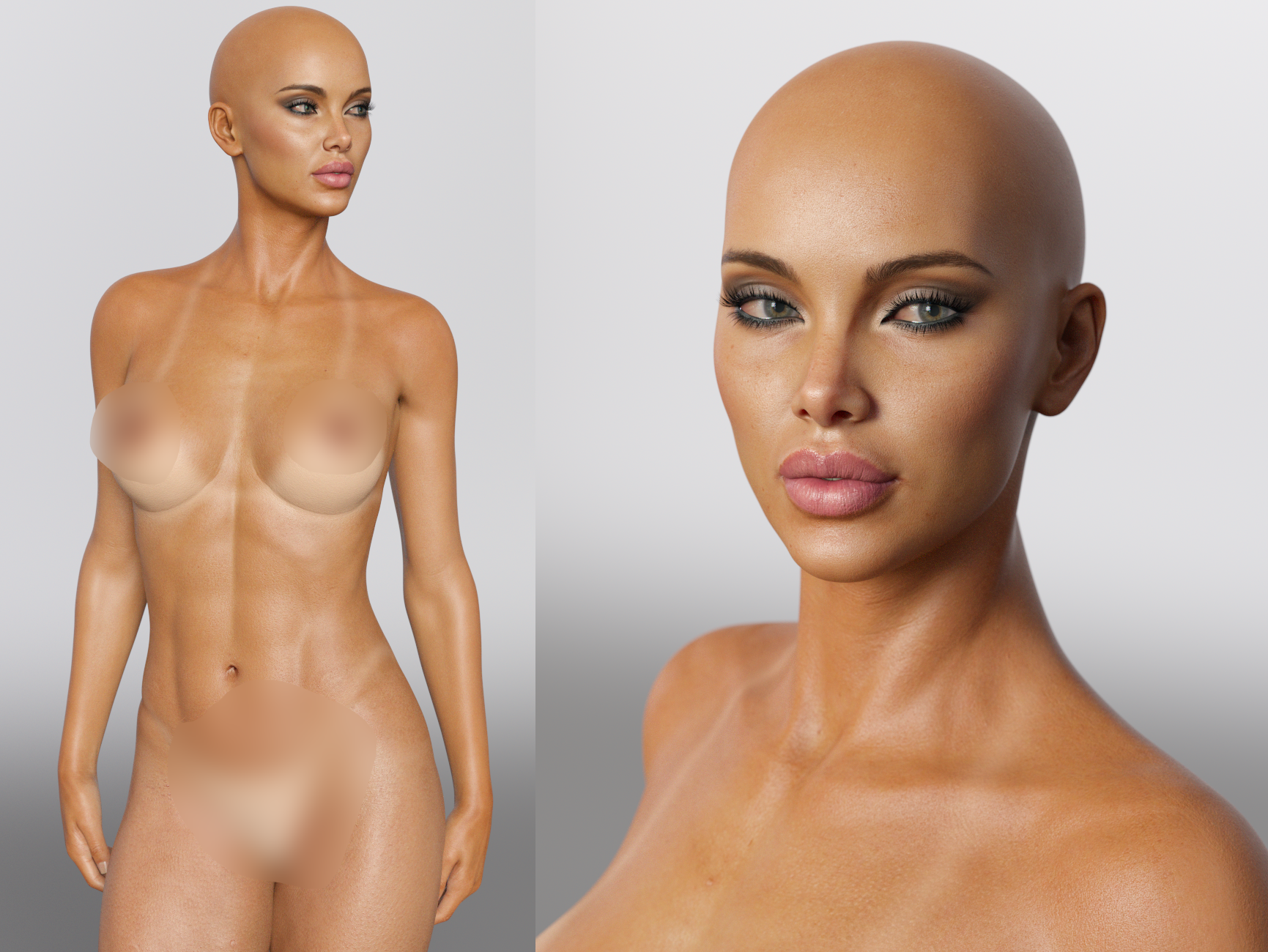 September 16, 2025 at 7:28 AM #2145409
Okay here is the file: https://www.mediafire.com/file/6bbin2e7rqpl3jw/LindayTwosret.7z/file
You will need:
+ Twosret installed for the skin's textures.
+ Genesis 8 Female Body Morphs: Everyone should have this by now, its one of the essentials of daz.
Included in the pack are:
+ Milawa, Monique, Penny morphs only.
+ Musculature Morphs.
+ Surgical Beauty morphs.
+ Linday's tan line textures and modified studio tomoco HDRI (I heard this hdri is considered the best of the best, its the default HDRI of substance painter)
+ Josephene 8's 5 make-ups.
I didnt include auto shape enchancer because this character only use auto shape enchancer for bend morphs. I prefer Ultimate Natural Bend Morphs 2.0 for bend morphs. You can install auto shape enchancer yourself if you want that instead.If you dont want the pack to clutters your library with morphs, or you already have musculature morphs and surgical beauty morphs installed, you can go to the data folder and delete xenic's musculature morphs and Surgical Beauty morphs.
-
AuthorPosts
