Home Page › Forums › Art Showcase › Elf Character WIP
- This topic has 38 replies, 11 voices, and was last updated 3 years, 8 months ago by
 Frank21.
-
AuthorPosts
-
February 10, 2023 at 9:25 AM #1925743
@lucafeelgood ah! That’s what you meant. It’s the novara bob hair after dForce was applied, something is wrong with the shader/opacity after the dForce (I stopped fighting it for now). Without dForce, it looks fine.
I will try a different shader or dForce setting.
Do you guys have a suggestion for a short bob hair that doesn’t look too gummy or toonie but is similar style OR how to fix dForce from messing with the hair texture?
February 10, 2023 at 9:43 AM #1925759I have used the incorrect term. My English is not my mother language.
I mean that you use something soft. It looks like DOF. It's not just the hair, it's the whole image. I first noticed it in the hair.
About BoBhair.. outoftouch...Has some good once.February 10, 2023 at 9:58 AM #1925764Oh! Hrm. I think I know what you mean. Its likely because I did the render at a higher resolution (but low quality) and then resized it down (photoshop must be applying a smoother). I’ll do a full quality render and see if it helps.
Also try clicking on the download link for image because the forum appears to be resizing it down further and adding another smoother too.
February 10, 2023 at 6:27 PM #1925972I like the muscular detail, lighting and the skin tone.
Other than that, it's to much of an "uncanny valley" elf for my personal tastes.
February 10, 2023 at 8:26 PM #1926030Updated renders.
Things done:
+ Changed from Height Map to Normal Map, bumped up values 4x.
+ Reduced muscularity by 40% overall, 60% on the rib cage. @Goblyn
+ Removed DOF on the full figure render.
+ Tweaked nose.
+ Tweaked brow.
+ Tweaked mouth.
+ Tweaked legs.Todo:
- Not happy with the ears, LOL! Need suggestions/assist on them. They seem so low quality compared to the rest of the figure. I noticed this on the base g8 model as well. Am I doing something wrong? Is there an hd detail or something?
@D0gg0d Thanks for the feedback. Yes, haha, I could see where you're coming from with the uncanny valley. I have to work on the texture and lighting a bit more, as it currently does feel very porcelain like, but other things are not.
@lucafeelgood I think because of the resolution of the renders I am embedding, the board is resizing them down and adding a filter (and/or postimg is automatically doing that on the embedded image). When you download the original file, it shouldn't be blurry or smoothed. Let me know if that works. Also, I will give those other hairs a try. Thanks for the suggestion!February 10, 2023 at 11:51 PM #1926077Image hosts seem to not to preserve the image quality that well but I think imgbox is one of the best I've use. I like to first post to postimg to have the picture on the board, and then link* it to imgbox so it opens full-sized when clicked.
Just overlay imgbox as a link onto the postimg link.
* upload to imgbox, click the thumbnail, right click the image and go 'open image in new tab' and grab the url.February 11, 2023 at 1:34 AM #1926108@frank22 oh wow frank! Thanks for the imgbox suggestion! I just uploaded the most recent render to it and noticed is preserving the qualities of my image on the embed and the link. Postimg embed kept resizing it likely due to image size. The forum still applies a resize on the embed though Hopefully everyone sees the most recent render as it’s intended to be now when you click on the download link.
February 11, 2023 at 2:33 AM #1926116Postimg links will open a crappy image in a little box like this. Clicking the + will just expand it to non-real proportions. The way I suggested will open the full-sized image into your browser at original size without any fucking around, perhaps but I don't know at original quality.
Postimg is fine when just showing an image for a product or in a thread, but when you've spent hours rendering something I think most of us would like to show the result with a bang in full resolution.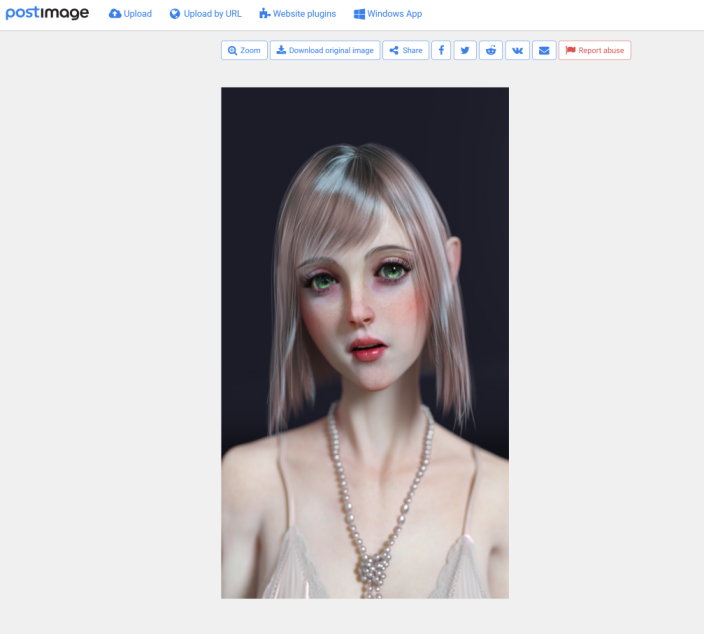 February 11, 2023 at 2:46 AM #1926117
@frank22 I agree. For instance the original jpg I uploaded was 3.2mb but after uploading to postimg and redownloading it with the original button, it gave me a 2.8mb file - so I’m really thinking files over say 1mb they are applying some compression on the file which inevitably means smoothing and loss of detail. The preview and thumbnails are even worse. I replaced the recent render with imgbox, how does it look now? Also? Do you know of any geograft or prop for ears? I’m finding the level of detail for the ears is severely deficient.
February 11, 2023 at 3:29 AM #1926131Slower loading but the image seems clear and crisp, but it is big. As for ears, I'm not someone to ask. Unless it's got to do with skins, tits or gens, I'm generally not that interested. And no, I don't think those particular interests would get me on the podium of the next Golden Globes or Academy Awards LOL.
February 11, 2023 at 4:05 AM #1926135Lol love critical drinker, always on point!
February 11, 2023 at 7:26 PM #1926457Almost looks like a painting..
PS Twiggy was a model in the sixties, ( thin as a twig, hence the name)
 February 11, 2023 at 7:47 PM #1926462
Very interesting! She’s definitely a bit androgynous, very cute/pretty!
@gaver is my render looking more like a painting (are the skin textures still blurry/smoothed?)February 11, 2023 at 8:50 PM #1926488I like your emaciated long neck character. The abdomen and the ribcage morphing very good for this character. I like this body type anyway. I also like the facial features. I just don't like her eyes.
February 12, 2023 at 3:16 AM #1926585 -
AuthorPosts








- You must be logged in to reply to this topic.
