Home Page › Forums › General Chat › Browser based tools...trustworthy or not?
Tagged: Mad Librarian
- This topic has 10 replies, 7 voices, and was last updated 2 weeks, 6 days ago by
 Josie.
-
AuthorPosts
-
October 13, 2026 at 10:18 AM #2191570
RenderHub has released these for free.
https://www.renderhub.com/forum/15088/introducing-the-renderhub-3d-toolbox-11-free-tools-for-3d-artists
They say that they're browser based. Does that mean that it's possible for them to see what you're working on when you use them?Further on that, their 'Mad Librarian'...
( https://www.renderhub.com/forum/15076/mad-librarian-every-daz-product-you-own-in-one-window-updates-and-support )
also requires a monthly online check. I don't trust either of these and together they make me suspicious. Not to the point of thinking about ridiculous conspiracies, just suspicious.October 13, 2026 at 2:55 PM #2191607Web-based anything is visible to the owners, full-stop. I mean, some things you have to trust - Proton VPN (they don't keep logs and the paid version is real fast), your Internet provider, things like that. Anything else and it's VPN + separate browser + pseudonyms for, and I'm very picky about what I do w/ that browser.
Think of it this way - at work, I use a wide variety of SaaS products (which is what that first thing is), and most of them have the ability for their support people to impersonate you for troubleshooting purposes - they can see what you see, and do what you do on that service. However, those pro-level products are bound by NDAs and SLAs, and their very existence as a company depends on discretion and confidentiality. By contrast, that fly-by-night 3d artist tool thing is under no such restriction, and they likely even have a user agreement that says they can see and do whatever they want with any data you upload to it. For all we know it's an LLM feeder.
The other one, meh. It's like Poser's online-checking all over again - irritating, and it could break at any time.
October 13, 2026 at 6:34 PM #2191628Thanks @pooper, That's an excellent and in depth look that mirror's my first thought. After the great fiasco several months ago they banned so many artists and their items without mentioning why at first, and never really coming clean about it, I don't trust them.
October 13, 2026 at 7:34 PM #2191633@Ethiopia:
The browser based tools require you to upload (drag-drop) the model you want to use, so sure, you actually upload it to their server. The Browser UI is just a client that interacts with the server on their end to perform various actions on the model, then the server updates your browser UI. They don't just 'see' what you're working on, they actually 'have' it.The 'Mad Librarian' looks like a Postgre database client. A really good idea, if it works as intended. These days, odds are good there was some 'vibe coding' involved somewhere along the line, so probably 'Claude' or it's ilk had a hand in this, which is cool, if it works...
October 13, 2026 at 9:06 PM #2191638A thought about anything 'browser based' is that they now have the ability to use mine/your models and work for training AI or even selling it for AI training. Isn't that what Adobe was doing before they where caught?
October 14, 2026 at 9:50 AM #2191675Hello everyone. Like pooper says, I do not trust anything web based, especially when dealing with some not-so-legitimately acquired assets. Not even my ISP (but I just can't renounce to one of them). Trustworthyness issues aside, the more we depend on those services, the more power they have over us and, sooner or later, the more everything enshittifies as shareholders keep pushing unrealistically for an ever increasing quarterly bottom line.
Best regards,
October 15, 2026 at 5:25 PM #2191794Quick clarification from Mad Librarian.
Mad Librarian is a local Windows desktop app. It indexes and searches the DAZ library already on your PC. It does not upload your models, your content, or how you use the app. That is separate from RenderHub's free browser tools, which do upload files you drop into them.
The monthly online check is only for the license: activation and periodic renewal so a key stays limited to two computers and a refunded key can stop working. What goes to the license server is the key/activation and the app version. Nothing about your library. After activation it can run offline for up to 30 days at a time. Details are here: https://affection-x.com/legal/privacy.html
Happy to answer questions.
October 15, 2026 at 8:16 PM #2191796The Mad Librarian sounds eerily similar to the EZFinder product in the Daz store, sans the repulsive UI and price tag (and a few features that I couldn't care less about). The similarities are mainly in terms of the overall schematics of being an independent app that manages and 'injects' content into DS, 'compartmentalization' of the content, how both handles the indexing of content in proprietary 'caches' outside the CMS or official DS provided files, choice of .Net framework in the implementation, just to begin with. Also, a lot of knowledge that was used to build the product would have been hard to acquire outside the internal Daz PA discussion forums or without Daz's technicians. Which brings me to the obvious question - Do these two products share a common ancestory? Is that EZFinder still being maintained?
Also, I am curious about the statement - "Marks items you own but have never downloaded, and hands them to Install Manager on request." How does the librarian achieve that without collecting Daz store credentials?
October 15, 2026 at 9:25 PM #2191806No shared ancestry: Mad Librarian shares no code or developers with EZFinder, and has no affiliation with Daz 3D. It was developed independently, without access to private PA discussions or help from Daz technicians.
The architectural similarities are understandable. A standalone Windows app, a local catalogue cache, virtual folders and .NET are natural choices for this kind of application. Daz also publishes scripting documentation and its DSON specification, so the necessary knowledge isn’t confined to private forums.
Mad Librarian also goes well beyond finding and organizing content. Its distinctive features include applying makeup and attaching grafts across generations and genders. Just double-click the item: Mad Librarian handles the conversion, fitting and skin color matching automatically. Makeup transfers while preserving the receiving character’s own skin. Those capabilities are a substantial part of what makes it a different product.
There is certainly a price difference: EZFinder is listed at $198.99, while Mad Librarian is $29.95. That’s almost seven Mad Librarians for the price of one EZFinder. And Mad Librarian looks much cooler, too. 🙂
On credentials: Mad Librarian does not ask for or collect your Daz store login. It reads product metadata already stored on your computer, including Daz Connect metadata that can describe owned products whose content hasn’t been downloaded. It then checks whether the referenced files are present. This depends on locally available metadata; it isn’t a live inventory of your Daz account.
The "hands them to Install Manager" wording could be clearer: the command opens the official Install Manager, where you select and download the product. Daz’s own software handles sign-in and downloading.
You’re also welcome to check out affection-x.com.
October 15, 2026 at 11:06 PM #2191812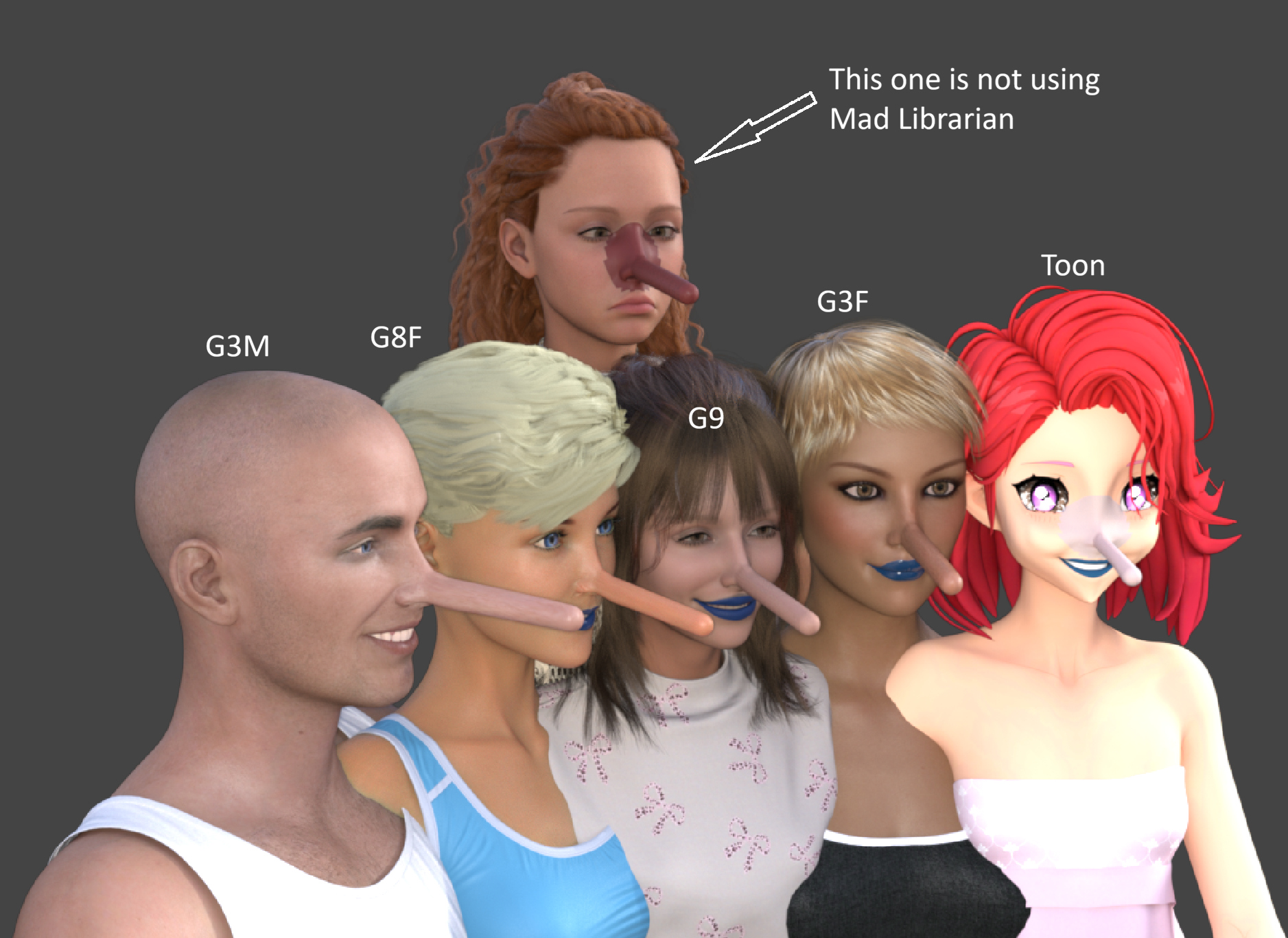
Grafts across generations and genders
Using a graft on another generation or gender is as simple as double-clicking the item in Mad Librarian.
The graft attaches to your selected figure, and Mad Librarian automatically handles the conversion, fitting and skin color correction. Just double-click and let it do the work.
The image shows the same graft on G3M, G8F, G9, G3F and a toon character. Compare them with the character at the back, marked "This one is not using Mad Librarian," where the color mismatch is clearly visible.
All graft adjustments across generations and genders are handled automatically inside Mad Librarian. No external image editor or manual texture repainting is needed.October 17, 2026 at 2:15 PM #2192051I tend to avoid most online tools except for a very few where it's a small file conversion, like a document to pdf, or something similarly benign, and the tool gives me the option to immediately delete the source file after completing the conversion. I absolutely despise any 3d tools that require you to be connected to the internet or are web based (looking at you Tinkercad) because they are usually severely limited in what you can actually hold in your own posession. I want local files and lbraries without the umbilical chord to someone else's server. In many cases they force you to bend the knee to a subscription model which is also something I will never play into. I'd much rather have a native software with the same ease of use, local file storage, and local shape libraries.
-
AuthorPosts










- You must be logged in to reply to this topic.
