Home Page › Forums › General Chat › Duplicate morphs and morph recovery
- This topic has 42 replies, 6 voices, and was last updated 1 year, 3 months ago by
 trader2h.
-
AuthorPosts
-
July 2, 2025 at 8:29 PM #2134661
@peepshow45 I love totocandys models. I've installed all of them and I haven't had a problem yet. Which character gives you trouble? The Duplicate error is a little more complex but it can be solved with a little work. I've mainly had problems with MGAB and MagicBrush models and managed to fix them.
July 2, 2025 at 8:57 PM #2134665There's plenty of his newer models being affected by this.
Here's a couple;
https://www.renderhub.com/totocandy/plus-size-queen-for-genesis-8-female
July 2, 2025 at 9:21 PM #2134673Yes, it should do.
Just be careful to catch all the entries to be changed.
If you are using notepad++ put the name to be changed in the 'find' box, increment through with the name change & you should be good to go.
🙂
July 2, 2025 at 10:27 PM #213467810k points to whoever wants to tackle this issue?
July 2, 2025 at 10:52 PM #2134680That's not how to fix this issue. I checked Miss Phill and the problem is in the TCD_Miss Phill_additional_head.dsf . It has a lot of double entries for the parameter.
Here's the solution.
1. Load Genesis 8 and ignore the duplicate formula.
2. Load Miss Phill full body ON
3. Locate in the Genesis 8 Parameters the TCD_Miss Phill_additional_head entry
4. Press the gear to edit it
5. Change slightly the color dial (or just anything as long as it's modified)
6. Got to File:Save As:Support Asset:Save Modified Support Asset(s)
7. There should be the TCD_Miss Phill_additional_head in the list. Choose only that one and save.
That solved it for me and it loads with no problemJuly 3, 2025 at 3:04 AM #2134696I'm not doing all of that, but thanks for the tips.
July 3, 2025 at 10:02 AM #2134742Whever I saw refrence to the morph I changed, don't know If I covered all of them, Ill double check this time.
July 3, 2025 at 12:44 PM #2134760@d1m1trius99 just do a replace all in Notepad++ . Which characters are you having trouble with? I might have them if you want me to check.
July 3, 2025 at 5:06 PM #2134780If I fix my situation, Ill help you.
July 3, 2025 at 5:29 PM #2134781@trader2h It worked! Thanks a lot, enjoy the points.
July 4, 2025 at 11:44 AM #2134860Thank you @peepshow45, the points are very appreciated, but it's such a very easy process. Let me make some screenshots to make it a little easier. It's just a couple o clicks.
July 4, 2025 at 7:04 PM #2134921You are a savior my man
July 4, 2025 at 8:35 PM #2134933Okay here's how I fixed TotoCandys Plus Size Queen,
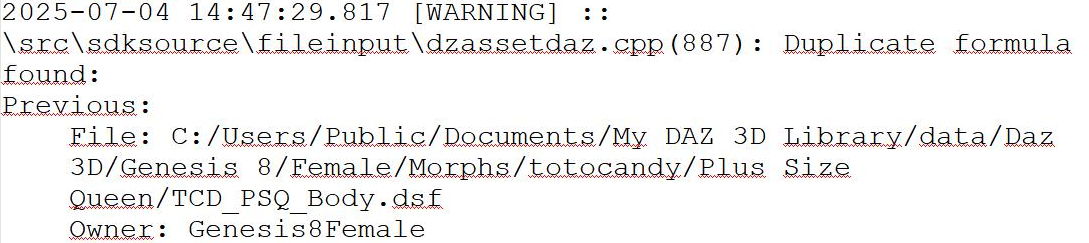
1. First I loaded G8 and checked the log to see which morph causes the Problem. In this case it was the TCD_PSQ_Body.dsf
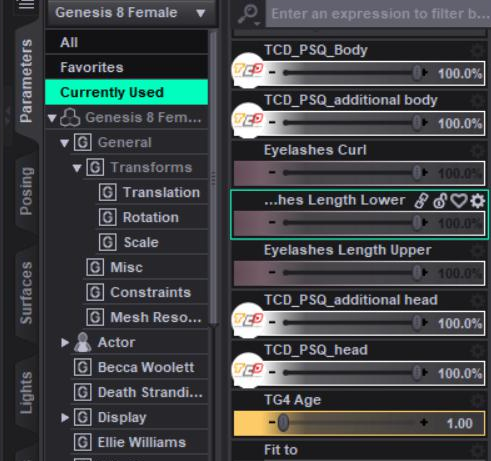
2. I applied Plus Size Queen to G8 and searched for the TCD_PSQ_Body in the currently used parameters of Genesis 8
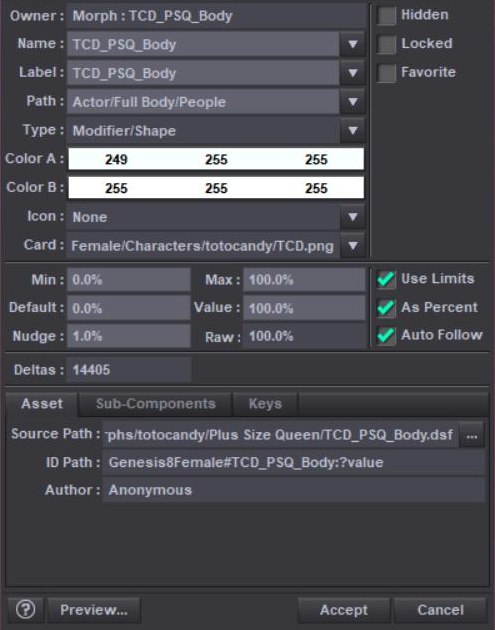
3. I pressed the little gear at the corner of that parameter and made a small change to Color A.
4. I went to File:Save As:Support Asset:Save Modified Assets
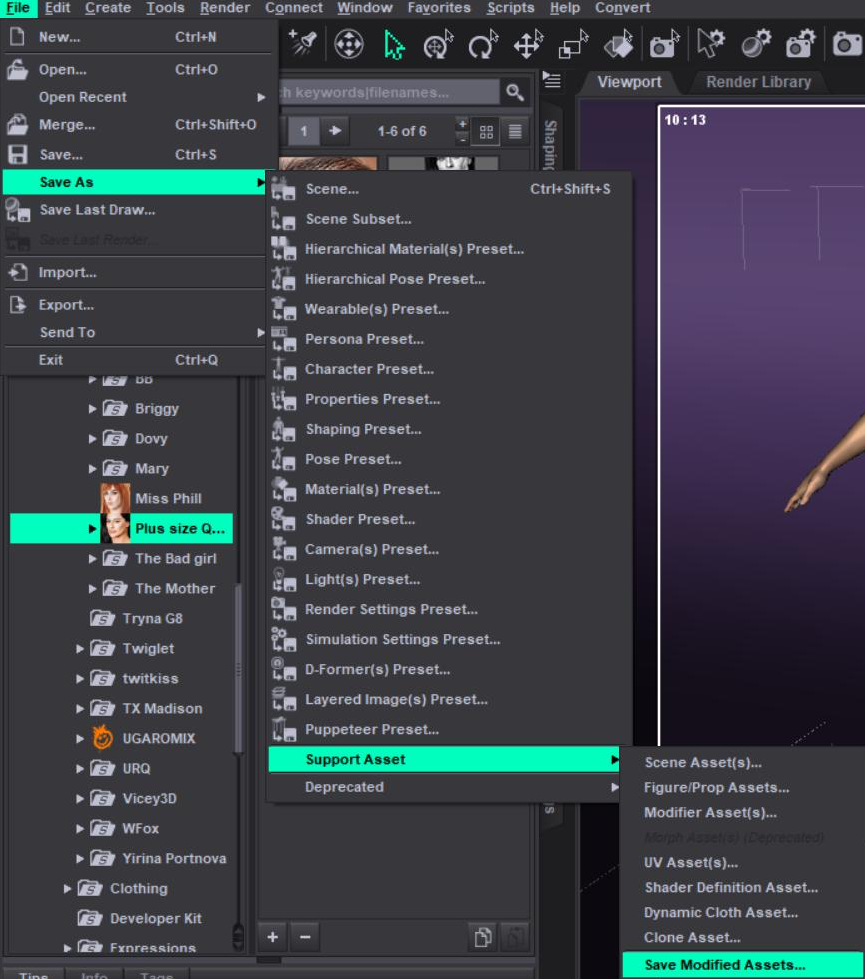
5. In the list that comes up, there should be a TCD_PSQ_Body entry. Choose only that one and save.
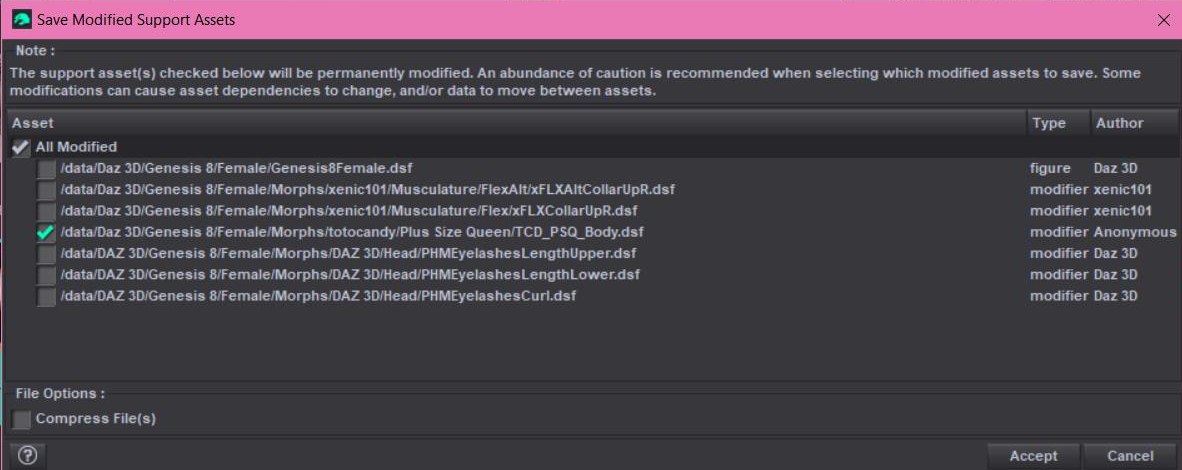
And that's that. It looks more complex than it actually is. I hope it helps:)
July 4, 2025 at 9:19 PM #2134937
How do I check the ones that I want to change like in your last picture??
July 4, 2025 at 9:34 PM #2134939You don't have check marks on the side like in my picture? What happens when you click on Cammy head and Cammy Body?
-
AuthorPosts







- You must be logged in to reply to this topic.
