

Forum Replies Created
-
AuthorPosts
-
September 2, 2020 at 10:16 AM #1624386
Looks like Matilda Hair for Genesis 8 Female(s) look at the picture with all different variations and the last one looks like the one you are looking for.
August 2, 2020 at 11:02 AM #1618362It's an internal drive so no option to safely remove it. But as eelgoo mentioned, the crisis is resolved.
August 2, 2020 at 10:10 AM #1618341Good morning eelgoo,
after setting up a fresh windows 10. Everything is as it should be. I copy files between my Vault and the install folder with maybe 30-40% activity while DIM is open and recating the xml files. As soon as the copying is done, the task manager goes down to 0%.
The performance monitor only shows running processes on my system drive.Another good thing in doing a fresh install once in a while, is you get rid of the clutter in your system. Cut my memory usage in half while idle. It was 13,6 normally and stays at 5,6 right now.
Thank you all for your felp and input.
Wish you a relaxing sunday.
Greetings from Hamburg
Edit: Quick follow up, another good thing about a fresh install, anomize works again for me. No more using two browsers to download content.
August 2, 2020 at 8:33 AM #1618326If I remember it correctly, a value of 100 is good, if it sinks below, you have to worry.
So far, the new installation looks good, copying files to my d: drive gets the activity not higher than 40%.
Now I do the necessary installs, like the rest of the drivers, programs and then I install dim and see what's that doing.I'll keep you posted, and thanks again for the input.
August 2, 2020 at 7:00 AM #1618317@Chris, I tried every repair/diagnose tool I have and the drive is fine.
@eelgoo, just a bit over a year old, bought it together with everything else when I build my PC last year.
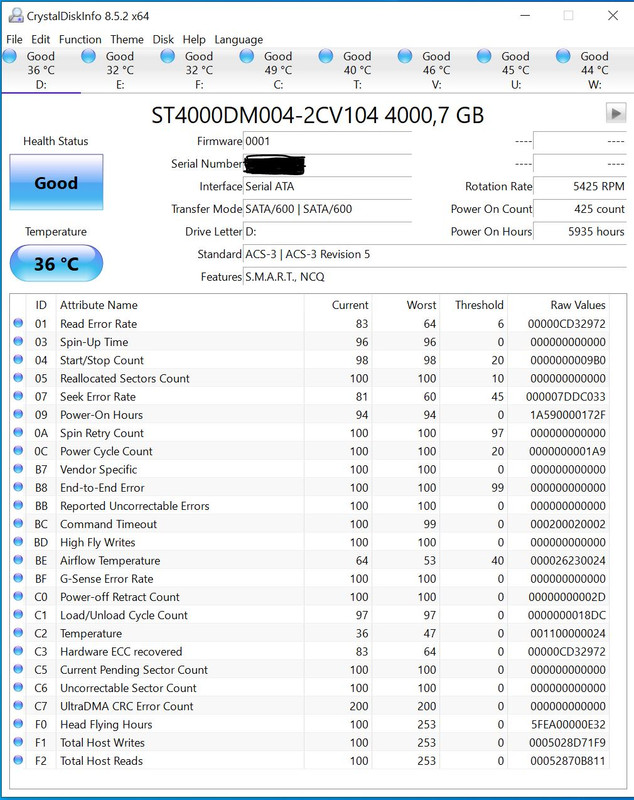
@Living, yes I have an antivirus running, I do hope everyone else has one running on their pcs, but I don't think that's the culpit here, because if it's the AV, then my vault drive should stall as well when I copy files to it, I downloaded here for example.
Active Indexing is turned off, took ages because the pc had to undo every index it already created. But it didn't help.Thank you all for your input, but I do a fresh installation of my windows 10 and hopefully that solves the issue with a few others. I mean, what better to do on a sunny sunday morning 😉
But please, keep the input coming, because if it turns out that the problem persists I will need other solutions.
August 1, 2020 at 10:17 PM #1618238Thanks for the video, but that's for another topic. That's to map your cms folder to another drive but that's not what I need. I'm looking for a solution, why my drive after copying/installing content always stays at 100% activity. It takes 5 to 10 minutes just to install one item.
Windows also fine, because I copied data between all of my external drives back and forth, without any issue. only the interal D: drive slows to a creep.
Maybe I should try a clean windows 10 installation.
Edit: Another thing I noticed, items I copied hours ago to the drive suddenly show up again on the performance monitor.
August 1, 2020 at 10:04 PM #1618232I don't think, that it has something to do with DIM, because DIM doesn't run while I copy the files to the drive/folder.
August 1, 2020 at 9:10 PM #1618228Okay, I did as you asked. I shut down the process through the performance monitor but nothing changed. The copied files still clogging up the performance monitor for some time.
July 31, 2020 at 11:55 AM #1617913I noticed it yesterday, that there are no post from you in the past weeks. Now I know why. Glad to have you back.
Take care of yourself and stay safe.
July 8, 2020 at 1:18 PM #1613304@ozzy, that's a good hint, maybe something in my chrome addon has changed. For now, I have to work around it with firefox.
July 8, 2020 at 9:21 AM #1613230Looks great.
July 8, 2020 at 8:28 AM #1613218hey super,
I purchased different items and it's always the same, I get to the anomize site and there the generate button does not work.
Interesting thing is, if I click on one of the adds above the button, I get redirected to the new anomize page but there the generate button also doesn't work. That's in chrome, now I tried to copy the anomize link into firefox and there it works just fine.I have also restarted my chrome browser several time but no luck. As soon as handbrake is done with encoding, I will try a complete restart of my system and hopefully that solves the problem somehow.
Nope didn't solve it, still not able to get past the generate button.
July 5, 2020 at 7:03 AM #16121601. Escape into Magic – SparklePants
2. Game Changer – dave
3. Trying to do the matrix, but – Mark SinisterJune 26, 2020 at 9:13 AM #1610153Thank you very much.
June 12, 2020 at 10:39 AM #1607704I have reported quite a bunch of broken links and have always got my points back.
Have you tried to unpack it and then put the files back into an archive? That sometimes solves the failed installation error I get in the DIM.
Just saw that it is a tutorial. I'm always unpack them anyway. Why would I install a vidoe tutorial in Daz with DIM. Makes absolutely no sense to me.
-
AuthorPosts
