Home Page › Forums › General Chat › "Scene Save Options" - New "feature" in 4.20 - Is it possible to turn off?
- This topic has 21 replies, 8 voices, and was last updated 4 years, 5 months ago by
 John Lund.
-
AuthorPosts
-
May 3, 2022 at 12:34 AM #1803178
I started to have issues with DAZ so I upgrade to 4.20.
4.20 has a "feature" that after saving the job with File > Save As > it's a pop-up with "Scene Save Options"
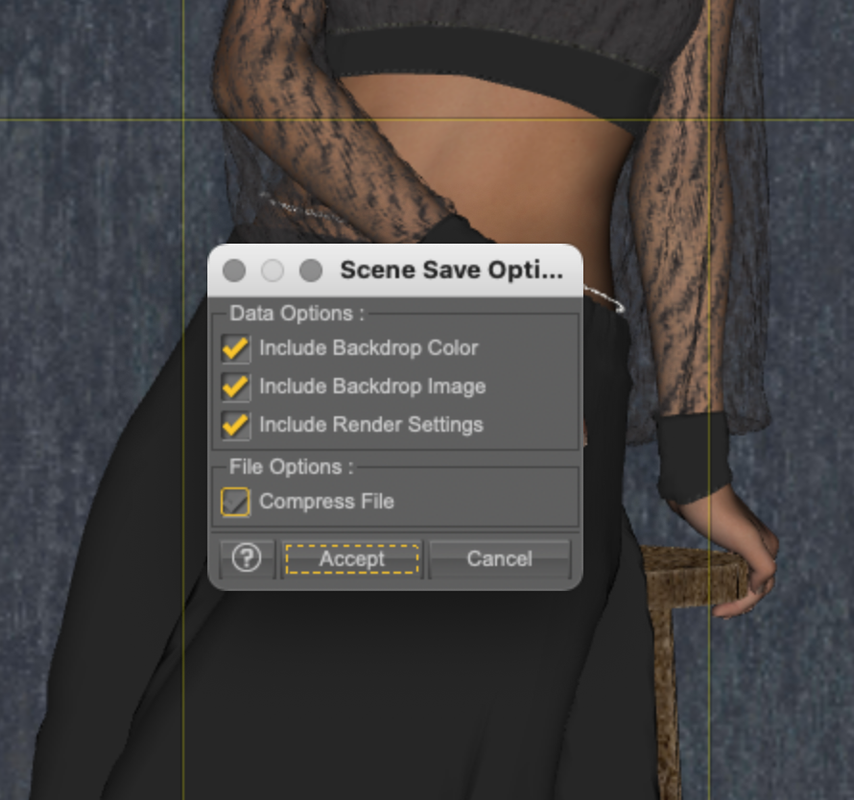
Now, that's a stupid extra click every time I'm gonna save something.
It's apparently some smart ass at DAZ that thought that was a good idea, it is said to be a new feature: https://www.daz3d.com/forums/discussion/565601/save-scene
Is there any one here that knows a way off getting that turned off?
May 3, 2022 at 1:08 AM #1803192I don't think so.
I love Daz-Richard's response, "Fix what? It isn't broken..."
The same response when Ghost Lights (emissive surfaces) got broken, workspace random resets, broken scripts etc etc.May 3, 2022 at 1:39 AM #1803197Yes, I also noted that answer...It should be the users that decide whether something is broken or not...
May 3, 2022 at 9:44 AM #1803279You find this under F2 (preference) scene tab I believe.
May 3, 2022 at 9:53 AM #1803287The Daz forum is yawning. Like Trump, if a journalist asked him an "annoying" question, he would expel him from the press conference. 😀
I think that here, from this "general chat", more problems are solved without pirouettes on issues.
In my case, I am using Daz v 4.10.0.107 (64-bit). (although I have 4.15 and 4.20 installed..., but just for testing. RAM consumption and loading time is remarkable.May 3, 2022 at 10:07 AM #1803297Anonymous
InactiveRank:
This feature showed up prior to me updating DS pro and Beta last week but no longer show up.
May 3, 2022 at 10:11 AM #1803300@Billyhill I installed 4.20 approx 18 hours ago.
Did it disappear by itself or after an update?
May 3, 2022 at 10:14 AM #1803302@Lucafeelgood It repeats what is set on that page, problem is that it wants to have an extra confirmation; "is this REALLY what you want or have you changed your mind lately, like last 120 seconds?"
May 3, 2022 at 10:16 AM #1803303@Abad Do you get the same pop-up, wonder if it is just some that gets it?
May 3, 2022 at 10:56 AM #1803329I think it only bugs you for those options if none are enabled by default. You can check all the boxes in Preferences. Then it should save without popup.
I don't get that popup, but I seem to remember setting them all to On the first time around.May 3, 2022 at 11:30 AM #1803331I don't get this popup after I disabled it. Running 4.20.0.17 Beta.
May 3, 2022 at 1:34 PM #1803376I believe Amber is correct... I had those set long ago, and have yet to see it pop up. On 4.20.0.2 (in case someone snuck in a newer update when I wasn't looking).
May 3, 2022 at 1:44 PM #1803378InactiveRank:I updated a few days ago. Before that it was working but not any longer.
I'm getting the feeling it's either broken or it won't show any longer if I reject it's offer to save the scene assets. Will have to test a bit more.
May 3, 2022 at 2:18 PM #1803389@Amberkat @Pooper
This is how my preferences looks like:
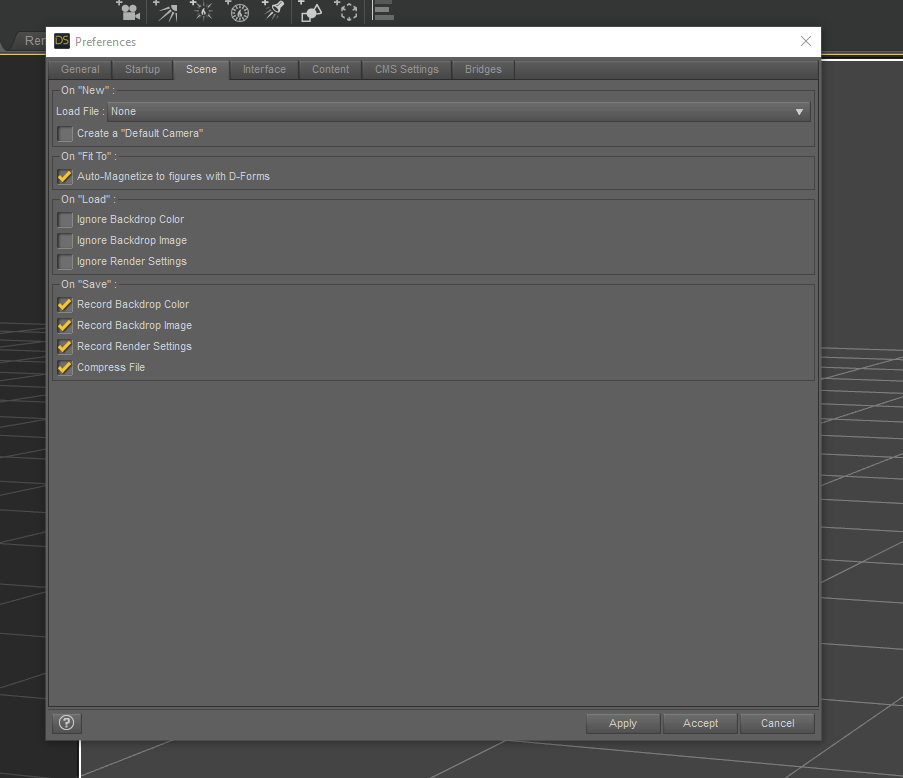
This is default, I have never made any changes to it (and nver before got the pop-up)
Any suggestion how they should be changed?
@Lucafeelgood
How do I disable it? I can't see that option...May 3, 2022 at 2:54 PM #1803398 -
AuthorPosts










- You must be logged in to reply to this topic.
