Home Page › Forums › General Chat › Manual Install to DS
Tagged: Data content folder structure
- This topic has 125 replies, 31 voices, and was last updated 1 year, 3 months ago by
 eelgoo.
-
AuthorPosts
-
April 5, 2025 at 2:43 PM #2124156
@Amberkat Thank you very much, I will try your suggestion with "Everything" as soon as possible, not least because of the minimization of useless G9 stuff, but also everything else "you" "install" (drag and drop) that takes up WAY too much space, for no use whatsoever.
Btw. still you have the best avatar ever 😉April 5, 2025 at 11:48 PM #2124209Addendum for those interested:
"Everything" can also be integrated and used in the TC.
Tips here: https://ghisler.ch/board/viewtopic.php?t=80302July 4, 2025 at 11:46 PM #2134947@eelgoo,
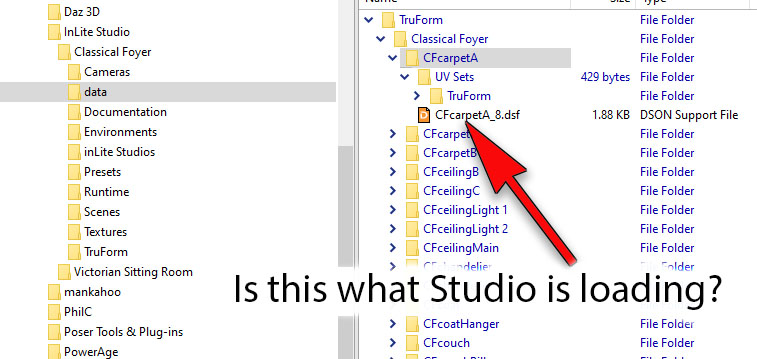
I'm redoing my massively unorganized content. I could always find stuff but I've been dragging it along since Poser 2 or 4 or something, then Studio came along and....you can guess.https://i.postimg.cc/HsYCC1Z3/What-is-Studio-looking-for.jpg
I get the arrangement but was wondering what Studio looks for when you select something from your library. Is it loading the .dsf file in the data folder? I assume that this file points to all the other (geometry, morphs, textures) files. If you move those other files, does Studio do a search when it's asked to load the content or does it maintain a database of where stuff is? I see people whining about a corrupted 'SQuirreL' file thingy, is that the database?
July 5, 2025 at 8:29 AM #2134987There is really no magic bullet, as much as Daz might have you believe in sunshine, rabbits & rainbows.
It really depends on your workflow when you organise your library.
Structured Query Language is database related, so once you have a properly structured, coherent library, and maintain it properly, it will run smoothly.
If you rely on vendors, SMART content and DIM, all bets are off.
The core of it is file nomenclature & file heirarchy. Vendors cannot be trusted to use a coherent, repeatable format.
You have to have to set your system up in a format that makes sense to you, & stick to it rigidly. Bear in mind that lengthy file names quickly gobble up the available character string.
There are plenty of Vendors especially at Daz that delight in giving items ludicrously long file names, which can give issues with nested file heirarchies.I hope that clarifies?
🙂
July 12, 2025 at 12:42 AM #2135884Thamks for the info but I was looking for a more in depth discussion on the working of the content manager. I found a couple of articles that made things a lot clearer.
This one is quite technical but explains it succinctly...[Guide] If you're having cms / PSQL related problems you might want to read this.
byu/ShelLuser42 inDaz3DThis second one is an excellent guide to backing up the content data....
Tutorial: Keeping your Daz Studio data safe ("what to backup?").
byu/ShelLuser42 inDaz3DJuly 12, 2025 at 9:45 AM #2135929Whilst it might be of some academic interest, there is no need to dive to that level of detail to have a properly maintained, robust, reliable library installation. You don't need to be an engineer & understand every component of a vehicle in order to be able to drive it.
That said it is a good idea to make regular back ups of stuff you wouldn't want to lose.
The key to 'My Library' reliability is meticulous regular maintenance & attention to detail, both in nomenclature & file hierarchy. I always work from a backed up standalone remote library installation. Yes, it can be hell to set up starting from a disorganised mess & often is easier & better to start again from scratch.That way you can adjust your library as you create it to fine tune how you want it laid out, without having to individually rename thousands of files.Unlike Poser, DS is pretty adaptable to revised file locations.
It usually bimbles along quite happily once it knows where you have put things. If it does throw up a query, point it to the file in your system & once you have it correctly loaded, resave the duf.
It will reference the correct location & pick the file up next time you click the duf. -
AuthorPosts







- You must be logged in to reply to this topic.