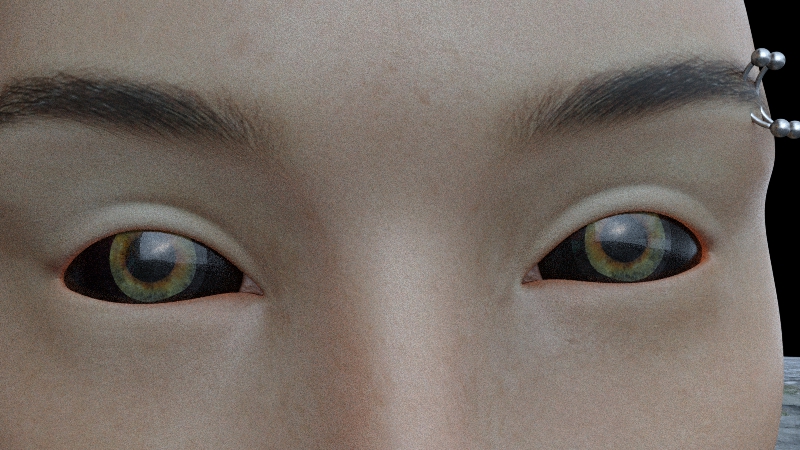
Eye help please.

Home Page › Forums › General Chat › Eye help please.

Viewing 8 posts - 1 through 8 (of 8 total)
  • Author
    Posts
  • #810244
    ADAM
    Participant
    Rank: Rank-1

    Ive had this happen before and messing with it a bit fixed it but now its pretty much stuck like this.

    Replacing it by copy and pasting mats from G8 base work a little but, leave a black ring around the Iris.

    Trying to replace it with any eye texture other than that makes it black. I can make the entire eye a nice shade of silk or metal but any eye texture turns it black.

    Any info or guesses are welcome. Thanks

    #810390
    ADAM
    Participant
    Rank: Rank-1

    think i might have it figured out

    #812612
    EvilMonkey
    Participant
    Rank: Rank 6

    #813162
    ADAM
    Participant
    Rank: Rank-1

    it's a freaky cool look if thats what i was going for.

    The reason is a positioning problem. Something to do with being outside of a HDR or something. Zeroed the figures position and it went away.

    #813658
    EvilMonkey
    Participant
    Rank: Rank 6

    That was it? Just in the wrong place for the light? Weird.

    #815065
    ADAM
    Participant
    Rank: Rank-1

    yeah, messed with it about an hour and on Daz forums suggests that just zero the figures position.

    I could move the figure and in some areas it was ok others it was not. I figured it was lighting but that didnt effect it.

    I this happens you just have to build around the figure rather than move it where you want.

    #815077
    eelgoo
    Moderator
    Rank: Rank 7

    Very odd.

    Thanks for posting the solution as well, though.

    🙂

    #815108
    EvilMonkey
    Participant
    Rank: Rank 6

    Yeah, I would never have thought to do that. The figure was lit, why wouldn't the eye receive light as well? But HDRi's can behave really strangely though so I'm not surprised.

Viewing 8 posts - 1 through 8 (of 8 total)
  • You must be logged in to reply to this topic.


Post You Might Like