Home Page › Forums › General Chat › Does Anyone Else Have This Problem?
- This topic has 12 replies, 4 voices, and was last updated 4 years, 7 months ago by
 Charley.
-
AuthorPosts
-
March 7, 2022 at 4:55 PM #1782736
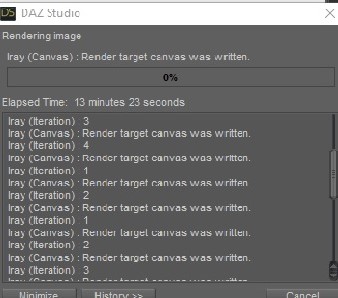
Recently I've noticed that there is a problem with CPU rendering. Occasionally, if the scene is big, Iray falls back to CPU - which wasn't a problem until recently. Usually, when it did fallback, the only difference I noticed was render speed, but now I have a different issue.
When the CPU is being utilised to render, I lose iterations; for example, the render might be on it's fifth iteration and progressing, then suddenly the progress is lost and it starts all over again on the first iteration. Any idea how to fix this?
Here's an example:
 March 7, 2022 at 6:06 PM #1782750
Do you have the Post Denoiser on? It needs the GPU
Render Settings -->Filtering
hth
March 7, 2022 at 6:59 PM #1782762@tomdooley No; the post denoiser is off.
March 7, 2022 at 8:19 PM #1782785What version of DS are running? I've read in the Daz Forums about this, but can't find the thread
March 7, 2022 at 9:05 PM #1782790@tomdooley I'm running 4.20; I notice the GPU renders are slower too, since I updated.
March 7, 2022 at 10:23 PM #1782797Anonymous
InactiveRank:
There's a thread here about this, but unfortunately no clear solution 🙁
https://www.daz3d.com/forums/discussion/552776/daz-render-keeps-resettingMarch 7, 2022 at 11:30 PM #1782817@trader Thanks, I'll check it out. 🙂
March 8, 2022 at 12:12 AM #1782833That's crazy, I've never in life seen it bug out like that. Mine is perpetually CPU, since Radeon Vega gfx chip 🙁
I have noticed though, that Daz is taking waaaaaaaay too long to delete object references on clearing a scene, especially when closing. First time ever I've seen it take 2 minutes + to unload a bare Michael 8 on shutdown.
March 8, 2022 at 12:36 AM #1782845@amberkat I'm really starting to regret upgrading to 4.20, I didn't have this problem before the upgrade. I'm finding it really slow to load bare characters and low poly scenes too, and LIE also takes ages to load.
March 8, 2022 at 2:45 AM #1782870Do you save your old installers so you can downgrade?
If you need a previous version (Win10 x64 only) let me know.March 8, 2022 at 2:51 AM #1782871@amberkat I downloaded it through DIM, so I don't think I have the old installers. I'd really apppreciate it if you could send me the link to the downgrade. 🙂
March 8, 2022 at 3:03 AM #1782873I dropped 4.16 in this thread, along with a lot of hot air about strategy :^)
...and you can save files downloaded to DIM before you actually install them. Read that article.
March 8, 2022 at 7:55 AM #1782921Thank you so much!
-
AuthorPosts





- You must be logged in to reply to this topic.
