
Forum Replies Created
-
AuthorPosts
-
January 22, 2021 at 1:58 AM #1660335
?? other than the darker skin I don't really seen anything improved?? It doesn't look like anything you couldn't do with materials...
Personally they should be working on making G8 more efficient when people have more than one figure product installed. I hate the loading times.
January 22, 2021 at 1:54 AM #1660334@adam Yeah canvas are so use full when rendering huge images. I use it when I'm making a render for Getty Images. I have to review those views again.
January 21, 2021 at 1:28 AM #1660042Thanks. You use of night render is so good. I've always shy away from doing night stuff because it can be hard to get detail lighting right.
January 20, 2021 at 9:29 AM #1659753Well you did a mighty good job with lighting it. I'm going to have to give that a try.
January 19, 2021 at 8:29 PM #1659650Yeah I don't use smart blur because I already have the action that I want to use to create the Watercolor effect that I want. I don't need to do much tweaking.
I just download any photoshop effects that are posted on this site or search Youtube for tutorials and create my own action from the tutorials.
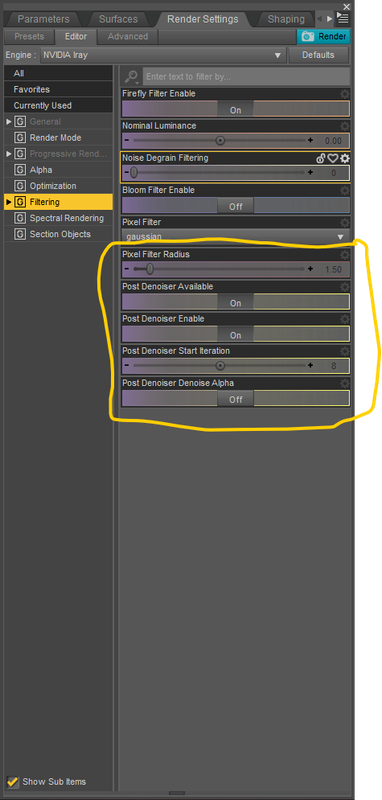
January 19, 2021 at 8:18 PM #1659648There's 3 things I use. 1 of which I use for quick renders.
1 - In Daz I use this for fast rendering. Sometimes I would do a render with and without and mix it in photoshop with a Mask Blend.
2 - In photoshop I use a Action that turns images into watercolor paintings. There's a lot out there but I found one that makes nice smooth effect. Then I use a Mask blend to restore some parts of the image if I want to show bumps and stuff. But I mainly just use the make to pop the details of the eyes back to the original renders and leave stuff like hair and some skin in watercolor style.
3 - I go into Photoshop Express. It's an app in windows Market Store or your android app store. In there I play around with filters. But there's an option in there where you can smooth the crap out of everything. It's called Reduce Luminance Noise.
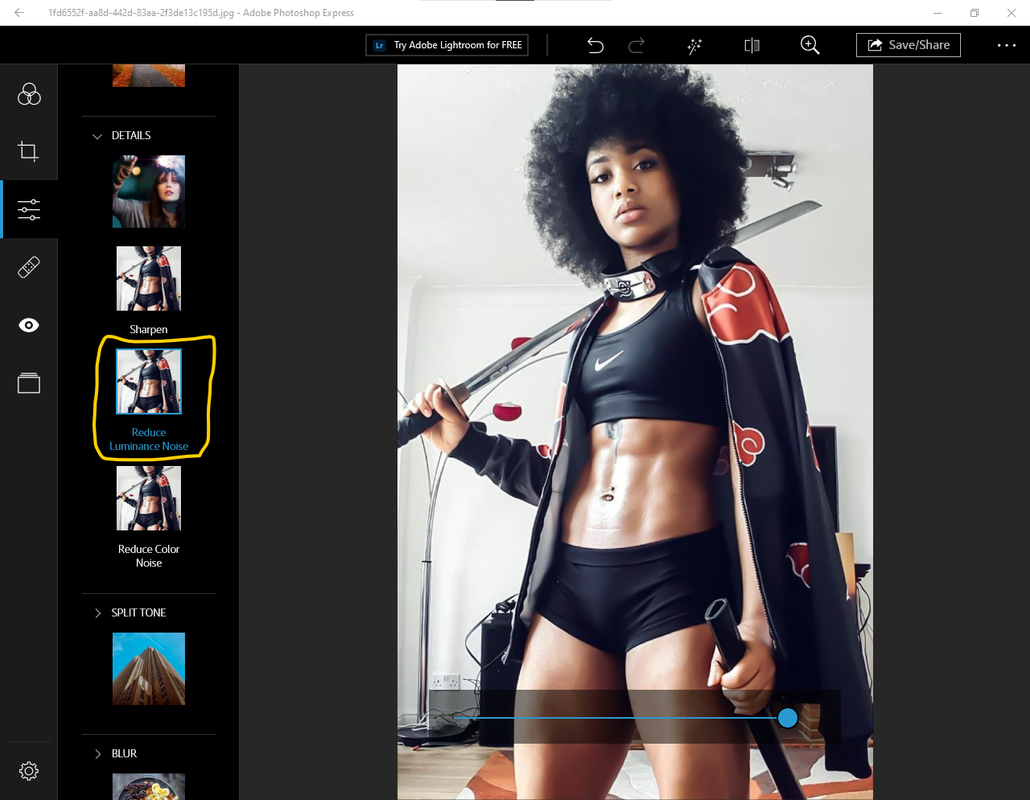
I use 1 an 2 a lot but 3 I don't use as much because it can remove all details and make everything to smooth.
It all depends on the effect you want. I like the watercolor effect, but I don't like making it to cartoony unless I need it that way.
Even with this image I had to go back and restore their badges because it became so smushed that I couldn't be read anymore.
January 19, 2021 at 3:32 AM #1659484She's a mix of a whole lot of characters and morphs... and a Geoshell for the makeup for this scene.
January 19, 2021 at 2:24 AM #1659472Wow! How? How did you light this character with out it hitting the background? How did you black it out like that?
January 19, 2021 at 1:41 AM #1659463Cool. What tutorial are you using to learn Iclone?
December 21, 2020 at 11:43 PM #1651993You should make a youtube tutorial on how you did this. This is interesting!
December 18, 2020 at 11:16 PM #1650931👍
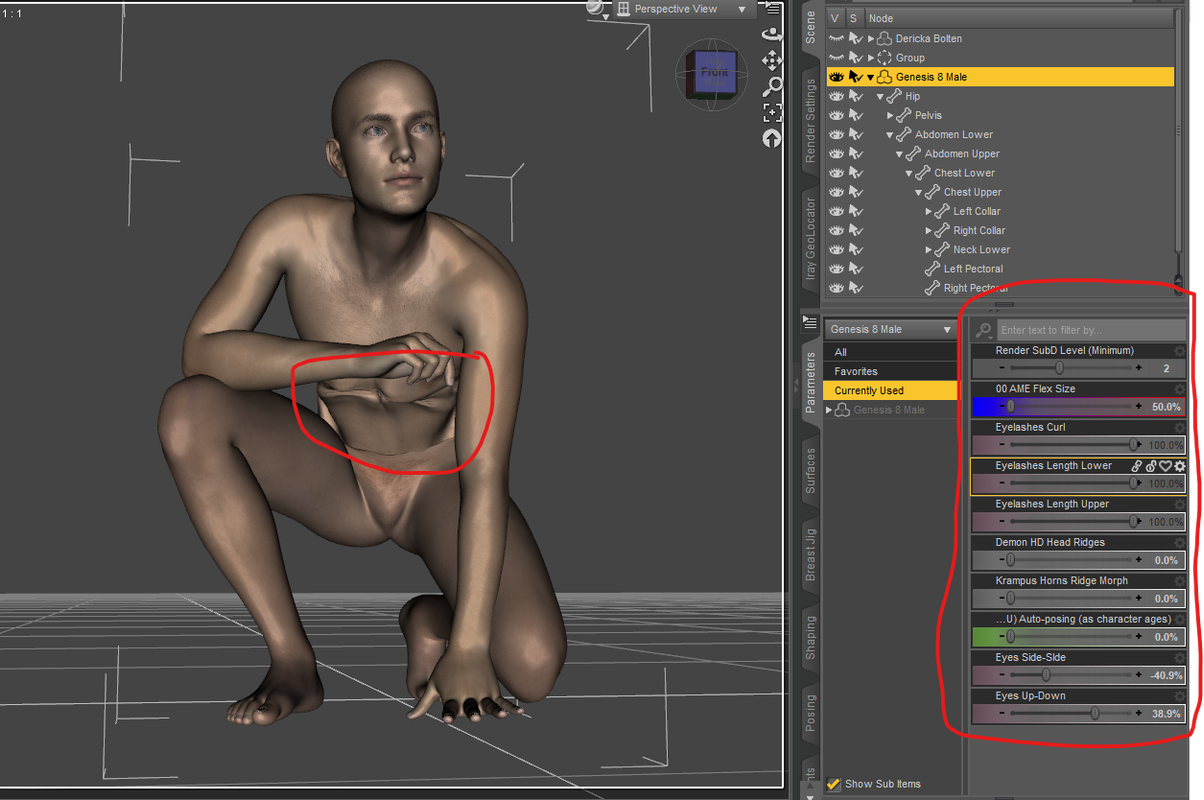
December 18, 2020 at 10:56 PM #1650927I found the problem. It's the Anthropomorphs - ManHippo HD.
"If you installed Manhippo (https://www.daz3d.com/anthropomorphs--manhippo-hd-for-genesis-8-male) this the problem!
Uninstalled or you need this character, other gen8 male charater : parameters tab - hidden - search "hippo" - you seed the non zero parameters :-)"
December 18, 2020 at 10:44 PM #1650919Yeah I did it on a Starter Genesis 8 male. Nothing out of the ordinary was in the currently used.
Nothing dealing with flexing or anything.
 December 17, 2020 at 8:52 PM #1650613
👍
December 17, 2020 at 3:14 PM #1650559Thanks for the info.
-
AuthorPosts
