Home Page › Forums › Art Showcase › 360 3D Renders for VR headset + Tutorial.
Tagged: VR
- This topic has 7 replies, 3 voices, and was last updated 5 years, 10 months ago by
 Isilfor.
-
AuthorPosts
-
December 19, 2020 at 7:46 PM #1651145
Has anyone done 360 3d renders?
Share, this is actually interesting and unusual.
They are done using a spherical camera. For the left eye and right eye and in the size 8192x8192. Therefore, the scenes are simple and time consuming.
Another problem is how to share them.
I usually watch them on my Oculus Rift S in the DеоVR app.
Previously, you could upload to gala360app.com, and watch directly on the site, but now for some reason the site does not work.
There is also orbix360.com.
Here are examples of my renders there:
https://orbix360.com/CnhoeKwwU
https://orbix360.com/EX27AQ4q5
https://orbix360.com/QwvBFLBcEA small tutorial on how to make spherical panoramas and 3D spherical panoramas.
1. Create a scene and place the camera in the center of the future spherical panorama.
2. Configure the camera.
I attached my camera with settings:
360 Camera
And here are the basic settings:
- Lens Distortion Type spherical
- Lens Stereo Offset (mm)
This parameter is just responsible for 3D.
The standard eye distance is 67 mm.
Therefore, we first render for the left eye, set it to -33.5 mm.
- Dimensions
Use Local Dimensions On
Aspect Ratio 2:1 - standard for spherical panorama.
Pixel Size The bigger, the better. Usually good quality is 8192/4096
3. Select our camera and run the render for the left eye.
When finished, save the resulting image for the left eye somewhere.
This is a ready 360 panorama. if you don't need 3D, then you can finish there.
4. Open the camera settings and set the Lens Stereo Offset to 33.5 mm.
Start rendering for the right eye. After finishing, save it.Now launch Photoshop or another editor and open both images (for the left and right eyes).
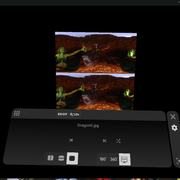
For 3d panoramas the "Over-Under" (OU) format is used. Above is the image for the left eye, and below is for the right.
We get this image with a size of 8192: 8192.
Done.
December 21, 2020 at 11:43 PM #1651993You should make a youtube tutorial on how you did this. This is interesting!
December 21, 2020 at 11:53 PM #1651996Yeah, I'd be interested in learning more about this.
December 22, 2020 at 5:02 PM #1652219I have added a small instruction. If you have any questions, I will answer.
December 22, 2020 at 5:15 PM #1652222Is it best to use a lossless image format for your final save? Or does it matter (i.e. just use jpg)?
December 22, 2020 at 5:24 PM #1652223I am saving as PNG on my computer. And for hosting in JPG, due to size / format restrictions, there are.
December 25, 2020 at 5:21 PM #1653000I do not know exactly. But 3D films are usually in OU (over under), SBS (side by side) formats. The half format (HSBS) and (HOU) are also common.
For quality it is necessary that the resolution is not less than the matrix resolution.
For example Rift S uses a single display with resolution of 2,560 x 1,440.
The user sees the panorama sector (100 degree?) and usually looks forward (not down and up) and the resolution for 360 panorama of 8000x4000 is optimal in quality.
Visually, the resolution less than 6000x3000 is noticeably blurred.
loading speed is not critical for modern hardware.December 26, 2020 at 4:01 PM #1653165Yes. All common formats. You watch in a player. You just choose which format before playback and that's it.
You can just make glasses out of cardboard (google cardboard) for video. Glasses of this type can be bought everywhere in any stores. You insert your smartphone into them and watch it 3D :).
Example (DeoVR player):
-
AuthorPosts




- You must be logged in to reply to this topic.
