

Forum Replies Created
-
AuthorPosts
-
October 23, 2026 at 8:23 PM #2192754
No worries, it's all good. And to be clear, I also DO NOT prefer AI, but I *DO* prefer it as a tool in conjunction with many other tools. It's just one spoke on the wheel. I use it with various other software, DAZ included, and utilize each program to their own strengths. DAZ is great for setting the scene, and there are many other things far better suited to handle stuff that DAZ sucks ass at doing, and that is where other tools come into play, AI edit models included.
October 23, 2026 at 12:30 PM #2192722You keep harping on the toes, when I still don't see the issue. I count 10 toes on the seated image, and on the standing image the pinky toes are occluded (as they would be in many occasions when someone is wearing those type of shoes, since they are shorter toes and don't extend far enough! they would be pressed against the side of the 'band' around the shoe's upper).
Expecting the requisite number of toes on a human (in the process of your demonstration of the evolutionary advances in AI image generation capacities) isn't asking for perfection.
The same can be said for ANY tool, including DAZ. I guess those 'imperfections' are acceptable to you. All the pokethoughs and D-Farce BS, those are all totally fine for you and escapes critique (even though they are more of a challenge to correct when they arise).
There's a reason why even software such as Photoshop are adding AI edit models to their products: some people find them useful. If you don't like them, don't use them. It's really that simple.
October 23, 2026 at 12:56 AM #2192637I'm wasn't defensive about the AI tools whatsoever (I could care less whether someone likes the tools or not)! I was slightly defensive toward the accusatory attack! ( of having some "goal" or objective, as if i'm trying to pull a fast one on you or something?) I don't get it. Then accusing me of evangelizing it like a salesman, but then complaining that I didnt create perfection to sell it to you ?? (make it make SENSE!!).
It was a fast demo of a few capabilities of modern tools, take 'em or leave 'em.
That said, I know there are some people who have some hatred toward anything AI-related, no matter what. That seems kind of bonkers to me, that it drives people crazy. I don't understand that. If it's something that can help you achieve great result quicker, it seems crazy to me to ignore it. It's like a stubborn old man trying to work on his car to get a stubborn bolt off, and refusing to use air-impact wrenches because back in his day all they had was a box wrench. It seems crazy to me.
October 19, 2026 at 8:39 PM #2192309Actually, I didn't notice the toes problem, and still don't. You said they look "ugly" so I assumed it was a preference thing. If they are not to your liking, you can mask the area, change the random seed, and spin again, or use a refiner to specialize in that area. Didn't think it was such a big deal it needed to meet anyone's expectations.
Evangelizing? Lol. Just pointing out inaccuracies about the current state of AI models, its not 2022 anymore. There are tools that many will find useful for their needs, and figured I would show some of the things now possible.
Everyone is free to choose whatever tools they like, I don't have any "goal" here, I don't give a flying fuck if you create your art with your mouse or if you fart on the keyboard to produce it.
October 12, 2026 at 8:04 PM #2191526yes, but its totally fixable, very easily. That was a quick 1-minute generated test. The problem areas can easily be masked, then re-generate the image only altering the masked area, the rest of the image remains unchanged. Plus, lora models come out all the time to specialize fixing details such as that, so it happens even less often on the first attempt.
October 12, 2026 at 4:56 PM #2191516No problem, hope it helps.
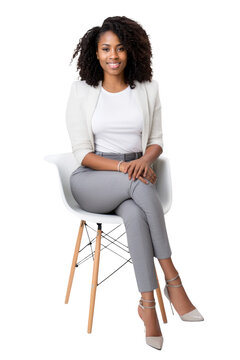
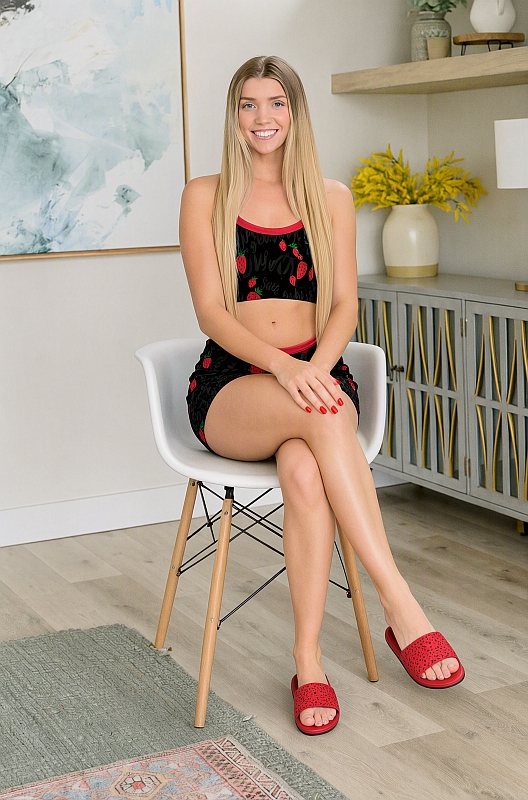
Here's a quick pose demo using the same girl and outfit from above. I found a simple image of a woman sitting in a chair. I re-posed the girl in the above image to be seated in the same pose in the chair. Prompt used: "the woman in image 1 is seated using the exact same pose and chair from image 2 with her legs crossed and both hands on her right knee. remove the woman in image 2."
If any time its not perfect, just re-generate!
 October 12, 2026 at 4:30 PM #2191513
im not familiar with meshy, but the sheets can be used for a variety of purposes. And of course are not limited to clothing sheets. You can use a multi-view sheet of a human, so the AI model has a definitive reference of truth, to know the character. You can re-use that character in any image, scene, pose (using either real or DAZ generated room, sceneries, poses, etc)
Also, if it missed a slight bit of hair (i dont really notice it) you can just re-generate it until it gets it right, usually its pretty accurate
October 12, 2026 at 4:22 PM #2191511Here is an actual demo, using that AI generated sheet from above. I searched for a random girl image, and will replace her outfit with the outfit from my last post.
This was using Qwen 2.1 with the simple prompt: "change the outfit and shoes of the woman in image 1 to the outfit and red slip-on shoes in image 2."BEFORE:
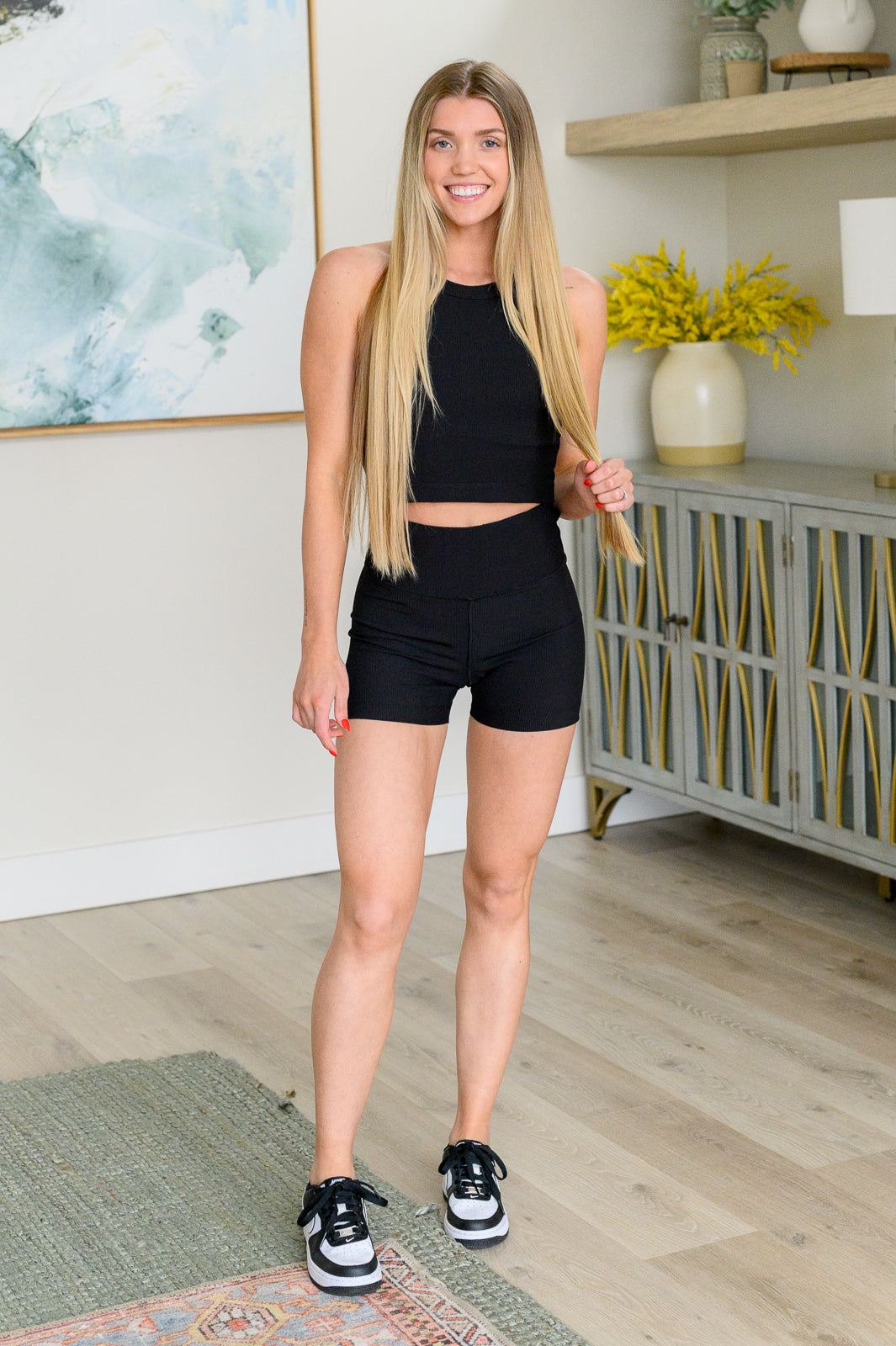
AFTER:
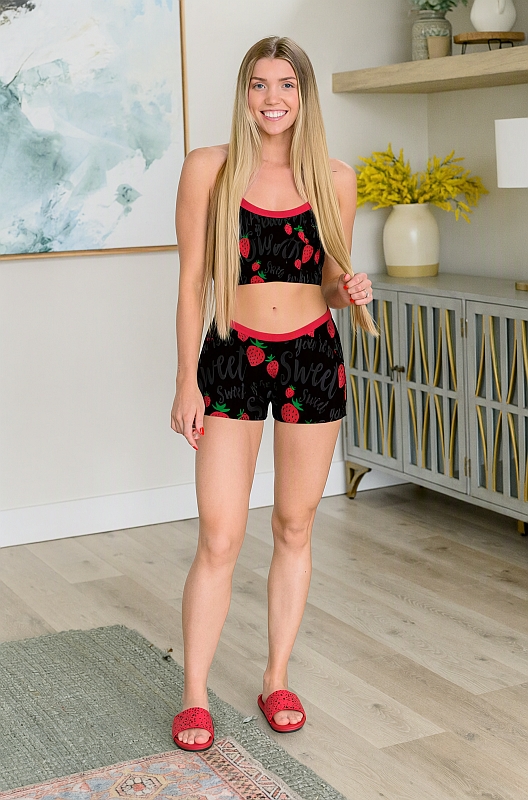 October 12, 2026 at 2:27 PM #2191506
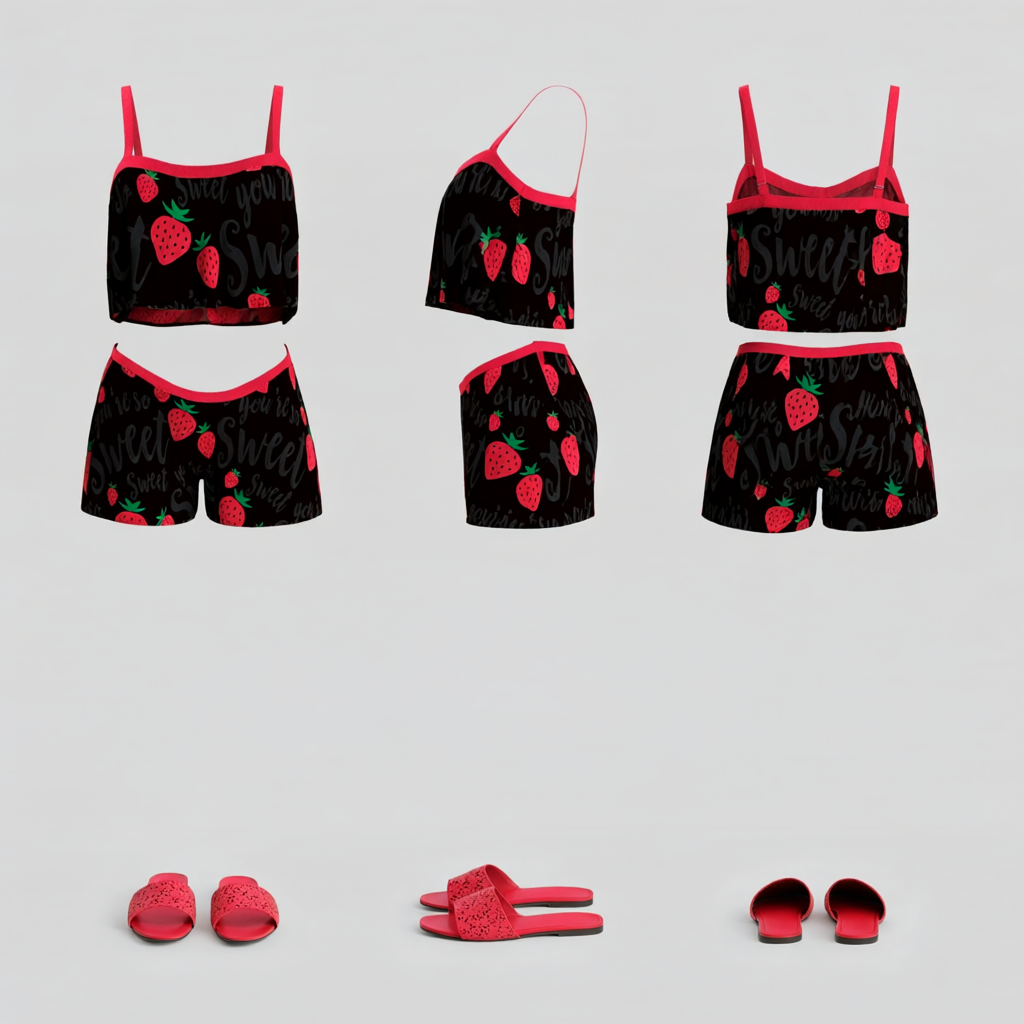
Yes, Qwen 2.1 is pretty good, it actually just came out a few weeks ago. But I usually default to Flux.2 klein for human subjects because i prefer the greater skin details (just a preference, some people might prefer the opposite), but for other stuff, Qwen 2.1 is great. For your task of clothes, yes either qwen or flux.2 . What you can do with all of these models, for instance: supply an (image or images) of the clothing or full outfit and accessories. Then generate a "character sheet" reference of that using the AI model. This will generate a reusable image of the outfit from all views and angles (such as front view, side, rear). Then that sheet image can be used as the reference in the future, as needed, to swap onto any character. The AI model does not need to guess about what the back of the clothes look like (which in the past was why you might struggle with getting consistent clothes, the AI had to keep inventing what a certain view looked like). But now in this character sheet, everything is provided to the model.
here is an example of a simple reusable character sheet from a daz clothing product. You can then simply swap it onto any character, either a real one or a daz generated one.
 October 12, 2026 at 2:01 PM #2191503
thats because you are using a text-to-image model. Use an edit model. If you want it to do a backflip, supply a reference image of a backflip, either a real one or a DAZ generated one.
October 12, 2026 at 1:42 PM #2191500try to look for some "edit" models, such as Flux.2 (flux.2 klein is a distilled turbo version that is quicker than their full models, its a good starting point). There's also Qwen 2.1 which just came out recently. These can be run locally on your own pc, even with a rtx 3060.
October 12, 2026 at 1:07 PM #2191495Most of the negative thinking here, regarding AI tools, are outdated. Modern models and tools have moved well past those critiques (unless you use a text-to-image model, but there are better alternatives now). You can be creative as you are with DAZ, just using a different set of tools.
For instance, in DAZ, you can change the clothes on a person in the scene by searching for a clothing in your library, loading, then selecting a material (which you are limited to, unless you are comfortable modifying new materials). Then worry about pokethroughs and other BS.
The same can be done in modern tools by simply supplying a reference image or images(multiple views/angles) of the clothing, and it doesnt matter the color, or whether its real clothing or not (you can supply a DAZ clothing, just dont break legal TOS). The person or person(s) in the scene that you specify with now wear the item(s) perfectly, (no dforce BS). And you can change the color simply by saying so, no need to hunt an image of a specific color down.
Prompting is a very small part of the newer AI models (unless you are using a strictly text-to-image AI model, of course). Your prompt for the above clothing example would be a simple:
"replace the clothes on the standing character on the left of the scene with the clothes from reference image 1" or "replace the clothes on the man wearing the blue shirt with the clothes from reference image 1".very easy, quick. Its the SAME level of "art" as doing the same thing in DAZ, you are literally doing the same thing, just using a different toolset.
February 2, 2026 at 7:59 PM #2162191For the most part, yes, if using reference images with Flux.2, but of course not on every inference of an image. Its not 100% every single time, but you can always re-run it again in those cases. You can also re-enforce with strong prompting to absolutely maintain particular details, and it will.
see here for more detailed info and examples:
https://docs.bfl.ai/kontext/kontext_image_editing
https://docs.bfl.ai/kontext/kontext_text_to_imageAnd if making animations, what you can do is generate initial frame with flux.2 and then also run wan2.2 for image to video generation, and prompt what you want to happen in the video (what you want the action in the still photo to be)
Both can be run locally (though not at the same time!), I run both on a RTX 3060 12gb and 64gb system ram
February 2, 2026 at 5:23 PM #2162143Why even rig them when AI can probably animate them without a skeleton?
If needed AI could probably rig them now or eventually.You can make up a person from a few random photos or words.
Have AI construct a 3d model of that person. Place it in a 3d environment generated by a painting or a place, light it with an AI generated HDRI then animate it with prompts. One person with a streamlined workflow could probably do that in what? A few minutes. Maybe a couple hours if started from 0.This absolutely can be done, right now. Flux.2 can accept 6-10 reference images (depending on which version of flux.2) and it can output from those whatever you want. For instance an image of a person, and 3 images of different clothing. You can then prompt to give images of the person wearing the various clothings. Or you can supply multiple images of the same person to get a good perspective from different angles, then prompt to make that character be in whichever scene you want or whatever pose you want. You can even supply a reference image of a pose, and just have the character assume that pose. It's pretty cool stuff
January 19, 2026 at 3:01 PM #2160247Any time there's something new, there will always be some people who say they will refuse to adapt or accept the new technology. But eventually, they always do, and the "old" is always still there in the background, there if you need it. The old stuff usually never goes away, but eventually most people see the value in the newer stuff. I remember when digital cameras were first hitting the scene, and people hated it and swore they'd never use it, and preferred film, and so on. Now, most see the value of digital cameras and appreciate its benefits, such as instant images without waiting for film developing, plus easy editing, etc.
-
AuthorPosts
