V4 to G8

Home Page › Forums › Art Showcase › V4 to G8

Viewing 6 posts - 1 through 6 (of 6 total)
  • Author
    Posts
  • #1007220
    ADAM
    Participant
    Rank: Rank-1

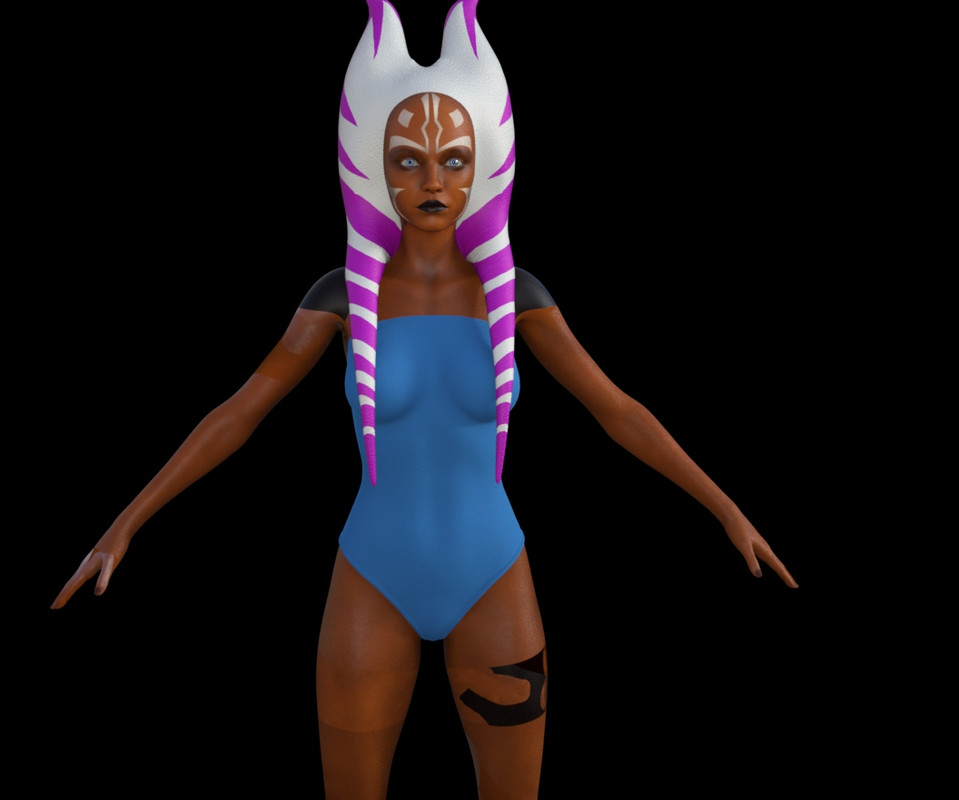
    So, Im trying to move this texture to G8 but using the program/script to do so results in black shoulders and an offset texture. Any idea what Im doing wrong?

    Blue part is just for modesty.

    #1007273
    Mark Sinister
    Participant
    Rank: Rank 4

    She's not wearing her Geo-Skin. You need to add the Legacy UV's Geografts to the character. It's kinda like clothes.

    Then you have to use the script on it then apply the texture skin to the Geograft skin.

    Geo Skin

    #1007328
    ADAM
    Participant
    Rank: Rank-1

    Interesting. I clicked that earlier but just got a transparent section that I couldnt figure out. Thanks, Ill try to figure out how to add texture to it.

    #1008470
    ADAM
    Participant
    Rank: Rank-1

    still cant figure this out.

    #1008473
    Fail
    Participant
    Rank: Rank-1

    Now you go to your surfaces and copy/paste the original figure's surfaces to the geograft parts.

    #1008607
    ADAM
    Participant
    Rank: Rank-1

    I tried but it didn't work for me. I selected the torso surface on the model and copied surface. Then clicked each section seperately on the geo shell and pasted it.

    I did not however apply a script that strips the model of all textures. I guess Ill mess with it again.

Viewing 6 posts - 1 through 6 (of 6 total)
  • You must be logged in to reply to this topic.


Post You Might Like