Home Page › Forums › Art Showcase › This Filatoon thing is pretty neat (UPDATE)!
- This topic has 5 replies, 4 voices, and was last updated 1 year, 8 months ago by
 Grouchy Old Fart.
-
AuthorPosts
-
January 31, 2025 at 8:56 PM #2116086
As long as you don't use Genesis 9, it's awesome to use.
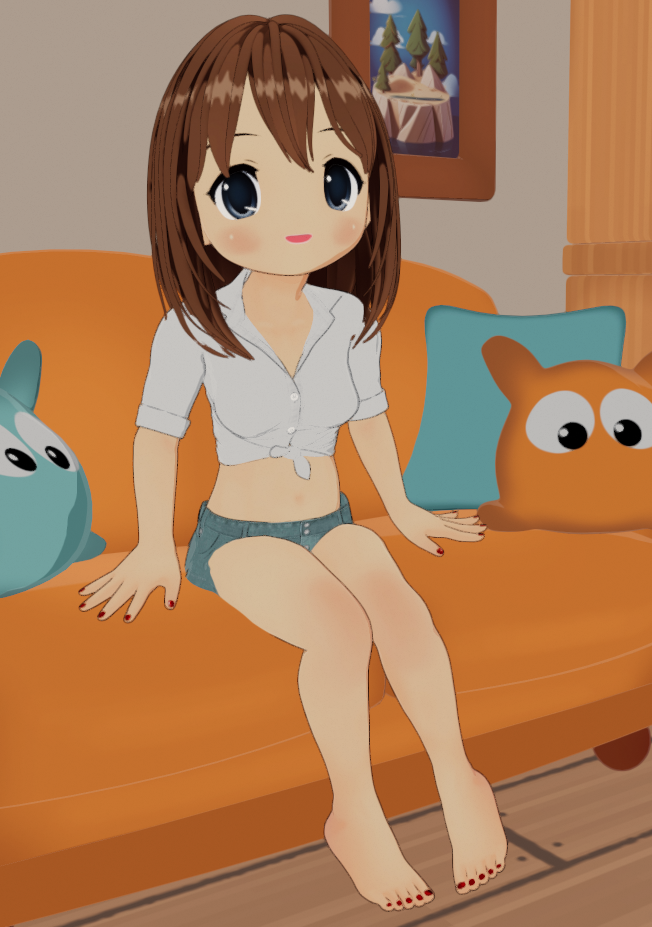
I loaded the excellent Moetan/NearMe figure, gave it some morphs, converted V4.1 clothes and some G9 Toon hair, used an old Toon living room, converted everything to Filatoon, and it turns out very very well.
I think I'm going to have fun with this new toon shader kit.
Update: I learned how to convert nearly any shader or texture to Filatoon now. The aftermarket conversion kit, quite frankly, sucks. The tools that come with the Genesis 9 Anime package do a lot better job of it. Just go to (where you put your textures)/Daz Defaults/, and apply the conversion tools in order (Filatoon Base, then Filatoon Outline) After that, apply (to each or group of surfaces) the best shader type that fits in the Presets/ subdirectory (General, Skin, or Metallic, etc).
I'm now able to take a 15 year old figure and make it just like new again.
This is fun!
 February 15, 2025 at 1:12 AM #2117927
I think your render is the first time I've felt like it might be a good thing. I took a crack at it. Then two cracks at it. The style reminds me of Poser's style, which isn't a bad thing. But for me, I'm still using pwtoon with volumetrics because I have a certain look I aim for. Filatoon drives me cray cray so far.
February 17, 2025 at 2:34 AM #2118195I'm loving Filatoons so far, but converting some clothes just leaves too much detail sometimes. It doesn't seem to like busy patterns when trying to get that cel shaded look.
February 18, 2025 at 7:48 AM #2118309Cute
February 18, 2025 at 2:41 PM #2118353I'm loving Filatoons so far, but converting some clothes just leaves too much detail sometimes. It doesn't seem to like busy patterns when trying to get that cel shaded look.
I've seen that too. There's a couple of things that do help - you can make the outlines thinner (in some cases I remove them entirely), and I've even found a way to make the shadows a lot softer (the LUT settings help with this). Take a walk through this thread - it definitely helps: https://www.daz3d.com/forums/discussion/704951/anime-toons-and-filatoon-shader-q-a#latest
February 18, 2025 at 3:24 PM #2118360PS: I'm also learning how to soften shadows as well:

-
AuthorPosts




- You must be logged in to reply to this topic.
