Home Page › Forums › General Chat › Stuff about lighting
- This topic has 37 replies, 11 voices, and was last updated 8 years, 9 months ago by
 silverboaX.
-
AuthorPosts
-
January 22, 2018 at 7:22 PM #469278
@coolcat It's under environment in dome mode, select finite sphere or finite sphere w/ ground depending of your needs. After that, play with dome sphere multiplier to adjust. Have fun! 😀
January 22, 2018 at 11:18 PM #469491@coolcat - by default DAZ puts it lighting in <your daz content folder>\shaders\iray\resources
I personally have an HDRI folder on my drive and just navigate there since I use a bunch of different 3d software.
@eelgoo - I've found DAZ isn't a fan of HDRIs over 100Mb, but your computer may vary on what it handles nicely.Also if you want the best results, change "environmental lighting resolution" up, I recommend 4096 (4k)
This might be why @dragon I think it was, had trouble getting HDRI to cast shadows (they totally do)
January 22, 2018 at 11:43 PM #469507Thanks a lot for the info @silverboax
Much appreciated. 🙂January 23, 2018 at 1:05 AM #469593No worries, I seem to be one of the people here who has cracked DAZ lighting and I have time to experiment so i'm happy to try to make stuff work and explain it 😀
January 23, 2018 at 2:42 AM #469653@silverboaX if you have cracked lighting would that mean you may have cracked shadows with layers? if so could you take a look at my question in the 'rendering in layers' forum? i would appreciate any assistance you can give. thanks.
January 23, 2018 at 4:42 AM #469704@bob - honestly it's not something I really need to do in DAZ, my PC is decent enough to handle most of what I throw at it, even if it takes a couple hours for a decent render.
I know the iRay in DAZ _can_ do depth maps and such but it's a part of the renderer I haven't played with. DAZ calls the layers 'canvasses' for some stupid reason and I know there are some tutorials out there on using them.
Honestly though I would generally use another renderer if I were going to work in subgroups of objects, something that lets you set up proper layers rather than messing around with DAZs god awful grouping system to manage object visibility.
January 23, 2018 at 5:26 AM #469725This was going to be an example for @norbertz for posing, but I think he's given up 😀
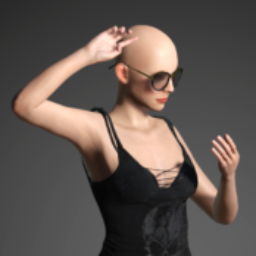
So instead, @drgnmztr - an example of using a plane with an emissive texture for soft lighting... not the worlds best render, I got bored waiting 😀 The orange glow is because DAZs default colour temperature for emissives is quite warm, lowering the colour temp will bring it toward blue.
Obviously in the real world you'd have the plane off camera but I want you to see that there's no magic here, it really is just a flat plane (you have to make sure its facing toward the model!) with an emissive texture, I think I threw this one on 50k lumens.
The rest of the scene lighting is again just DAZs default environment on default settings.
 January 23, 2018 at 12:14 PM #470029
Thanks @silverboax , @miarka 🙂
January 23, 2018 at 8:27 PM #470442I heard someone had a fresh plate of Mallos here. Dragons like Mallos. 😉
@silverboaX for starters, thanks for the tip on pumpin up the light res for HDRI. I'm still learning. I'll play with that. So many controls.Also, I've tried the emissive plane, and the emissive sphere trick with my moonlight render I mentioned in the other now off topic post. I cranked it for 20k to 400k also and got nothing. However, I gave up on that render a few days ago but I'm willing to try this technique again.
January 23, 2018 at 10:35 PM #470524I like the emissive plane thing although I still need to tweak it a bit
as my render might be a little dark still (background city came with lights too though)
 January 23, 2018 at 11:59 PM #470581
something else you can make fairly easily within daz is a curved plane, make a cylinder primitive and use the mesh tools to remove the top, bottom and back of it, then you can use the scale tools to alter the curve. This will let you wrap the light around the model a bit.
a bunch of the downloadable packs with mesh lights have this sort of thing already set up.
January 27, 2018 at 10:41 PM #475077Anonymous
InactiveRank:
No I haven't given up 🙂 The poses are fine to an extent but I'm currently learning Vray in Maya and thinking of ditching Iray altogether.
Major flaw though. You can export the Genesis figures to Maya with the DAZtoMaya plugin and it will automatically convert the textures, that's the easy bit.
The hardest part is posing because the plugin won't export the pose (Still learning my way around Maya because I'm a native MAX user)
Then of course the lighting setup and all the rest still has to be done.I'm a fan of realism but Iray in DS just doesn't do it for me :/
January 27, 2018 at 11:23 PM #475113Haha yeah I learnt 3d on Max myself, I’ve tried to get used to Maya a couple of times but I can’t.
I believe if you export a collada file it keeps the bones, so maybe use the plugin to make the textures easy, then manually export the model ?
January 28, 2018 at 2:32 AM #475320I tried using an invisible plane as A light but, my settings still showed it in the render. Any help with this?
January 28, 2018 at 2:44 AM #475327 -
AuthorPosts








- You must be logged in to reply to this topic.
