Home Page › Forums › General Chat › Save Character
- This topic has 4 replies, 3 voices, and was last updated 7 years ago by
 Kerry Nova.
-
AuthorPosts
-
September 27, 2019 at 12:23 AM #1262344
Hey guys & gals!
I am Kerry the DAZ Newbie saying hello again!
I have been downloading a bunch of content and I think I should start creating my characters now.
My next question is: How do I save my characters?
Is there a correct way to save a character?
I want to create my characters and then load them again to create new scenes, in a new location, with new outfits, hairs, makeups, add other characters.etc.September 27, 2019 at 3:39 AM #1262495The way I do it is I created a folder on my computer where I put all my characters and their stuff. Then I go to "Edit > Preferences > Content Tab > Content Directory Manager... > DAZ Studio Formats" right click and add your folder to "DAZ Studio Formats".
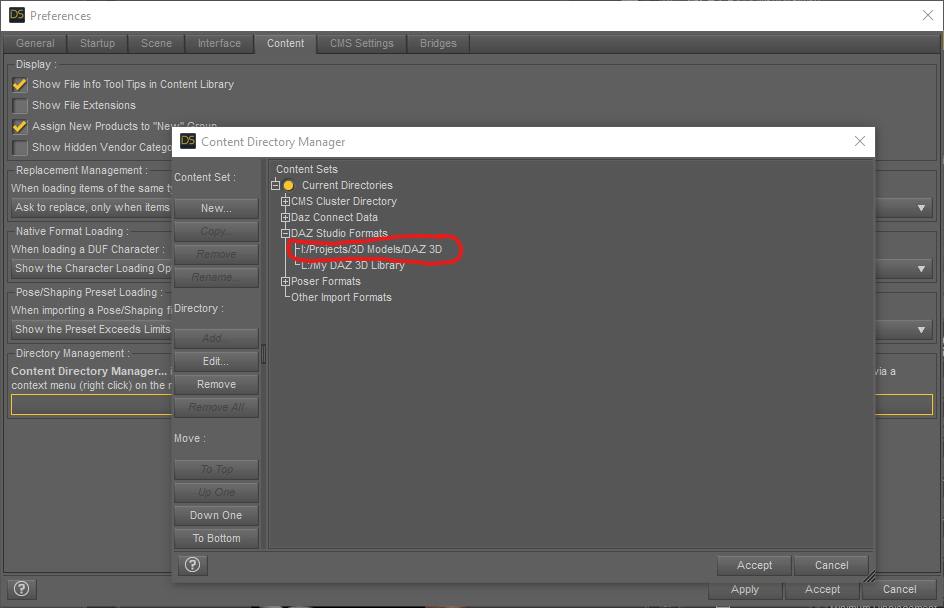
When that's done go to your "Content Library" Tab in the main application view and you should find the name of your folder in the "DAZ Studio Formats" at the very top of your menu list.
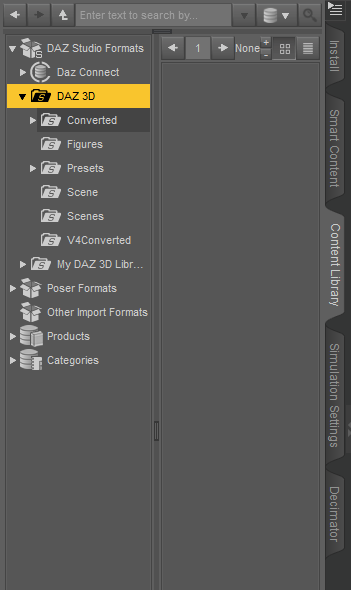
After that go to a "Presets" folder in your folder you named. In there you should see some folders in there like Characters, Light, Materials, Wearables, Render Settings, Poses, Etc. Any folder you add in your folder in Explorer will also appear in there.
Just go to the folder you want to save your characters in and save them there by pressing the + sign at the bottom of the "Content Library" and select "Character Preset...".

The other folders should be self explanatory and the option to save should are in the + sign menu.
September 27, 2019 at 3:43 AM #1262499All those folders with people names are each of my characters folders for their Wardrobe under "Wearables" which I manually added as time went by.
September 27, 2019 at 6:28 AM #1262644Wherever you decide to save your item be sure to use 'Save as Character'
This will save the morphed & textured character.You will then have to add hair & clothing.
Usually I save the hair &/or clothing used as 'Wearable' presets.
🙂September 27, 2019 at 9:41 AM #1262821Thank you all guys!!!
-
AuthorPosts





- You must be logged in to reply to this topic.
