Home Page › Forums › General Chat › Library setup
- This topic has 13 replies, 11 voices, and was last updated 2 years ago by
 Paul (Fuzzy3000).
-
AuthorPosts
-
September 20, 2024 at 5:10 PM #2091722
Been talking on discord about installing libraries. It made me wonder...Do we have a common practise (Say the most ergonomic way to do so) Or are there different ways of organising. If so, what are the pro's and cons?
I have found over the years that organising libraries by category works best for me. So a separate lib for characters, poses, hair, environment, light etc. I also made some additional libs like :weather, war, history, etc
Will be interesting to hear other peoples ideas about thisSeptember 20, 2024 at 5:28 PM #2091724I just have all my main Daz assets in one library and all my HDRI/billboard/Poser assets in another.
September 20, 2024 at 7:20 PM #2091741Every few years I re-install my content leaving out the stuff I haven't used. This can be a bit traumatic because I might really really trulio really like item X, but have never used it so out it goes. Most of my stuff is clothes and toys. I only have a few figures and only a few morphs for each one. I find they mostly all look the same so it's easy to keep the figure collection small.
September 20, 2024 at 7:53 PM #2091749I do have one mondo-massive library for everything that isn't Genesis 9 that comes in at 1.4 TB. I began G9 with its own library set, and it's already up to 300 GB. I do have 3-4 Poser Library directories, one for V4, one for 3rd-party figures, and one for all the really old stuff I used long ago - all of the old Poser stuff comes in at a combined size of 166 GB (things were a lot smaller back then.)
Someday, I might do the painful process of separating out into individual DAZ libraries for G8/3, G1/2, Environments, Props, etc. But I have yet to see anything that might make the process less painful (I wish there was a script to automagically locate and copy out all supporting files for a given directory of assets without it being a complex pain in the ass, but *sigh* nope.
September 20, 2024 at 8:36 PM #2091754@Larry
That's my modus operandi
Same goes for poses, fight, sit, stand, couples, etc
Enviroment is divided in things like school, office, apartment, historical, etDid this for all the " main" groups
But as Ethiopia says, in time you got lots of dresses, and you only use 2 or 3. This can clutter libs over time as well.
still I think it is the best way to organise...September 20, 2024 at 8:49 PM #2091756@Old fart
I have saved all the zips as well, and use the same folder structure as my libs.
So if I have to reinstall say hair I go to :Genesis figure X/Hair/long hair
I take all the zips and extract them to a temp folder:
I copy all equal named folders to a content folder, I delete all the read me's etc, as well as the templates.
So 9 out of 10 I end up with 3 folders
data
people
runtimeBecause we are doing hair I create a folder Long hair in:
Hair\People\hair\Genesis figure X\Hair
All the hair files go here.( after they got taken out of the vendor folder)
When all is done I cut and paste the 3 folders in the content folder to my actual hair libIt seems a bit much, but it is pretty easy actually, for you can "instal" in subfolders ( and all the zips are in the same sub folders)
I know there is somebody here that unzips every new download, rearranges the structure of the zip file, so all he has to do is unzip.
But if you have terra's of zip's it is a daunting task ( nice winterjob)September 20, 2024 at 9:04 PM #2091757Have over 52 My library folders each containing over 60gbs.
There is one internal drive devoted to this alone which is accessed by The Daz Program
Each Friday the current drive is backed up two external drives (includes the new stuff)
The installation files (zips) are backed up to one main external drive and this
is duplicated to a second external drive (thank you Seaagate)
The whole procedure takes under one hour.
If this seems like a lot, I have been collecting for abot 10-15 years.
I have a sizable investment in this of both time and money.
Realize it seems redundant, but years ago I lost what I had in
a freak accident (had to pay a company to restore it,)
Too long an explanation, but it is Friday, I am done and venting is good!!!!September 21, 2024 at 1:26 AM #2091785I have everything into categories, and sub-categories. And further if necessary.
With some categories as there are so many assets, there is the need to break them down further. I know I should get rid of some things, but with those put into another category instead of deleting them.
I did do a backup of my database a few months ago. Am planning on copying everything before I get a new computer. My database is over 1.5TB last time I checked.
September 21, 2024 at 2:35 AM #2091795I gave up trying to organize the DAZ library using internal means such as smart content and categories. Too many times would the categories get wiped out due to a crash or DAZ bug.
I wrote an external software to handle it, now it takes seconds to find what I want. It does take some manual work to categorize new content, but it only takes 1 click to do that.September 21, 2024 at 4:41 AM #2091800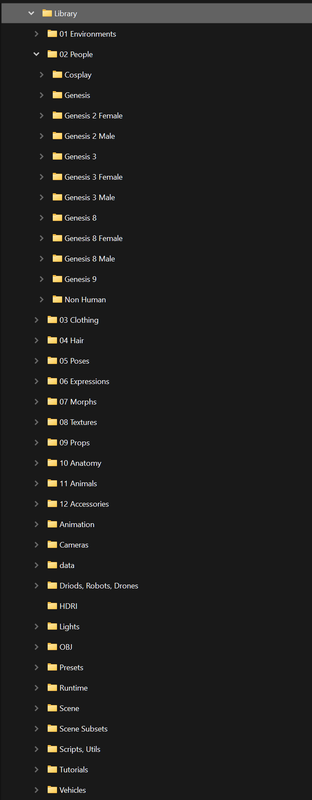
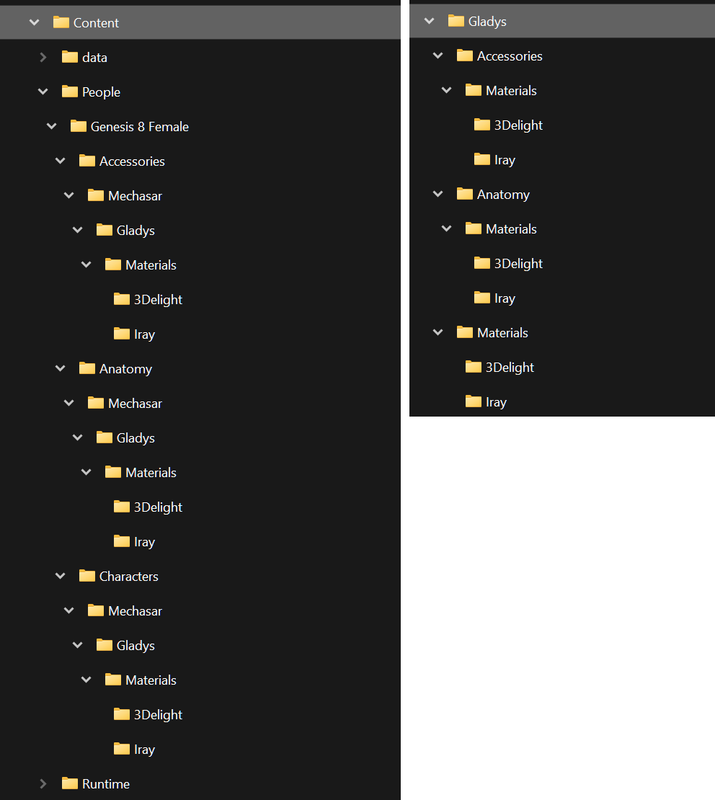
.. this is how i have organized my library.. i have trouble remembering the vendors for the assets and hate going thorough vendor vanity folders.. i might remember the asset name and i hate it if it is hidden inside a vendor folder..
.. this structure takes a little bit more effort when adding the assets to the library.. but it works for me..
.. have all my assets in one single library.. somewhere around 1.5TB.... this is how it is in some of the assets and how i make it into..
 September 21, 2024 at 8:42 AM #2091839
There is a sticky I did about it a long time ago, but it is still valid.
September 21, 2024 at 1:25 PM #2091895At present I am still 'away from home' so only working off laptops.
One day, if or when I return permanently to the UK, I may invest in a new desktop to build my 'dream layout, for libraries [will probably be on RTX 60' series by then:) ].
Until then I have all assets unzipped, and promos added to folders, and store them on 2x 2TB Nvme drives.
The assets are organised in categories such as Characters: split into Female- G9/G8/ everyone else; Male- same layout; Fantasy and Sci-fi Chars; Misc Chars- ie. cats, dogs, dinos, horses, apes etc...; Clothes- converters, shoes/stockings, accessories, G1/G2/G3 etc..,; Body- morphs, skin/makeup, eyes, hair etc..; Poses; Expressions;
A similar treatment is given to sorting Sci-fi collections; Effects/shaders; Environment & Props; utilities.
Each broken down into the most suitable collections. it makes it easier to add new assets to each of the categories and to find when wanted.My DS has the basic library and I just install as needed.
I keep a copy of the basic DS install items - create a path to a 'project' library [i.e. Xmas Comp], delete the content from the Download folder and do an off-line refresh of the DIM, then copy the basic content back to the download folder, refresh DIM again and I then install items needed for that project to the appropriate path using DIM. This makes it easier to uninstall individuals [or keep desired ones to remain with the 'basic' content.
The content drives are backed up to an external WD 14TB weekly, and a spare 4TB when I remember.
The DS library remains a reasonable size and this allows for adding favorite's to the 'basic' download folder, or removing, as I wish.So far so good
🙂September 21, 2024 at 11:25 PM #2091975"The DS library remains a reasonable size....."
I guess that would also benefit your loading time. There's a thread here and on Daz where some have reported ridiculously slow load times for G8/G9, due to having every morph pack known to man installed.September 22, 2024 at 10:41 AM #2092042Yes - keeps things nice and trim, never had load issues.
Of course it depends on how many items you consider essential to have installed at all times - but with a little time it can be tailored to suit on a project basis and added or reduced as desired.
Only really works best for those that use DIM - for speed of install/uninstall.For those that prefer DIM;
1st launch DIM online - this lets you check for any updates to installed content.
After any updates completed go to the DS Downloads folder [where DIM files saved] and copy all contents to a folder called DS Download Master [you can use the contents of this folder to check with DIM online for future updates].After saving the 'master' files relaunch DIM OFFLINE.
Now you can uninstall any thing not wanted on essential.
When happy save this new DS Download content in a folder called DS Basic Content.
Keep this as a backup in case things go wrong.
Copy the content to the original DS Download folder [delete contents first]
Launching DS will now just give you the items in your 'basic selection'.If you decide on a project just copy the DIM files from your content collection into the DS Download folder and launch DIM offline to install the new content.
Any items that you want to remove after finishing project can be uninstalled via offline DIM.
You can always add 'essential' files to the 'basic' choices and re-save if desired [.
You could even save several versions of the basic files to accommodate sci-fi or horror or however you feel. Just copy the files to replace those in the DS Original Download folder [keep backups of Master and Basic - these can also be easily copied to different systems].🙂
-
AuthorPosts















- You must be logged in to reply to this topic.
