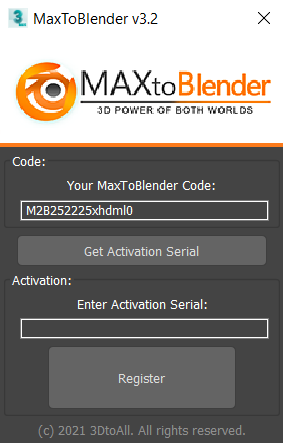
Installation of Maxtoblender v3.2 --- activation serial number issue

Home Page › Forums › General Chat › Installation of Maxtoblender v3.2 --- activation serial number issue

Viewing 3 posts - 1 through 3 (of 3 total)
  • Author
    Posts
  • #1918957
    maryssmith
    Participant
    Rank: Rank-1

    Has anyone installed the pluggin Maxtoblender v3.2? https://zonegfx.com/maxtoblender-3-2-5-1/

    How did you solve the issue of activation serial number. They seem to have a .py script for that but I don't know how to use.

    maxtoblender

    I also tried the stupid way of using flt0j0Hde0s025 (interpreted from they Python code but not working...)

    #1918975
    queensknight
    Participant
    Rank: Rank 7

    It looks like there's a serial number provided in Serial.txt in there, it's just nested pretty deep:

    MaxToBlender
    -> MaxToBlender_v5.1c_Incl_KG_iND
    -> MaxToBlender_v3.2_Incl_KG_iND
    -> MaxToBlender_v3.2
    -> Manual
    -> To Blender Addons Folder
    -> MaxToBlender
    -> Serial.txt

    #1918981
    queensknight
    Participant
    Rank: Rank 7

    Actually, with a bit of Googling (and translation from Chinese sources) it looks like this is the process they want you to use:

    (1) Install MaxToBlender_v3.2.msi

    (2) Press the shortcut key X in the window, enter MaxToBlender, find the plug-in and run it

    (3) After running, there will be a request code, copy it

    (4) Open MaxToBlender_v3.2_KG_iND.py with Notepad, you can see 'xxxxxxxxxxxxxx' in the "m2bReq" field

    (5) Enter your request code here, paste and overwrite xxxxxxxxxxxxxx, and save

    (6) To run a script in MAX, you can press F11 to open the listener first, select Python, and then select Run Script from the listener menu

    (7) Get a string ('MaxToBlender v3.2 serial for request number', 'MTABSC04JHX33 is: \n————–\nlJZCi088o3i3os\n—————'), etc., copy lJZCi088o3i3os, pay attention to remove n, paste back The software is activated. (The activation code obtained by each machine is different, so calculate it yourself)

    Basically you use the MaxToBlender_v3.2.msi installer, run the MaxToBlender app it installs to get the "request code" (which is unique to your computer, based on its MAC address), then you use that request code in the MaxToBlender_v3.2_KG_iND.py script to calculate the "activation code".

Viewing 3 posts - 1 through 3 (of 3 total)
  • You must be logged in to reply to this topic.


Post You Might Like