Home Page › Forums › General Chat › Identify this dress please
- This topic has 12 replies, 5 voices, and was last updated 5 years, 6 months ago by
 John Lund.
-
AuthorPosts
-
March 31, 2021 at 10:03 PM #1680404
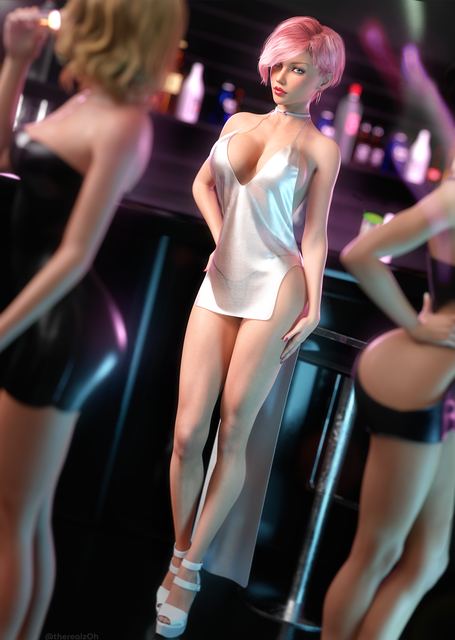
really like the look of this dress but i just cant find it. thanks
April 1, 2021 at 9:44 PM #1680667thanks for that. would you happen to know of a daz asset that is similar to that dress?
April 2, 2021 at 2:44 PM #1680823Wow, who did the original? I'd love to see if they would sell the girl in that.
April 2, 2021 at 6:57 PM #1680873I managed to grab all her outfits. In the process of converting them to G8F. She has some really good items. Shame she can't be bothered to rig them. She could sell them on Daz or Rendo and make more than the $1 she charges for her entire collection.
April 2, 2021 at 6:58 PM #1680874@my3d you seem pretty awesome at figuring this stuff out, Any idea what panty that is in the image? I spent an hour looking and can't seem to find it. Its not part of her collections.
April 2, 2021 at 7:06 PM #1680875You think its worth the download still even though it isn't rigged @necro
Some of the clothing looks pretty good.
April 2, 2021 at 7:18 PM #1680877@sleepysheep
If you're just using it for basic stuff for sure. (By Basic I mean normal G8F stuff) Super morphed G8F you'll need to load that specific one and do the below for that one too. Example if you did this for G8M and then used it on the Brute it might not look so good. But I don't know any real G8F's that are super morphed like that.
Anyways, Just follow below.
1. Open Daz 3D Studio, and add default G8F
2. Import .obj file you downloaded from her
3. Using geometry editor edit rename the parts of the dress to make better sense
4. Transfer utility from G8F to clothing, use smoothing modifier (see options in image).
5. Pick some shaders that you like and fill in the materials. (Personally I like the Ultra Business Shaders. I liked it enough I bought it on sale.)Using the image below for the setting on transfer. Don't worry too much about step 3. She's done them fine. Just make sure to get the OBJ version. You don't need the MD one. Pay attention to the Projection templates. You might need to play with it for some of the outfits (when in doubt, use full body or none). But for basic poses and such I found it good enough. Then File Save as Wearable preset and you had the outfit ready to fit almost any G8F.

DD
April 2, 2021 at 7:27 PM #1680880Here's a quick render I did with it using those steps.
 April 2, 2021 at 8:06 PM #1680896
@my3d
Awesome I have those. I'll just covert them over to G8F.. Some of the best outfits made were for G2F and G3F. Been spending time converting them to G8F.In regards to her files. Yes, There is the MD, OBJ, and FBX files. I found the Obj files most useful. But I've got zero skills in Marvelous Designer.
PM sent.
April 2, 2021 at 9:44 PM #1680918@DirkDiggler any chance you would share the outfits?
April 2, 2021 at 10:17 PM #1680921I 2nd that, I'd be interested in the outfits you convert for G8F, it looks stunning and the custom morphed girl is truly remarkable, would be lovely to obtain indeed
April 3, 2021 at 8:44 PM #1681143does anyone else know of a dress that is similar to this one? not really worried about the tail. i am looking but just not finding anything simialir to it
April 4, 2021 at 9:17 AM #1681224 -
AuthorPosts







- You must be logged in to reply to this topic.
