Home Page › Forums › General Chat › IBL 3delight eyes always render ugly white reflections.
- This topic has 6 replies, 3 voices, and was last updated 7 years, 5 months ago by
 globalrecession2009.
-
AuthorPosts
-
April 23, 2019 at 7:48 PM #1052133
Last few weeks i have been trying out IBL Master as my only source of lighting in 3delight renders.
I like rendering vehicles but i can never seem to get good result with a figure.
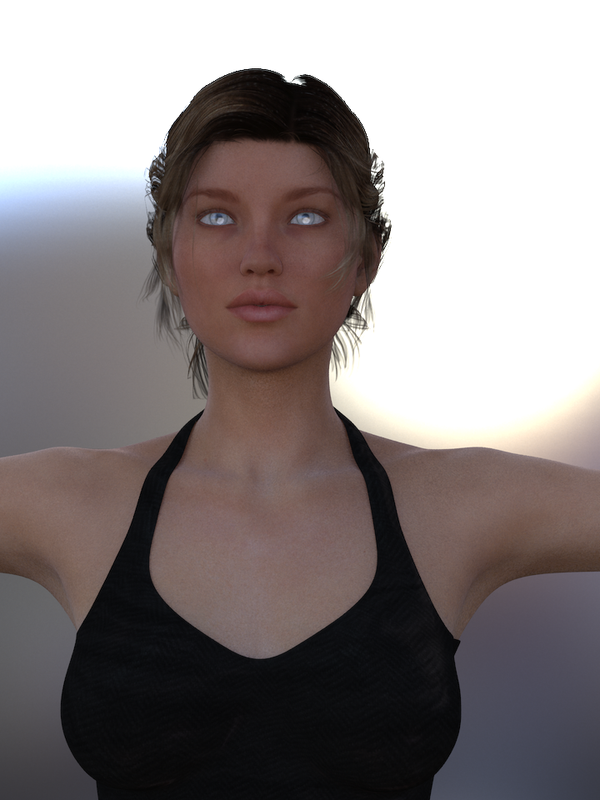
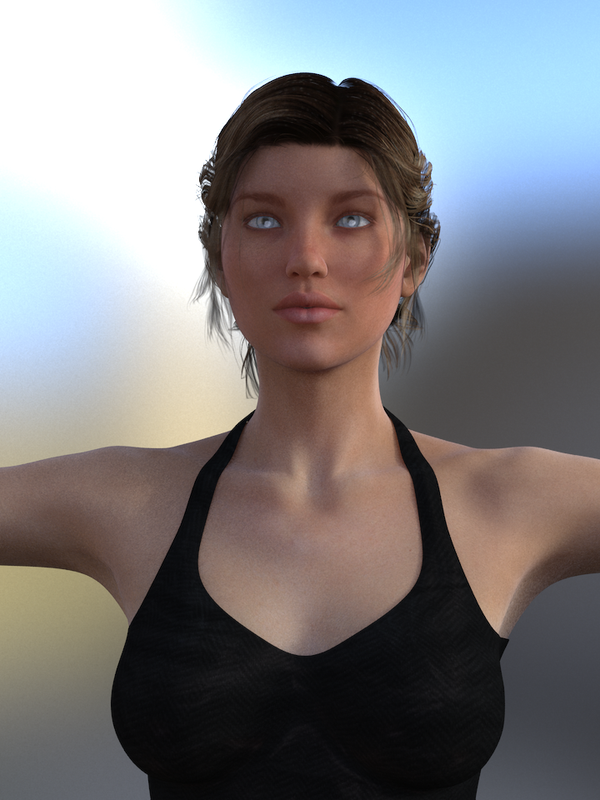
Using IBL master and the default ibl "ruins" here is example of victoria 6 with the ibl light coming from the side and then another pic with the ibl light coming from behind.
I have auto headlamp in render setting set to never.....and my camera headlamps is turned off.
But as you can see I am having trouble with the eyes, no matter which direction the light comes from, the eyes always turn out with this ugly white reflection showing.
So my friends...is this normal for IBL 3delight renders?....please help me out here.........What am i doing wrong?
https://i.postimg.cc/ryh1wwsf/behind.png
https://i.postimg.cc/VNQtSSjc/side.pngApril 24, 2019 at 3:02 AM #1052635I don't render using 3deLight and i never tried IBL Master, so i can't really help you with these setting.
But if i were you, here is what i would do:
Personnaly, when i get a problem of that nature and i don't know what cause it, i'm going with a process of elimination from what i did before that wasn't causing this, to what i'm doing now by reviewing everything that i have done that as changed.
- Have you tried rendering a test scene with the character and all, but without IBL Master, just using Daz default 3deLight scene environment light ? If it is still doing this or not, than you will know if IBL Master is in cause or not.
- Another thing i would try is just trying to render in Iray. Just for testing. And see if it's also doing this. If not, than maybe it's has something to do with the 3deLight Render engine.
Base on your capture you provided, it really give me the impression it's the reflectiveness of the eye that is doing that from a light source close and in front of them. Although, you did say your shutted down the Camera Headlight, it do feel it is still active and lighting your character's eye. That's...weird.
Of course, another test you could do it going in the character texture and playing with the "Eye reflection" texture. Maybe turning it off, or toning it down. It just a suggestion, but if eye reflection is really the only problem you have with you rendering setting and it doesn't bug you that much to not have eye reflection than maybe it's a solution. Hum....
* A few minute later *
After reading what IBL Master was and what it was doing, i'm pretty it has something to do with how IBL Master is configuring your environnement. I think it may be something else than the light from the sphere causing that. Maybe the light from the environnement (HDRI), i don't know. I'm not good at all with that.
But what i'm pretty about, it's affecting the eye reflectivement texture of your character. So while not an ideal solution, maybe just go in the eye texture of your character and try to tone it's intensity down. Maybe it'll work ?
Sorry i couldn't help you more.
April 26, 2019 at 1:40 PM #1055865try this.
If the figure is not at location zero, reset all locations for the figure to 0. I had this issue with HDMI.
If not then I am not sure.
Also try a new eye texture, ive had issues with certian texture / light combos.
April 26, 2019 at 2:35 PM #1055911ibl master mystery
Ok after a few hours of more testing.
This shows I have IBL master loaded and I am using the "ruins" environment map.
All render settings are default with exception to gamma correction being turned ON and gamma set to 2.2
You can see that in render setting the auto headlamp is selected as "never" and for the camera setting the headlamp is "off" Screenshot 1
https://i.postimg.cc/K8L2LrhZ/Screen-Shot-1.pngI load Genesis 3 female with her default textures into a brand new scene, and I leave her in the same position.
I render out Gen3F....You can see she has ugly white eye reflection in Screenshot 2
https://i.postimg.cc/MGvrVzQ1/Screen-Shot-2.pngNext I hide Gen3F and load Genesis 3M into the scene with his default textures, leaving him in the same position and render him out....He does NOT have ugly white eyes reflection in screenshot 3
https://i.postimg.cc/0QCmNwyn/Screen-Shot-3.pngI then proceed to replace Gen3M eyes texture with Gen3F eyes texture and render......He still does NOT have ugly white eye reflection in screenshot 4
https://i.postimg.cc/VLtfBcjQ/Screen-Shot-4.pngI hide Gen3M and then replace Gen3F eyes texture with Gen3M eyes texture and render.....She has ugly white eyes reflection in screenshot 5.
https://i.postimg.cc/15bK2DnV/Screen-Shot-5.pngI change to iray engine and render each one with again with their default textures for 25 passes and there is no ugly white eye reflection seen in screenshot 6
https://i.postimg.cc/7Zvcv5fh/Screen-Shot-6.pngI revert back to 3delight engine and turn IBL off, and turn camera headlamp ON and render each one. Screenshot 7
https://i.postimg.cc/cJDC5yXx/Screen-Shot-7.pngWith ibl still off, and headlamp on, I turn gamma control off and set gamma back to 1.0 and render each one. Screen shot 8
https://i.postimg.cc/760vJSCF/Screen-Shot-8.pngI hope I have supplied enough information showing the problem.
So if anyone can understand WTF is going on then please.... help me solve this mystery......its doing my head in.April 26, 2019 at 9:26 PM #1056428after that load of info, i think as said above its the texture.
If she continues to load wrong, Id do a re-install over her. Something may be glitched like a setting or path.
April 27, 2019 at 6:47 AM #1056995LivingPixels pretty much though the same thing has i did. But i must admit he/she explained it better.
I would also look at the "EyeMoisture" surface in the Surface texture tab of your character. (On Genesis 3, it is call EyeMoisture. On Genesis 2, it is call EyeReflexion. I didn't know it changed name. I mainly use G2, not G3! Heh! Learned something today.)
From what i can see, Genesis 3 Female and Male don't use the same shader for their EyeMoisture. Genesis 3 Male use AoA_Subsurface shader (Age of Armour shader) for all it's texture. Including his EyeMoisture.
Genesis 3 Female also use AoA_Subsurface shader for all her texture...except....For some ungodly reason, her EyeMoisture texture for her use omHumanSurface shader (Omnifreaker Shader) !!!!!
(And her EyeLashes too)So there you go.
I'm not 100% sure, but i'm ready to bet a kick in the butt that this simple change of shader is the reason Genesis 3 Female and Male EyeMoisture reflexion aren't behaving the same under the environement of IBL Master and the 3deLight render engine.Maybe what i would suggest you to do, if you don't want to use Iray engine (because you did show us that it worked well in iray), is trying to go to the EyeMoisture of Genesis 3 Female and change the type of shader there. Try to put the sameone has Genesis 3 male since it seem to work well with what you want to do.
April 28, 2019 at 3:28 PM #1058705Thanks for the input and ideas, it does help alot.
Ok so we previously tried changing the female eyes to male eyes and it made no difference so we can rule out textures.
Im not good on how shaders work but I decided to try swap them over.
Sticking with just the basic Gen3F and Gen3M, lets focus on the eyemoisture for Gen3F.She uses omnihumansurface shader, so I select it and change it to AoA.
Now both figures share the same eyemoisture shader so we click render.But the render shows her eyes have gone really white, thats strange.
So I go though the surface tab and compare the eyemoisture settings on each line to make sure they are the same as G3M......and I see they are not.
He has minor Bump and displacement changes -0.10 - and +0.10.....she has none but thats not important.
His specular strength is at 50% and she is on 100% .
So I bring her down to 50% to match his setting and click render.This time the white eyes affect was still there but it looked like it had faded abit so then i tried 0% and rendered.
Finally .....its a Success.....eyemoisture AoA shader with specular strength at 0% = No ugly white eye reflection!
Thanks so much everyone for the help.....you all got me looking in the right places.
Update
So now i get curious, and load her up again but this time I dont change the original eyemoisture shader she loads with. Instead I just go looking for that specular strength and turn it down to 0% and render.Again its a Success.....OmniHumanSurface shader with specular strength at 0% = No ugly white eye reflection!
The longer I sat there looking at the eyes I could see that they were abit cloudy looking. I compared pics with both shaders and they both did look a little cloudy.
Well its much better than what it was, so i should be happy.....but im not.I looked again at the surface tab, scrolled down and saw that there was a specular2 strength as well. That was at 20%.....i bet that was why it looked cloudy.......so I turned it to 0% and rendered.
https://i.postimg.cc/MTMLcMsk/Screen-Shot-13.png
Finally i had CLEAR EYES.Later on I discovered the OmniHumanSurface shader had buttons that turns specular and specular2 on and off.....turning both off did the same as turning everything down.
I have never turned anything on or off in the surface tabs ever........so i learnt something.
The specular settings for the AoA shader and the daz default shader dont have an on - off button.....but I discovered changing the colour from white to black seems to work.
Checkit1414, Adam, and LivingPixels thanks for your help.
It seems that all my IBL Master problems stem from the specular settings in the eye moisture, eye reflection thing.
Update
Just discovered something with the eye moisture with figures using the Daz sefault shader. The specular glossiness controls the size of the ugly white eye reflection.
The lower the gloss the bigger the circle, the higher the gloss the smaller the circle.
Update
After hours of rendering over and over it seems that whole approach about specular settings fixing the ugly white eyes MIGHT not be the case for some eye textures. Because even changing shaders the problem would remain. So in that case the problem might not be the eyemoisture but in another part of whatever the whole eye thing consists of.........too much of a headache.
I have spent a whole day rendering just to get where i am now for genesis 3F:)
At least i know what works and thats good enough for me.
Ok thats all for me now. Most important is that the solution for Gen3F is messing around with the shader setting for eyemoisture eye reflection thing.
It seems that i am the only one that has ever had this problem rendering with IBL Master but hopefully my post will help someone in the future. -
AuthorPosts





- You must be logged in to reply to this topic.