Home Page › Forums › General Chat › I had a new notification, but I don't know where it came from
Tagged: messages, notifications, profile
- This topic has 24 replies, 16 voices, and was last updated 3 years ago by
 Beagle Bandit.
-
AuthorPosts
-
September 26, 2023 at 2:27 AM #2030504
So today I visited Zonegfx and found a new notification:
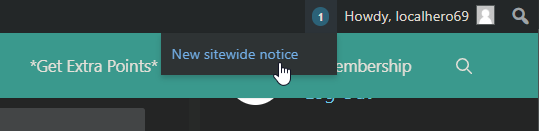
The title of the notification reads "New sitewide notice". When I click over the title, it just brings me to my profile page.
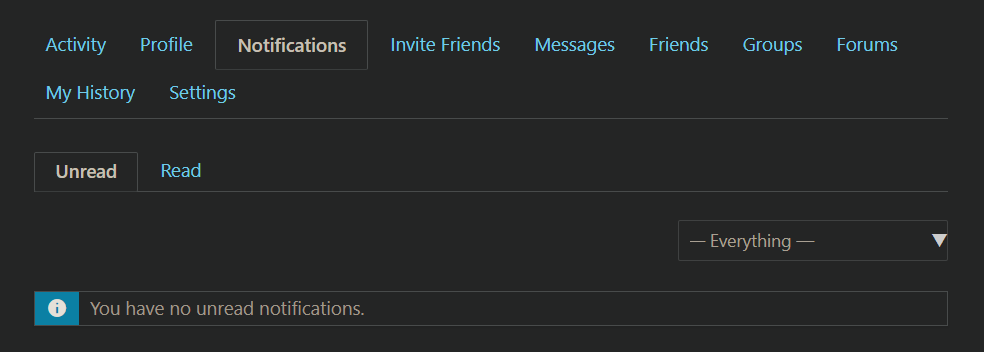
My profile page doesn't show any unread messages or any unread notifications, so I don't know where that notification came from. And since I don't know how to find the notification, I also can't dismiss it, so I'll have that number 1 next to my name on top right all the time while I'm browsing here.
Does anyone know what this notification mean and how to get rid of it?
September 26, 2023 at 2:39 AM #2030505i'm having the same issue, maybe its something on the site back end?
September 26, 2023 at 2:41 AM #2030506it is a site wide notice. It says the zone will be closed for a few days or so for maintenance.
September 26, 2023 at 5:14 AM #2030540@localhero69 @saitamapunchman455 If you can see a maintenance notice after you click on the notification you need to close that. If you already closed it, just click again (maybe twice) on the notification and it will disappear 🙂
@gaver The maintenance is done 🙂September 26, 2023 at 5:57 AM #2030559Well thought off system for the requests... I never request things, but it looks nicely designed (Y)
September 26, 2023 at 11:12 AM #2030686@Warrant63 It says I have 6 messages in my inbox but when I go in there , there are no unread messages I've gone threw them all and can't seem to find them 6 unread ones and this has been like this for some time now , how do I fix this ?
also we should have a SELECT ALL option in the bulk actions so we do not need to select every message or notification one by one when we want to delete them or whatever.My bad you can select all on the page 🙂 but I've deleted all my messages and notifications and it still says that I have 6 messages in my inbox BUT it's empty
September 26, 2023 at 12:53 PM #2030712Here is how I solved it.
I did a "select all" in my messages, then bulk applied mark as read. It went away.
Then this morning I had a ton of old messages that had me doing the same thing again. Hopefully it's resolved.
September 26, 2023 at 1:10 PM #2030714
@warrant63 as I said before, I can't see any notice when I click on that notification. It just brings me to my profile page.
@kerwidwen I don't have any unread message right now. I have that notification icon on top right, but I can't see a single unread notification in my notification list.September 26, 2023 at 1:23 PM #2030717@localhero69 Kerri meant the "ALL" check mark in your msgs, either you have unread msgs or not 🙂 Try to apply it to them.
I can't see what's happening during the maintenance, but we have many plugins that need to work together, and sometimes after an update this is the side effect. :/
 September 26, 2023 at 2:03 PM #2030723
@warrant63 I have no unread messages at all. And selecting all messages and marking as read does not make any change, the page just reloads and everything stays as is.
September 26, 2023 at 2:06 PM #2030724Kay, no problemo, I will forward the problem 😉
September 26, 2023 at 3:44 PM #2030748Same problem here. I tried to mark an old message as unread and then as read again, but it didn't help (it correctly increased and decreased the counter but it doesn't make the "new sitewide notice" notification go away). I still get the notification bubble shown.
Oops... I just found the (x) button besides the notification. After I pressed it, the notification bubble finally went away.September 26, 2023 at 6:02 PM #2030810I also cannot get rid of the sitewide notification (1)
I can't get the message itself, clicking it just takes me to my normal notification page, where there are no notifications, no x's appear near the (1)....
please help, this (1) is driving me crazy 🙁
September 26, 2023 at 7:48 PM #2030838After clicking on the notification message, this sitewide notification can't be found in the messagebox at the bottom where typically the messages can be found (which is also the reason, why I didn't find it in the first place). It is a textbox either above the "Read" "Unread" bar or the "Activity",... bar and says something about downtime and maintenance. This textbox has an x-button on the right side. Press the x-button to close it. If it doesn't appear, try to disable your adblocker.
September 26, 2023 at 9:46 PM #2030897It is a textbox either above the "Read" "Unread" bar or the "Activity",... bar and says something about downtime and maintenance. This textbox has an x-button on the right side. Press the x-button to close it. If it doesn't appear, try to disable your adblocker.
I can't see a textbox anywhere. And I don't use an adblocker here.

-
AuthorPosts












- You must be logged in to reply to this topic.
