Home Page › Forums › General Chat › How do you move your Daz Studio and installed files to a new PC (Win)?
- This topic has 5 replies, 4 voices, and was last updated 4 years, 1 month ago by
 Grouchy Old Fart.
-
AuthorPosts
-
August 20, 2022 at 3:58 PM #1858662
How do you move your Daz Studio and installed files to a new PC (Win)?
I am worried that copy-and-paste may not work simply. Should I install the packages with IM again?
August 20, 2022 at 4:38 PM #1858672You could just copy the whole library folder to the new system and add that as a Base Directory in the new installation..
Your current library should be by default in C:\Users\<username>\Documents\DAZ 3D\Studio\My Library
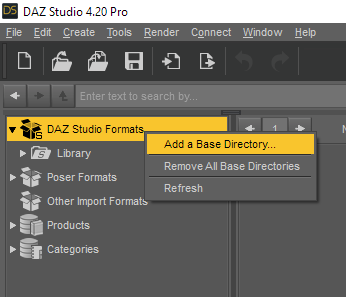
You can put your old library folder anywhere and add it as a base directory..
August 20, 2022 at 5:15 PM #1858683Thanks, but unfortunately I also installed half of my packages automatically with Installation Manager in
C:\Daz 3D\Applications\Data\DAZ 3D\My DAZ 3D Library
Do I also simply copy-and-paste it to new PC and use the same process? Hope it can be read by the Daz Studio of my new PC?
The folder C:\Users\<username>\Documents\DAZ 3D\Studio\My Library was for copy-and-paste installation... sorry for my bad habit...
August 20, 2022 at 5:24 PM #1858687AFAIK.. that should also be portable.. whether you install with the IM or manually, the Daz folder structure should be the same for a the products..
I don't use the C:\Daz 3D\Applications\Data\DAZ 3D\My DAZ 3D Library folder for my IM, I have set a custom folder and the products install to that folder.. the structure is the same..
 August 22, 2022 at 6:05 AM #1859214
I keep my files on an external for just this reason.
The hard part is moving over the actual stuff like the install's guts such as installed plugins. That's mostly an issue of copying the daz appdata and the plugins files.
August 22, 2022 at 10:20 PM #1859417Like everyone else up there, I have a specific "My Library" directory that I keep separate from the application, and plug it in when I change computers. I do keep it on an internal 2TB PCIe though, because performance is king 🙂 )
I have backups on external drives, so when I get a new computer, I just copy it all in and make sure the 2nd HDD is a big enough PCIe rig. It takes about 18-20 hours to do it over USB 3, but well worth it in the end. I just fire it up and forget it (after ensuring there's no power-save settings or stuff to interrupt things.)
-
AuthorPosts






- You must be logged in to reply to this topic.
