Home Page › Forums › Art Showcase › Help Needed
- This topic has 7 replies, 2 voices, and was last updated 6 years, 4 months ago by
 Deadpool209977.
-
AuthorPosts
-
March 22, 2020 at 10:39 PM #1528676
Hello everyone!
I need keen eyes and Suggestions.
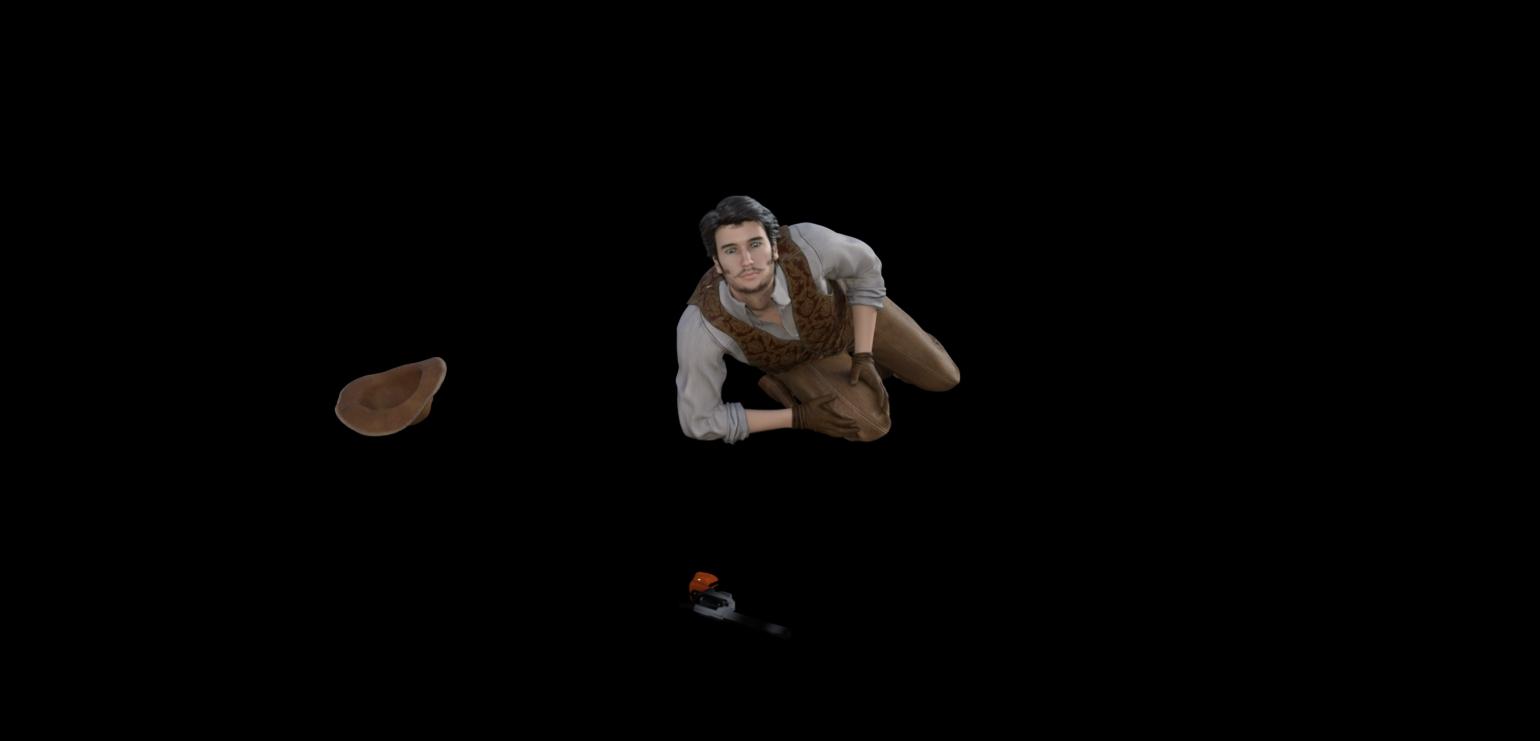
This photo is a portion of a larger scene and I need to get it as good as possible.
On the right leg I need to find a way to put a gun wound somewhere between his hands. Meaning a hole in the cloth and blood. Any Suggestions will be appreciated.
Other than that give me some real critics please. Be real but not mean lol!
When I get the big picture done I'll post it on here.
Thank you and be safe!
Posted on Daz Forums as well.
 March 23, 2020 at 5:25 PM #1530027
Awesome! O wait, noob needs a tut somewhere lol!
I am going to go ahead and put him in the scene and post it here in a bit.
The pistol i have has no UVs or textures or whatnots so I'm having to do it manually and all i can find is chrome, gold and silver.Thank you for the input!
June 6, 2020 at 5:27 PM #1606734Not sure if you're still working on this but you can do the blood in post production with Gimp or Photoshop using layers. If you have Photoshop you can use Ron's special effects.
As for the gun why not download a gun that's textured already?
June 7, 2020 at 12:04 AM #1606786This project got nixed with a huge data loss on my laptop.
I don't have Photoshop or gimp but i will be looking into it.Thank you for your reply.
June 7, 2020 at 9:06 AM #1606811That sucks...
Yeah it's better to do minor things like that in Photoshop or After effects and not worry about it in Daz unless you're doing it in a full 3d program like Blender or maybe even Zbrush.
June 7, 2020 at 2:00 PM #1606851I do have blender but I am still very unfamiliar with the program. I am working on learning blender more though.
June 8, 2020 at 11:11 AM #1606929Well you can do it in blender. But it would be super faster to just do it in Photoshop \ Any Image program with layers.
You need stuff from this artist:
https://www.daz3d.com/rons-blood-ii
https://www.daz3d.com/rons-bloodThis is some more good stuff for special effects:
https://www.daz3d.com/deviney#
These are all Photoshop brushes so you'll need Photoshop to use them.
You can use this program with some tricks to use Photoshop brushes here:
Paint.NET application
https://www.getpaint.net/
How to Use Custom Brushes in Paint.NET
https://www.lifewire.com/use-custom-brushes-in-paint-net-1702091Unless you're doing animation I recommend you doing your effects in a photo editing program. All you need to do is learn Layers and Color Blending.
My Instagram has a lot of examples of Photo editing with Ron's Effects.
https://www.instagram.com/pixcell_studios/Good luck.
June 9, 2020 at 12:26 AM #1607042Thank you
-
AuthorPosts


- You must be logged in to reply to this topic.
