Home Page › Forums › General Chat › G9 to G8 Conversions
Tagged: assets, backwards compatability, clothing, conversions, daz studio, g9 to g8, hair, morphs
- This topic has 125 replies, 29 voices, and was last updated 1 day, 16 hours ago by
michaelbishop.

-
AuthorPosts
-
November 13, 2023 at 8:43 PM #2042201
Actually it is only the textures they converted, not the shape. I forgot. But they converted all of the textures, including the G9 normal maps that basically every Daz core uses.
There is no material preset. But you can make your surfaces PBR skin, then copy Victoria 9 materials and paste on your G8, then swap the textures out. From there you can save this as a preset. Then you can just swap in your favorite G8 defuse and sss textures for other characters if you want that Genesis 9 look for all your characters.
I might try this ultimate unwrap if it works. If you can set wrap3d up right you can get pretty solid results. The trick is to wrap as little as possible. You want to have the G8 and G9 mesh lined up perfectly by using clone morphs before export. Use Texture Atlas to make one giant UV on the donor, G9. Texture Atlas is ancient, and only recognizes Daz default shader, so you need to convert the G9 materials to the DS default and drop them in slots it can use. Once that is done, you export this, and with this you can get UV conversions in wrap3d.
November 13, 2023 at 10:50 PM #2042215I have plenty of decent quality G8F skins, so I am not bothered about using G9 textures.
As I have said many times, I am hoping for a solid script to take G9 morphs to G8 / 8.1 F.
I am aware it is a big ask.
🙂
November 13, 2023 at 11:30 PM #2042217Update:
Took a bit to get around to it, but finally installed
https://zonegfx.com/genesis-9-uvs-for-genesis-8-and-8-1-female/
...a week ago (ups to @because789), and can attest that (so far) it seems to work as a solution for G9 to G8/8.1 texture conversion.
(Note: A bit tricky to use the first couple times and get correct, but follow instructions explicitly and it does work.)November 14, 2023 at 12:39 AM #2042225The cayman stuff can work as long as you only use G9 textures and nothing else. It doesn't actually convert the texture. It creates new UVs on the G8 mesh to make the G9 texture fit. So this adds a bunch of extra material zones.
What they really want is the texture fully converted to G8 UV, so it can be used like any G8 texture and with other G8 textures. You cannot do this with cayman. Cayman also has another flaw, because some parts are mapped in strange places, some skins with unique features like a scar or birthmark might end up in an unwanted place, and if one happens to go across a UV boundary, that line is going to show up badly. It isn't cayman's fault, there is no way around this possibility.
Making a script to texture transfer would be tricky because of how different G8 and G9 are. You may not notice, but the clones for G8 and G9 are not perfectly matched. They are very close, but the nipples do not line up at all. So if you go and convert the textures with the clones in Daz, the nipple are going to be in the wrong place. I think the belly button is off a bit, too.
You can fix that with photoshop, but this still isn't ideal.New clones would need to be made then, since the official ones do not serve this purpose. That is where wrap3d comes into play. You can use a tool in wrap to gently push the nipple into the correct place while still maintaining the mesh.
It is tedious to set it all up, for sure. But once you do have it set up the process gets much easier the next time. You can save your wrap3d scene so that you only need to pop in a new G9 texture. At this point, the most tedious part is getting the Texture Atlas setup. Once you do it a couple times, it becomes second nature. Since we are not converting a mesh, the process isn't as involved as converting a whole character. Maybe not as fast as a script, but if you consider how painfully slow Daz can be sometimes, maybe not that much slower. You can also make a texture atlas preset to speed it up a bit.
November 14, 2023 at 9:51 AM #2042267I'm not an expert of these things. But I need to tell something. If you want same realism on G8 characters with the G9 textures it is impossible because the G9 is different shader system than G8.
November 14, 2023 at 10:42 AM #2042270IMO there is nothing wrong with re-using a better quality G8F skin.
It is the morphs that I am interested in.
November 18, 2023 at 8:42 PM #2043250The PBR Skin shader is just that, a shader. It can be used on anything, including G8, including rocks and tress if you want to.
PBR Skin offers tiling, so you can have a repeating texture like a skin swatch without tiling the other textures on that surface. This kind of tiling can be helpful. You can use this to make leather or rocks, it is perfect for that.Daz used PBR Skin on G8.1 first, they tiled a small patch of skin over and over. But this had issues of its own, a repeating pattern is not exactly how skin works.
So with G9 Daz took a different method and commissioned somebody to craft a highly detailed normal map, with each texture being 8k in size and at a low compression. The head normal map is almost 95mb in size, which is massive for one texture.
Nearly all of their core G9s use these normal maps in the detail slot. Some 3rd party PAs also use them in their own characters. The textures come with the start essentials pack, the free pack you get from Daz.
These textures are legit. They are the best normal maps I have ever seen for any character. They absolutely are worth having. You do not need to use PBR Skin to use these, you can slot them in the regular old normal map if you want. But PBR Skin allows you to use two different normal maps, you can use a regular normal and this new detail normal at the same time.
November 23, 2023 at 3:53 PM #2044310As I only wanted to use one G9 figure (Van Helsing) I did the conversion following Jay Versluis' method from the linked YouTube clip. It worked almost perfectly up to the mouth but the pupils and irises are a bit distorted.
Can someone give me a hint to how to solve this problem or how to reset the eyes to base G8.1 shape?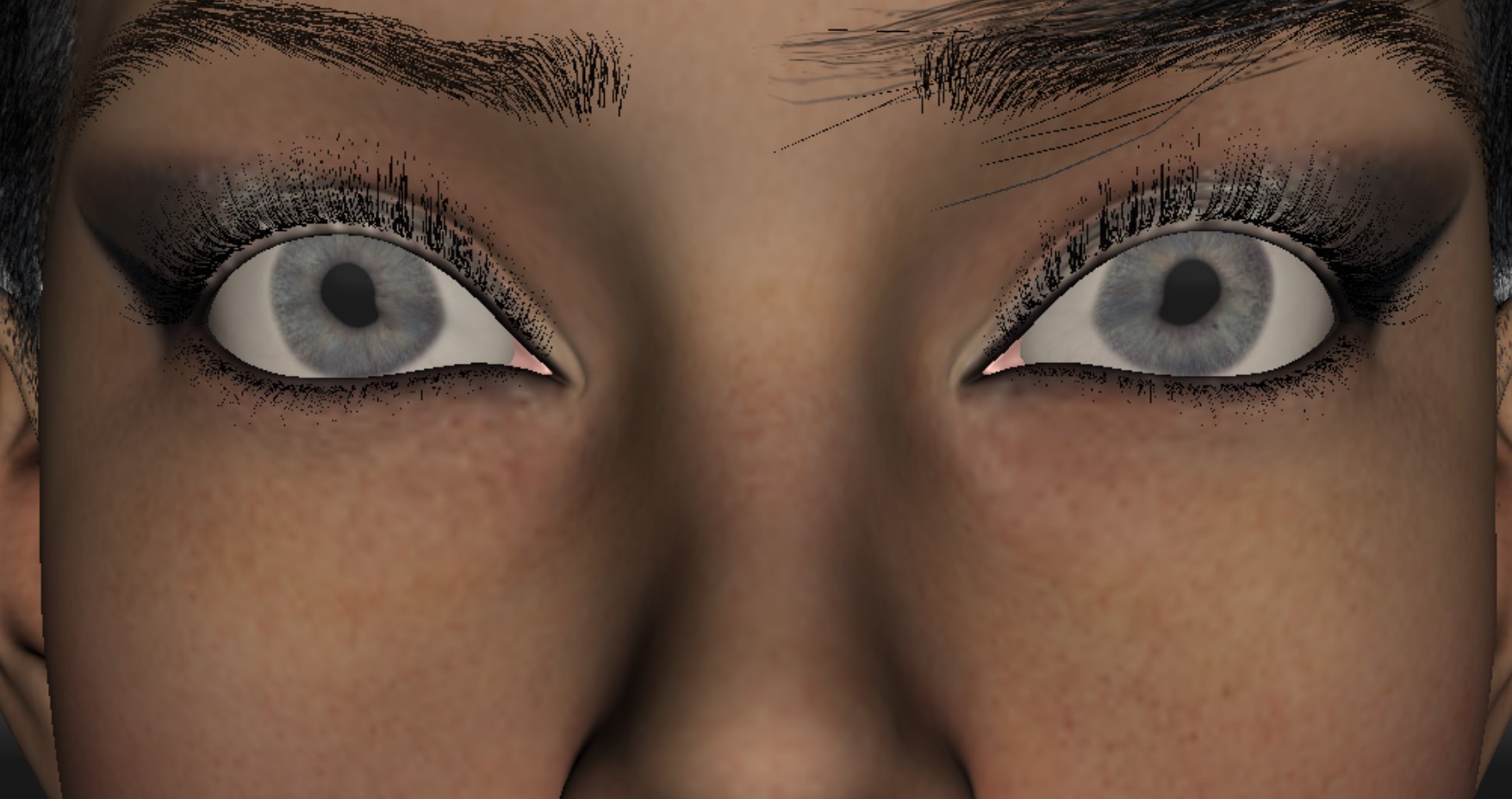 November 25, 2023 at 9:19 AM #2044597
Why do all G9 models have such bad shaders for teeth and eyes and so ugly feet? And why all the G9 hair models look like brooms?
As it stands, it seems that the only positive aspect of G9 is the initial skin texture that bLeW tHe uSerS' MiNds WiTh iTs quAliTy...
So... Why would anyone convert a crappy G9 model to G8?November 26, 2023 at 8:44 AM #2044910The tool did what it says on the wrapper. Perfect, many thanks! 🙂
December 13, 2023 at 9:04 AM #2048165'Why would anyone convert a crappy G9 model to G8?'
From my own point of view I would only be interested in the conversion of the least bad head & body morphs (and there are relatively few that grab me).
I am quite happy to use one of the better G8 skins.
:0/
December 13, 2023 at 9:07 AM #2048166As a side note though, given that it seems the concensus is negative.
Why are people buying the G9 characters anyway?
Is it all because of Daz's sales push, or just the 'Ohh new, shiny!' effect?
December 19, 2023 at 12:38 PM #2048983No one any opinion on that? :0/
December 21, 2023 at 4:02 AM #2049425My sense is that it's more the latter, "New, shiny".
That, and PAs are likely locked in at this point no matter what they do, in lockstep with DAZ and their push for - and promotion of - new product. There are still a few artists who continue to produce for G8/8.1, and good ones at that. But the majority do seem to be shifting to 9-Land, if they aren't already producing for G9 exclusively now.I'd guess that those that aren't in "new, shiny" camp do genuinely like G9. I can't square it, personally, but to each their own.
December 26, 2023 at 10:49 AM #2050330I suppose it comes down to personal preferences & what you use your assets to do.
Personally, I like single frame full body renders.
G9's janky body is a huge step backwards for me.I will continue to buy G8/8.1 products, ( despite not really needing any more! :00 ) and the better G9 clothing & hair.
I don't think I will ever buy a G9 character, unless perhaps it has been nicely ported to G8.
:0/
-
AuthorPosts








- You must be logged in to reply to this topic.
