Home Page › Forums › General Chat › Easiest software
Tagged: softwares choice
- This topic has 24 replies, 11 voices, and was last updated 3 years ago by
 MelonLord.
-
AuthorPosts
-
September 3, 2023 at 1:09 PM #2021299
Hello, im new into the 3D world, i curious about the easier way to begin with, since there is a ready to use characters on Diaz and other tools, i will just begin with that and not create from scratch, my question is with all theese contents and characters, wich is the easiest software to just put the character and animate ? i heard diaz is good but since its free software i was thinking about maybe the paid softwares like ( iclone, character chreator ) is easier ?? since they are paid softwares i guess they offers more ease or something ?
second question is : does the 3D characters on Diaz can be exported to character creator from reallusion ? or i clone ? .
Thnx guysSeptember 3, 2023 at 8:48 PM #2021450I would start with DAZ Studio and if/when you outgrow it then you move on to something else. Maybe try Blender (with Diffeomorphic plugin to import Daz content) if you want thing more robust or just create new items or morphs.
Yes, Daz characters can be exported to iclone, youtube has a lot of tutorials about that.
September 7, 2023 at 5:48 AM #2022597I started with Poser 7, then a couple of Poser versions later started in on DAZ Studio. I really had trouble with the interface, but stuck with it and now even though I am not too familiar with everything find that Studio is getting easier.
THe only thing I would like to see in DAZ Studio is an official manual, but that's not coming anytime soon.
DAZ Studio is more compatible with everything at DAZ and Rendersoity. You can't really deal with DAZ Studio content in Poser. It's a real headache.September 7, 2023 at 6:47 AM #2022638Having had made a deal with the Stable Diffusion devil I feel like a fifth wheel round these parts. If your a complete newbie Deg consider skipping Poser/DS altogether and try SD/AI. After 24 years starting with Millie back in 1999 I can hardly believe I'm saying that but sometimes change is good for you, or at least a new colour added to your paint box.
 September 7, 2023 at 10:11 AM #2022764
I've found the combination of Studio and AI to be spec-frigging-tacular. SD is amazing in all the areas that 3D rendering isn't, how it handles fabric draping, and special fabrics like satin and organza, is knock-yer-socks-off amazing. I'll make a basic scene in Studio, take a screen shot then do img2img to 'render' it. Studio does the posing and allows me to include fun accessories and SD does the grunt work. It's also stupid fast.
I was never confident in Daz writing Studio 5 and now I don't care. Studio 4.12 is stable and is all I now need.September 7, 2023 at 3:05 PM #2022930¿Easy? Cinema 4D.
September 7, 2023 at 3:38 PM #2022941@Ethiopia
Just getting around to installing SD, to run locally, this weekend.
Really impressed with the Img2img potential.
Can't wait to try it on some past renders to check out the improvements.
Some excellent demos and tutorials out there - lots to catch up on.September 8, 2023 at 7:11 AM #2023188What sort of comparison do you get with your original DS render?
How true to it is the SD version, do you need a lot of prompts, easy process?🙂
September 8, 2023 at 12:46 PM #2023273I follow a couple of people here ( https://www.chichi-pui.com/ ). There's one artist that I've followed in several different artist forums and he's doing some excellent work. If you join up with your Google account you can download the prompts. Like me, he's big on clothing and fabrics and seems to have the time to screw around.
Our Discord server has LOTS of good info. Mello is on a mission to try ALL the SD variants and gives in depth revues of them.September 9, 2023 at 2:45 AM #2023525@Ethiopia @Fuzzy3000
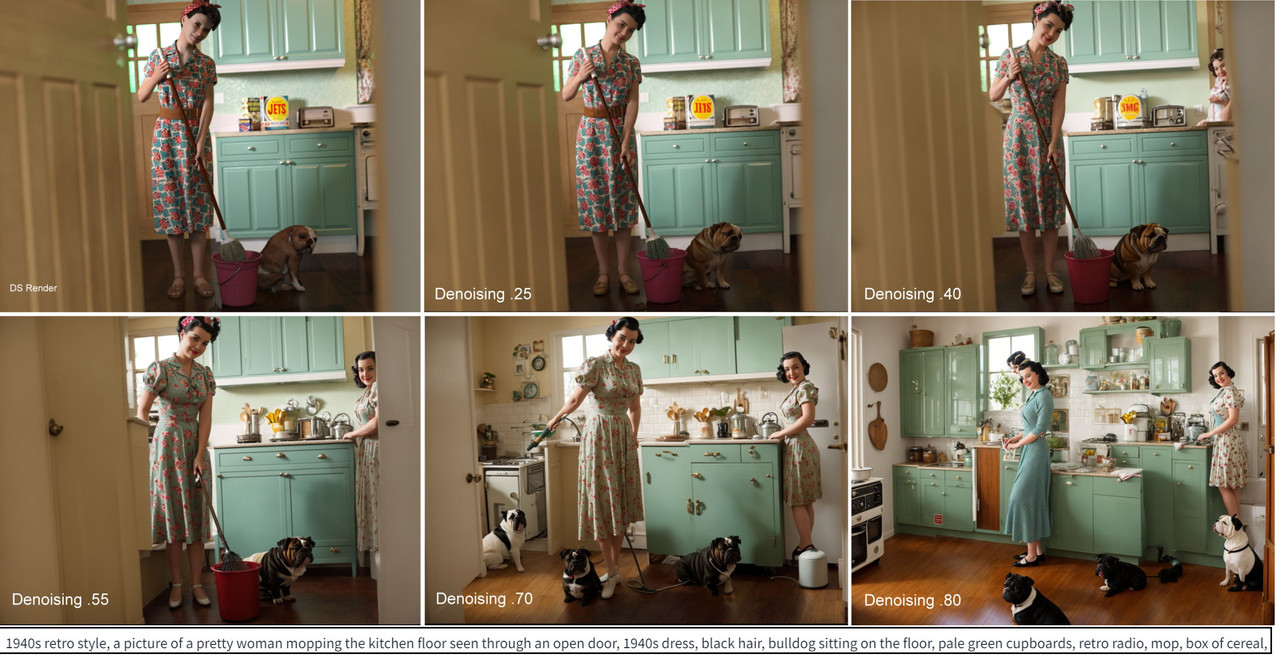
You really don't need any prompt in img2img but a similar one to the DS render will give closer results.
The main thing in img2img is the denoising strength. Low values will keep the image closer to the original image/prompt, and higher will change it more, to the extent that the dogs bred like crazy and her twin sister made a cameo appearance without being asked *bitch* (see picture)🤔.September 9, 2023 at 7:06 AM #2023580So, although the 0.25 is the closest to the original the DS version still looks crisper.
And whilst the 0.8 is the most 'realistic' most of the content has altered. Frustrating.
Like a re-make of an old movie with all new actors and a nice modern day setting.Is there an option that, with the 0.25 value, the overall quality can still be improved?
September 9, 2023 at 8:38 PM #2023915These were just raw low resolution renders for the demo. If you rendered them at higher rez, say 2000x2500, then downsized them a bit, they would/should appear a bit clearer. There are also some good upscalers like 4x Ultra-Sharp that can be used.
September 10, 2023 at 12:42 AM #2024006The SD stuff looks interesting. I don't know much of it though. The lighting looks great, the render from a screenshot is very cool - it should be able to handle say a cartwheel pose if the model hasn't been trained on it right? My biggest restraint switching from Daz to SD, can it keep a character's model consistent using the render from screenshot thing, and if it adjusts the appearance can it keep that adjustment consistent? 🙂
September 10, 2023 at 2:04 AM #2024022Characters can be kept consistent but not so much the clothing or other things from one render to the next. Using specific prompting and LoRas for characters/clothes etc. you can kind of keep some consistency but the big problem comes with more than one character in a scene though you can use txt2img inpainting to "paint-in" a second person's face. For something like a cartwheel and other poses you could use ControlNet models. I haven't used ControlNet myself.
September 10, 2023 at 2:17 AM #2024024@frank22, scrolling through the ControlNet, it looks awesome. Very beautiful images. With the rapid advancements, I wonder what it will look like a year from now. My pain thing is a visual novel that requires the characters to have the same clothing at least during a scene and their own appearance throughout the entire story. When it gets to that, I'm ready to jump ship. Can't get over that awesome lighting. Thanks for the link bud 🙂
-
AuthorPosts











- You must be logged in to reply to this topic.

![[big]](https://images2.imgbox.com/b7/5c/3HphGSsM_o.jpg)