Home Page › Forums › General Chat › Dforce not working on 4.21?
- This topic has 13 replies, 9 voices, and was last updated 3 years, 10 months ago by
veck.

-
AuthorPosts
-
October 14, 2022 at 1:15 AM #1877153
Anonymous
InactiveRank:
Hello guys!
Any other peoples here got that problem with dforce on daz 4.21?
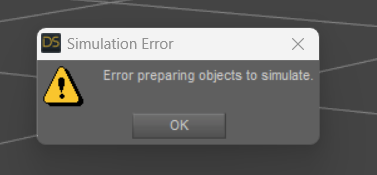
i have a RTX3080 and i can't do any dforce clothes
October 14, 2022 at 2:14 AM #1877159Is this a new GPU for you? The problem with dForce is not because of the video card, but because of the Nvidia driver for it. Try updating your NVIDIA driver.
October 14, 2022 at 2:47 AM #1877167InactiveRank:i using the latest nvidia driver
October 14, 2022 at 6:11 AM #1877198Just been reading in the daz forums - it's the game ready drivers from nvidia causing the problem
https://www.daz3d.com/forums/discussion/595931/daz-studio-4-21-0-x-pro-general-release
October 14, 2022 at 1:44 PM #1877355InactiveRank:Damn!, i'll install the studio drivers to test it, thx bro!
October 14, 2022 at 6:05 PM #1877406Getting the same issues here.
I too am using the latest nVidia Game Ready Driver.You'd think I'd learn not to update Daz right away after all the times it breaks something with an update, but no... I stupidly still update it.
October 23, 2022 at 8:47 PM #1880967I had the same problem. Just downgrade your nVidia driver and you can use dForce.
October 25, 2022 at 2:08 PM #1881652Studio drivers have the same problem... I use them and got the error message too since I updated the driver to the latest version.
October 25, 2022 at 4:12 PM #1881676because both the game ready and the studio drivers are on 522.XX.
you will need to rollback your drivers to the previous one, which is 517.XX.
October 28, 2022 at 7:23 AM #1882732anyone tested 526.XX driver? the one that's released today.
October 28, 2022 at 3:54 PM #1882981@slender331man I'm on 526, but dForce is still broken for me.
November 17, 2022 at 5:24 AM #1891218apparently the newest 526.98 driver fixes the dforce issue.
Game Ready Driver Fixes (For full list of fixes please check out release notes)
- G-SYNC logo is not displayed in the LG OLED TV menu when connected to GeForce RTX 40 series GPUs [3849595]
- Uncharted: Legacy of Thieves Collection may crash when launched on a GeForce GTX 10 series GPU [3841379]
- [QNIX QX2710/Fujitsu Siemens SL23T-1/Dell UP2715K/ HP Z27q] Unable to select the native resolution of certain monitors from the Windows display settings [3833829][3833632][3689061]
- [Daz Studio] Application crashes after updating to latest driver when trying to run simulation [3838022]
- Desktop Window Manager (dwm.exe) service may report significantly higher GPU usage on certain PC configurations [3830387/3739997]
- Maxon - Cinema4D + Redshift3D vidmemory allocations cause TDR or Driver Crash [3659104]
November 17, 2022 at 11:04 AM #1891341Can confirm: The 526.98 Studio driver works without any problems.
November 28, 2022 at 7:35 PM #1895244they also seem to have messed up .tif file types if you have a scene with any .tif textures iray will crash on iray preview and render
-
AuthorPosts










- You must be logged in to reply to this topic.
