Home Page › Forums › General Chat › DAZ Beta 4.1.2 Bugs
- This topic has 23 replies, 5 voices, and was last updated 7 years, 1 month ago by
 Dragon.
-
AuthorPosts
-
August 27, 2019 at 9:01 PM #1220981
Also, my HANG issues are when its simulating and everything is moving from the base pose into the final pose and the cloth and a body part get caught and it doesn't release so the clothing hangs up on like a finger or hand that passed thru the clothing during simulation.
Otherwise I call it a crash/freeze/locked up
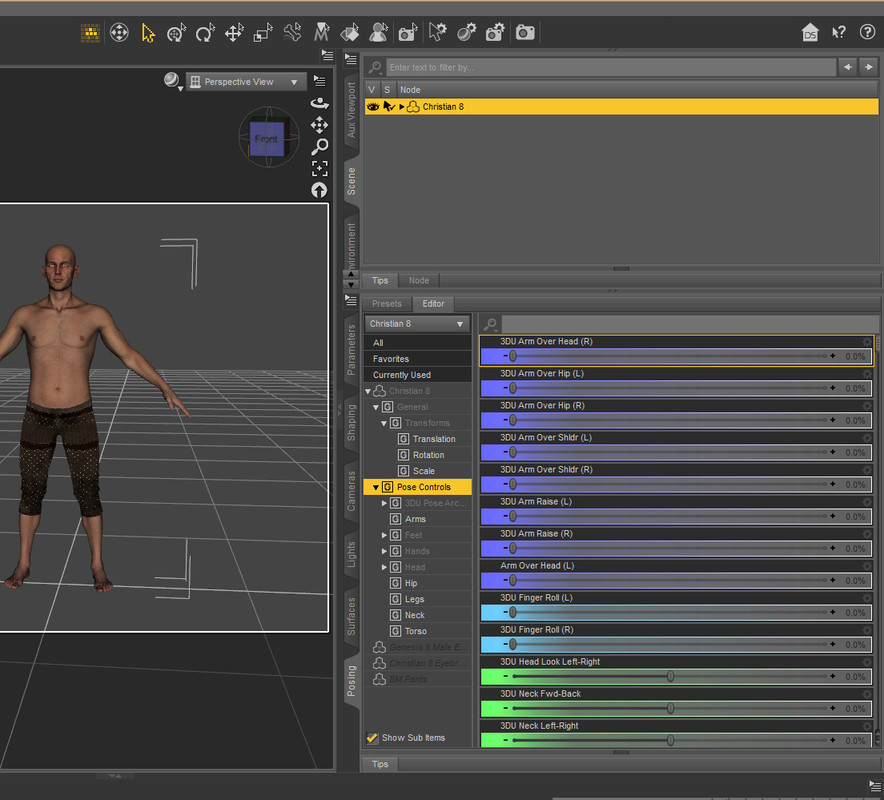
August 27, 2019 at 9:08 PM #1220990Figured I'd throw in another POSE TAB pic with an actual figure with pose controls displayed. 😉
 September 1, 2019 at 4:58 AM #1226846
I've only just started using the memorize button, but near as I can tell, it will zero all parameters you tell it to memorize. So say you set up a character just the way you want, and want to use it for something else just the way it is, then you can use the memorize to keep it from reverting back to the original load default. Probably better for shaping than posing, but it works for both.
Also, on a side note...I think I may have stumbled on an answer to the dForce freeze-up.
Seems you can change which processor it uses - CPU or GPU. mine was showing one of my GPUs so I changed it to the CPU and voilà! Now it works!!September 1, 2019 at 8:39 AM #1227075Hi Folks,
I'm not sure which iteration of the beta you are using, but the current one is
4.12.0.67
If you are not on that, it may be worth your while giving it a try.
🙂
September 1, 2019 at 3:28 PM #1227477Thanks eelgoo.. I tried to install an update after you mentioned it before but its only showing the one from the Aug 20th DL I got. And I don't know where to see all the numbers after 4.12
September 1, 2019 at 10:35 PM #1227891If you go to the Daz software forum, there is the beta thread.
Part way down it there is a 'change log' hyper link which shows the update page.
There isn't much useful details given really, but at least you can find out the most recent beta data available.
🙂September 2, 2019 at 12:58 AM #1228021In Studio, click on help - About Daz Studio
the the pop-up that shows will have the version and build number on it (upper left corner)
Also, memorize doesn't zero the new numbers of the pose, it just makes the numbers into the new defaultSeptember 2, 2019 at 1:48 AM #1228073September 2, 2019 at 2:54 AM #1228113Thanks guys.. I'm up to date with .67.
One positive, (I think) I've noticed is(before updating tonight), even though processing is still slow, my render time, for the most part is faster than with 11. And I seem to be able to move about better inside when its laden with heavy characters, instead of all the lag. Posing is still a bit laggy, (Daz is not responding), but thats like 2nd nature to me now. LOL
-
AuthorPosts





- You must be logged in to reply to this topic.
