Home Page › Forums › General Chat › Can't load G8.1F, Victoria 8.1, G8.1M, Michael 8.1 models. Help.
- This topic has 26 replies, 10 voices, and was last updated 4 years, 10 months ago by
 eelgoo.
-
AuthorPosts
-
November 27, 2021 at 6:28 PM #1752508
Hello. sorry for your problem, i have no idea what is "PBR skins", i am not that advanced into DAZ3D and i still learn things when around internet, my problem was that i didn't have the new Dependencies and was struggling to load 8.1 into the old Dependencies, that's all, but to share the same Dependencies that you already have is beyond my possibilities and really useless, speed is so slow i can barely read messages and i bet you can re-download them anytime. just ask some learned person around, i bet you will get an answer, try the admins or hi ranked DAZ3D users, good luck.
November 27, 2021 at 9:37 PM #1752543Hiya, my library is huge so I have it on it's own drive (not the C Drive), if you do remember some of the steps, I would really appreciate it. I have the latest version of Daz and I downloaded all the updated essentials content etc and still no joy. My figures load with textures but I get a message to say the PBR ones are missing
November 27, 2021 at 9:38 PM #1752544I understand, thanks for your reply and happy rendering 🙂
November 28, 2021 at 1:30 PM #1752733So... same deal for me. I think maybe the problem was that the .pbr shader was ending up in a secondary "My Library" that was on the C: drive. I Use DIM (Daz Install Manager)...
And it was *probably* a matter of uninstalling and reinstalling the Base 8.1 characters and looking at the paths in settings in DIM and then in Preferences, in the content tab, in the Content Directory Manager section.
It seems like this *was* the problem. I'd start looking there. I do recall there was a thread in the DAZ3D forums - but I can't find it in my history. I know it had to do with a Digital Creations G8F character and not being able to get the shaders right when adding geographs, and it was PBR shaders that were the problem.
This *may* be the thread:
https://hpcl.daz3d.com/forums/discussion/508406/missing-file-pbrskin-dsf-answered-solved
November 28, 2021 at 2:42 PM #1752767Thank you so much for taking the time to pass the info, I will look through my C drive and see if they're hiding there ! Appreciate your help x
November 28, 2021 at 11:59 PM #1752934Let us know if this helps you out. In the meantime, I'll continue to dig around and see if I can recall how I corrected it.
At any rate, this should give you hope that the issue *can* be corrected through DAZ directly. It is just a matter of getting the right shader in the right spot so that DAZ recognizes it and you can find it.
November 29, 2021 at 1:26 AM #1752941If it's any consolation I've tried out these so-called PBR skin shaders and I like the Uber ones much more. Also note that both are actually PBR so the Daz naming is inaccurate/misleading.
As for the "micro details" they look awful as they're shader-based rather than mapped so they're uniform on all areas of the skin. Just what real skin doesn't look like.
This is 3D model Jasper by Ian Spriggs and you can see that skin pores/details vary widely on skin. You would be better off using normal or displacement maps rather than just plonking on a one-size-fits-all shader.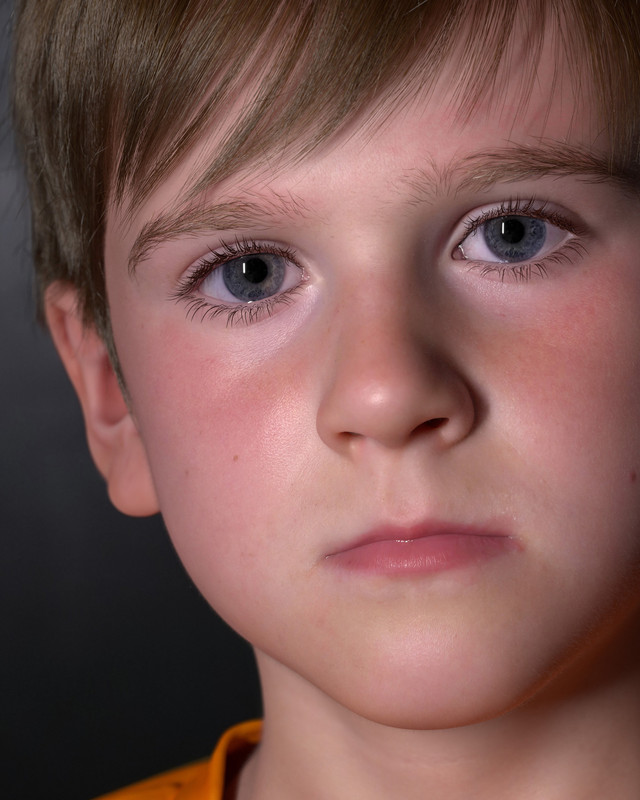 December 16, 2021 at 11:22 AM #1758320
I did DL 4.16 daz recently and tried to update starter essentials, then did a search on my entire pc (all drives search for the PBR textures) and got nothing. I don't know why that is but it's happening.
Not sure what to do next but stick to gen 8 at this rateDecember 16, 2021 at 11:23 AM #1758321Wow that render is amazing!
December 16, 2021 at 11:52 AM #1758329If you don't have an internet connection ... How do you write this? 😀
December 18, 2021 at 9:49 AM #1759007Have you heard of smartphones?
December 18, 2021 at 10:22 AM #1759014Whenever I see direct comparisons between PBRs and earlier types, 9 times out of 10 I prefer the latter.
🙂
-
AuthorPosts








- You must be logged in to reply to this topic.
