Home Page › Forums › General Chat › Daz to Unreal, didn't go well
- This topic has 14 replies, 4 voices, and was last updated 11 months, 2 weeks ago by
 tammebelg.
-
AuthorPosts
-
October 31, 2025 at 3:42 PM #2151106
Hey guys, first time I try this, the problem is that for a single character it generated +150 material slots, I can see for example for a single piece of clothing there are tens of slots.
Any idea how do I fix that?
October 31, 2025 at 11:05 PM #2151124I suppose Unreal imports all the separate material zones/textures. Isn't that a good thing? Can you tell it to combine meshes on import?
This person had the same issue.November 1, 2025 at 2:52 AM #2151143Importing that many separate materials is expected, but less than ideal, especially if you're concerned with Unreal's performance (like if you actually want to use the imported model in a real-time context, like in your own game or something -- or if you're using limited hardware).
Frank's suggestion to combine models can work, but can run into issues if a single model needs to point to different texture sets (like how a Genesis 8 body has separate UV sets for the legs, arms, torso, head, and each needs to point at its own textures). Only having one material on those meshes will prevent you from assigning the correct textures to each body region.
Ideally, you set up a single master material with the textures parameterized, like in this tutorial: https://www.artstation.com/blogs/qdwach/eN1V/tutorial-intro-to-unreal-engine-master-materials
Then, for anything that has multiple materials per object, you use a material instance of the master material, with the texture fields on the instance pointing to whatever other textures those materials need. Material instances with their own textures tied to a single master material will be significantly more performant than completely new standalone materials on everything.
Of course that's a lot of manual setup, but generally expected for this kind of thing. Unfortunately I don't know of a way to do this automatically.
November 3, 2025 at 9:35 AM #2151480If you use the vod version of the plugin, you can choose to have identical materials sent as a one material to Unreal. This version is also up-to-date, and he is also the creator of this plugin. DAZ3D is still distributing an old one from 2023.
November 3, 2025 at 11:26 AM #2151492I suppose Unreal imports all the separate material zones/textures. Isn't that a good thing?
It's not, for every material in the rendered object you have a lot of thing happening under the hood, main concern is something called drawcalls, you want to keep its count as low as possible.
If you use the vod version of the plugin, you can choose to have identical materials sent as a one material to Unreal. This version is also up-to-date, and he is also the creator of this plugin. DAZ3D is still distributing an old one from 2023.
I used that plugin indeed but I don't see such option, can you elaborate please?
November 3, 2025 at 12:17 PM #2151502Option: Material Combine Method
I also tested the "Covert to Epic Skeleton" option, and it works well. With the default export and some adjustments to the retargeter, I can use all DAZ (correct model) animations and poses, as well as all UE5/UE4 animations.
November 3, 2025 at 12:37 PM #2151507Option: Material Combine Method
I'm afraid I don't have such option
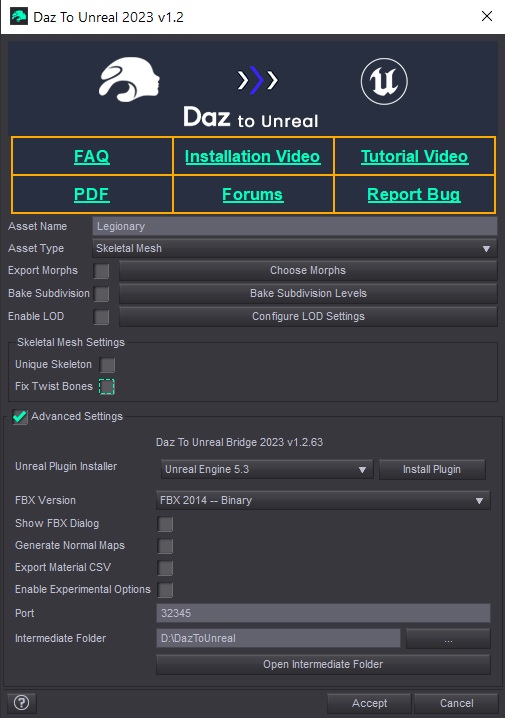 November 3, 2025 at 1:55 PM #2151538
See my first comment and download the latest version (GitHub). If you follow the YouTube video, it will explain how to remove the old version and install the new one.
November 3, 2025 at 2:18 PM #2151539It doesn't make any difference, this option is not there either.
It looks just the same if I install the plugin from the daz installer, or I remove it and then manually install the dll from the github repo.November 3, 2025 at 2:32 PM #2151545Did you replace the daztounreal folder in the plugins section of your Unreal version? Did you replace the daztounreal DLL in your dazstudio4? You have to do all of this manually. If so, you'll see the option.
November 3, 2025 at 2:39 PM #2151549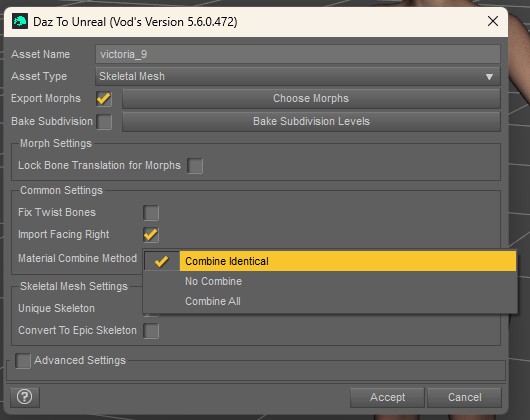 November 3, 2025 at 9:04 PM #2151601
Well I don't know, when I tried to install the latest stable version I had the same options I posted before, even when I did it manually, dropping the dll in the plugins folder. I don't know if somehow it was still loading the daz one or it's that they are very similar or identical, I read they both merged the features of each other.
I managed to install the alpha release doing some bizarre fuckery (the github instructions weren't working) and then finally I got a new set of options, but the merge materials one isn't there either.
November 4, 2025 at 7:04 AM #2151657Then you haven't downloaded the latest version. Just follow this video and every step will be spoon-fed to you.
You will still encounter a number of problems getting the DAZ character to work with both UE4/5 and DAZ poses/animations. I advise you to carefully follow the YouTube videos.
Good luck with your Daz to Unreal journey.November 4, 2025 at 2:20 PM #2151695It was the latest version available in the repo, that's a fact.
Anyway, I'm ditching all this daz3d thing, it's obviously not suitable for games, huge waste of time.November 4, 2025 at 2:52 PM #2151701No, it's fine to use. The latest version also merges skeletons. Like Golden Palace. So now it's easy to make an adult novel or game.
-
AuthorPosts






- You must be logged in to reply to this topic.
