Home Page › Forums › General Chat › how to package a character
- This topic has 8 replies, 5 voices, and was last updated 3 years, 6 months ago by
 Paul (Fuzzy3000).
-
AuthorPosts
-
April 5, 2023 at 5:55 PM #1952216
Anyone know a way to do this?
When creating something in DAZ and you want to give it to someone else to use, how can you package it up to include all the things it depends on (morphs, etc). You can never know what morph packages another person has on their system, is there a way to determine everything needed for an asset, and package it up?
April 5, 2023 at 9:37 PM #1952322Save it to a new Librarie, and pacakge all the files and folders in a ZIp?
April 5, 2023 at 9:57 PM #1952327I'm not sure I understand. Do you mean just zip up a whole new "library" folder/files that contains only whats needed? If so, seems kind of cumbersome, but I suppose it would work. Was hoping there's a script or something to ease the pain and do the job. I guess I could write a software to do it, but have way too many other things at the moment, was hoping something was already created to do this.
April 5, 2023 at 10:41 PM #1952332This tool is apparently designed to gather all the dependencies. I'm not sure if it also gathers the character Data files but I suspect it might. Some members here use this tool so they can advise you.
April 5, 2023 at 11:12 PM #1952339Thanks! I'll have to give this a shot first and hope it does what I need
April 7, 2023 at 3:07 AM #1952895Just package the morph files and the preset files (If there are any). The preset files are easy, the order of the folder doesn't matter. You can find the presets in your own content library in Daz, then right click the folder and choose 'Browse to Folder location', copy the entire folder to a new directory you make (preferably on your desktop). Create a new sequence, or copy to original one. Just make a 'People' folder and go ahead from there. For example
People > Genesis 8 Female > *Paste the folder here*The morphs are a little more complicated. You more or less want to get the pathing right, especially if you didn't make the morph. The presets will directly reference these morph files so changing the directory even one bit could result in an error.
I've provided images that may assist in getting the files and the directory order right.
First, in your parameters tab, locate the morphs you want and right click the cog on the side and choose 'Parameter Settings', a window will pop up, use my images below to open the folder that has the files.
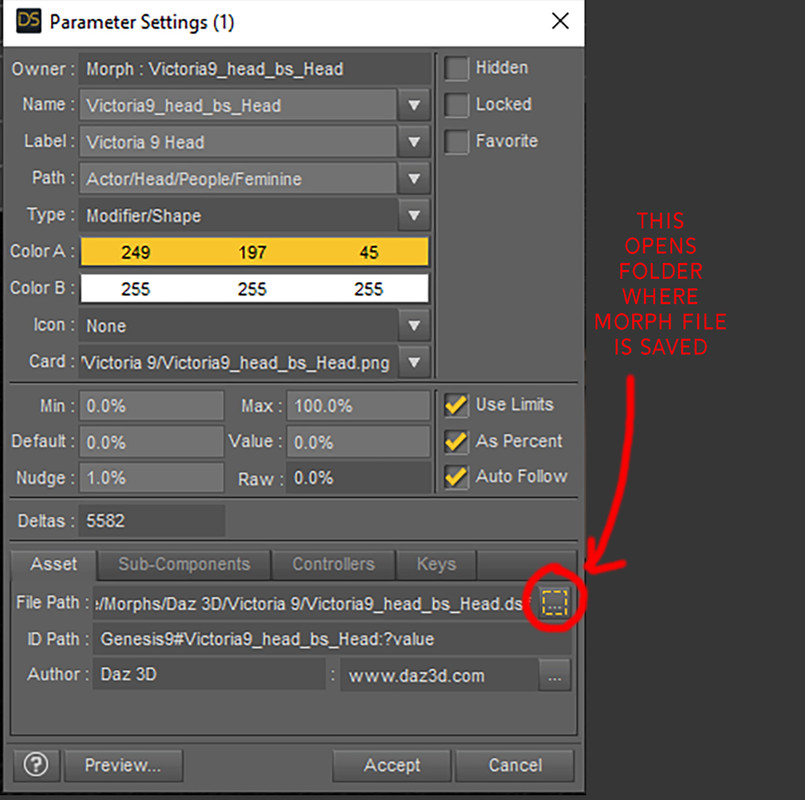
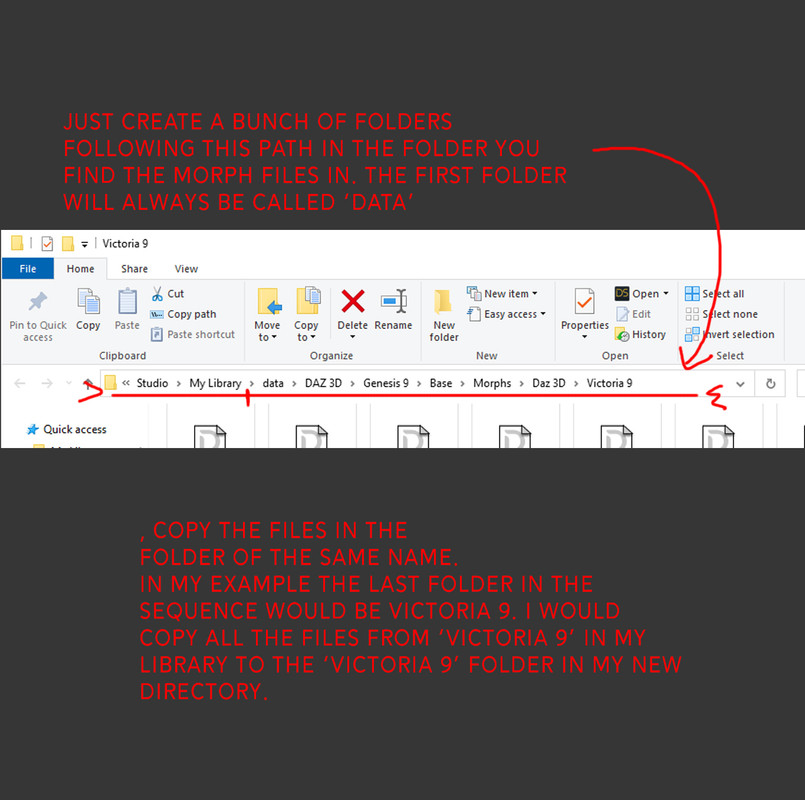
When you are done, Right click the folder you made that should now have two folders inside: People and Data, and choose Send to > Compressed Zipped folder
Now this zip file is what you can send to your buddy or post online.
April 7, 2023 at 3:29 AM #1952899@recktat19 I know I can do it manually but it's work to do that each time I want to package something. So was looking for a "programmatic" way to automate the process. I still have to try the content grabber, I have it ready to go, I just need to find time to test it out.
April 7, 2023 at 4:01 AM #1952911I guess you can try to find a program that will make a directory of folders for you, then the process will take probably less than 2 mins. It's already pretty fast manually. Takes the longest to create folders individually.
In my original post I did forget to mention the runtime folder, which is just the textures. It'd be the same process to find the folder location, just under the surfaces tab.
I'm sure such a program exists, or a batch script. But it'd be nice to have one that you can simply paste the directory with slashes and it would make a bunch of subfolders following your input.
For instance 'data\DAZ 3D\Genesis 9\Base\Morphs\Daz 3D\Victoria 9' and it'd simply make all the subfolders.
April 7, 2023 at 6:47 AM #1952932@recktat19
I have been wondering about the Content Gatherer as well - but still no time to try it out [or fully understand it :)].If it makes any sense your findings will be useful.
If anyone has any in-depth knowledge of getting it to work it would be really helful if able to put together an 'idiots guide' for the rest of us.
Certainly worth a few points for the effort spent doing so... 🙂 -
AuthorPosts








- You must be logged in to reply to this topic.
