Home Page › Forums › General Chat › DAZ Beta 4.1.2 Bugs
- This topic has 23 replies, 5 voices, and was last updated 7 years ago by
 Dragon.
-
AuthorPosts
-
August 26, 2019 at 7:31 PM #1219552
messing around with Beta 4.12..
Has anyone else noticed that the "POSE" tab is missing for some figures? I think its just G8 right now. I went to parameters tab and found poses there.
NO, I haven't read any update bug fixes issues at DAZ..
August 26, 2019 at 8:51 PM #1219608I can't say I have come across that. :0/
August 26, 2019 at 9:32 PM #1219645I always use parameters tab anyway, so I would not have noticed that. I have, however, run into a snag trying to do a dforce simulation...the two times I have tried so far have locked up studio to the point I have to force it to close
August 26, 2019 at 10:11 PM #1219680OK so I opened Daz Horse 2 and same thing. No pose tab, so its not just G8.
@tony0558 I use parameter when a clothing item doesn't have a pose tab. Its usually located there.
As far as Dforce, I JUST ran into that. LOL. Said I didn't have something installed or something and then locked up.August 26, 2019 at 10:13 PM #1219683As I only do single frame renders, I feel that dforce is more trouble than it is worth TBH. :0/
August 26, 2019 at 10:17 PM #1219686Typically, single frames are all I do also. I just like the idea that the clothing will look more natural if you let it run a simulation rather than trying to move it this way and that trying to get the 'poke-throughs' eliminated...not all of my models like wearing shorts and lingerie all the time... 😀
August 26, 2019 at 10:28 PM #1219700yeah, dforce is nice,if only it is lighter and easier to use, currrently it's fragile AF, somehow every simulation i do,either it made the clothing somehow get through the body or the Studio explode and made my laptop hang until the point of force restart :/
August 26, 2019 at 10:44 PM #1219719UPDATE.. I pulled a bunch of characters in.. Yeah. Pose Control is now located in Parameters. There's a curve I'm going to have to get used to.
Also, OFF Topic : My ex just came home after 3 weeks to grab some more of her stuff, and the song on the radio when she walked in was, "Pull The Heart From Your Hate".. Quite appropriate because she hates me some reason. Oh well, Karma will catch up to her one day. Women are moved by desires unknown to the men who place trust in them.
Back to topic. LOL
I only do still frame also, and I'm with Tony. When Dforce works its cool and very realistic. Still some things I'm trying to figure out, like how to keep the cloth from hanging up on body parts like fingers, and stretching, when its simulating.OH, and LAHM and Catalyzer STILL aren't showing up in 4.12 Beta. Though for some reason they've been screwing up in 4.10 and crashing DAZ. Mostly the Catalyzer. That doesn't work at all anymore.
August 27, 2019 at 3:39 AM #1219964Do you simulate from the original (base) pose, or do you memorize the pose then simulate? I haven't a lot of experience with dForce yet, so I don't know all the little tricks yet, but I'm working on it, and it seems to me this is a good one to keep in mind...
August 27, 2019 at 5:06 AM #1220027Ummmmm.... Not sure.. I'm still learning myself.. I don't know what you mean by memorize the pose first. I know that much. I think theres a setting where you can pose from the default figure pose or the current pose, and theres a setting where you run an animation or not..
August 27, 2019 at 8:54 AM #1220266on the scene tab, highlight the base figure (Genesis 8 Female or whatever name it has), click on the menu icon (three bars in upper left corner of scene tab), figure, memorize...you'll find it. Play with it a bit and see what happens, it may solve some of the 'hang-up' problems...
August 27, 2019 at 11:06 AM #1220373I've never had dForce consistently hang, across DAZ 4.9,4.10,4.11 Beta and Release, and 4.12 Beta. Must be something you do 😀
Also... Pose tab? Never, ever used. Pose controls have always been under Parameters? What kind of pose controls are we talking about? Are we talking morphs for specific items? Like Parameters -> Actor -> Morphs for movement, fitting etc?
The benefit of doing simulations with dForce from base pose to the actual pose you're wanting to use is that you start with a neutral point, where the clothing will hang relatively freely on the figure, and not intersect or otherwise hit other items (which most often will cause dForce to behave unexpectantly, or crash).
Also, take note that IF dForce crashes, you need to restart DAZ. And I mean make sure it's completely closed in Task Manager. Results will be highly unreliable, if it works at all, if you don't do that.
August 27, 2019 at 4:05 PM #1220678not like I had a lot of choice - dForce crashes on me I don't have a choice but to close it with task manager -- gives me a choice "wait for program to respond' or 'close program'
one thing I haven't tried yet is rebooting my computer since I installed 4.12...might give that a try.August 27, 2019 at 8:49 PM #1220969OK, So I started thinking my senility was getting worse, because I opened 4.11 Beta and it, Pose Tab, was gone. Then I opened 4.10 and BAM!!! Normal senility restored...
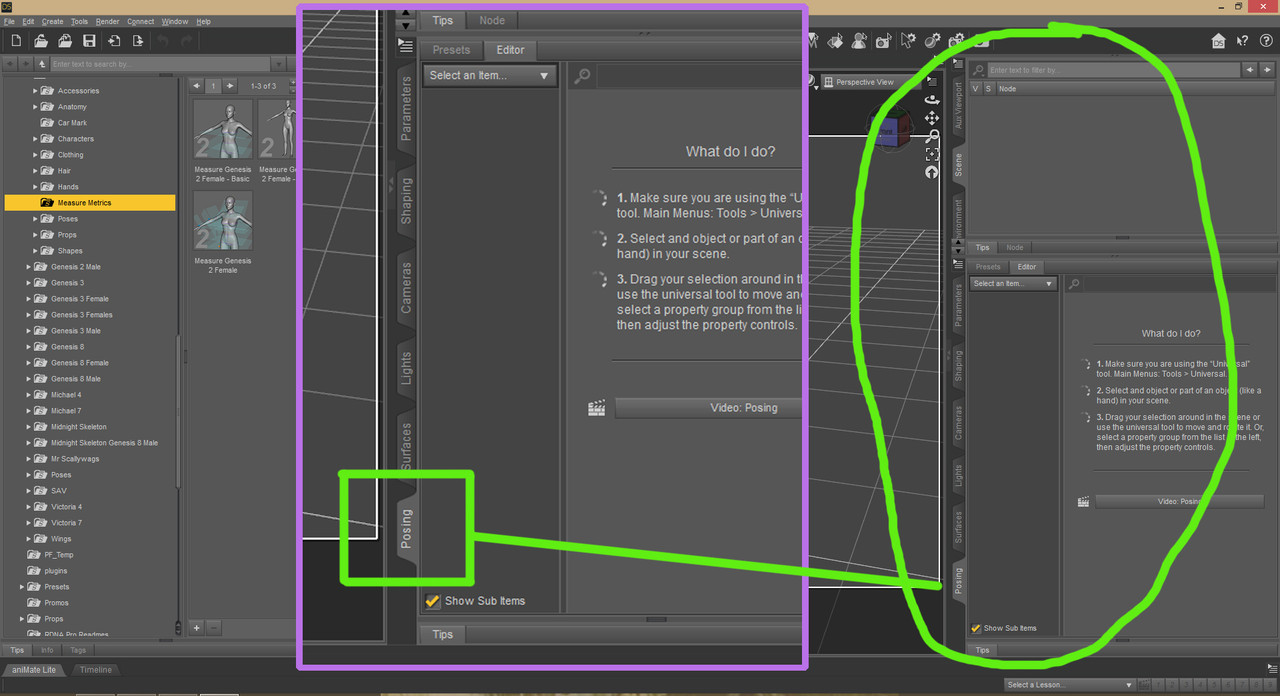
For bigger image https://postimg.cc/svSSJmdwAugust 27, 2019 at 8:55 PM #1220975ahhh.. OK, thanks Tony. Never knew about that.
So, if you don't mind me asking, what exactly does that do?
If using Dforce, does it keep the figure locked in that position so it doesnt revert to the base pose to start clicking into the main pose?
Is memorize pose only used for Dforce, or are there other uses, like its saved to use later? -
AuthorPosts









- You must be logged in to reply to this topic.
