Home Page › Forums › General Chat › The Stable Diffusion Information thread
- This topic has 31 replies, 9 voices, and was last updated 2 years, 11 months ago by
 Frank21.
-
AuthorPosts
-
November 5, 2023 at 10:14 AM #2040191
Thank you Fuzzy!! The videos actually made sense of the installation! I did not do it right (duh) the Git thing, I will redo this tomorrow and follow the directions from the YouTube!! I feel like I'm getting there.
Finally I know how to download and install!
Ethiopia, I finally got Discord to install on this new machine, and I can get on the server now! Yay! Before I had to launch windows on my old computer to get onto Discord, and most of the time I just didn't want to bother. I checked the AI forum earlier this evening um.. last night... lots of info there too! Thanks for the reminder. Also, as for the "goal" I do intend to do some male renders to use... is that what you meant?
November 5, 2023 at 12:29 PM #2040216I was suggesting that you MAKE some good male characters. Like all of this stuff, the hobby is dominated by creepy, immature, young social outcasts who make millions of redundant characters. It's mostly anime inspired stuff. There's a few (very few) people making items and characters for normal, well balanced grown ups.
https://civitai.com/user/EDG/models
This gent is my favourite. Among all the anime stuff, he's got a wide variety of realistic formal dresses and costumes. He's one person I find it worthwhile to support through the 'Koffee' thing. Five bucks a month is well spent and he's more than willing to reply to suggestions.November 5, 2023 at 1:44 PM #2040235One fun/weird/strange/bizarre aspect of exploring Civitai is discovering fetishes you'd never have thought of. The anthropomorphic female dinosaurs with humongous breasts is just too messed-up.
November 5, 2023 at 1:45 PM #2040236Yep, there is certainly a lot of weird shit out there! :0/
November 5, 2023 at 2:54 PM #2040261@Ninianed Just consider LORAS as add-ons for models (models are Stand Alone).
also, LORAS can be trained to add different things that might not be well represented by models, such as certain:
Characters
Styles
Objects
Clothing
PosesThere are also some of them that just add complexity to an image, or are trained as "things you don't want to see in an image" and are used to reduce the % of getting messed up things.
As for males, they should already be present in most models however, if you are getting ladies instead, you might need to put in the negative part of the prompt things that you don't want to appear.
-----------------------------------------------
PROMPTS:
SD uses mostly Danbooru tags.https://danbooru.donmai.us/wiki_pages/tag_groups
However, some do not work since they are for very specific characters.
An easy way to use Danbooru tags is to use the extension called TAG Complete which basically is similar to your phone's auto-complete function and can be very useful for beginners.
-----------------------------------------------
EXTENSIONS:
Here is a list of other popular and useful extensions that can be downloaded directly from you Automatic1111: [I strongly recommend looking for more info on YT for these)
Aspect Ratio: You just press a button to automatically select various aspect ratios for your images.
Adetailer: Automatically applies inpainting (the area is recalculated as a second pass at a higher resolution and gives better details) to a zone of your choice. Typically, these "zones" are auto-detected and are hands, eyes, faces, or whole body of characacters (it can detect multiple characters).
SD Dynamic Prompts: This extension applies to a prompt a random line from a text file (put in a specific folder). These text files (called Wildcards) basically are lists of features/things you might not want to bother coming up all the time.
For example, you could have one wildcard be hair_colors.txt and another hair_styles.txt. Now you can just put in the prompt something like __hair_colors__ (those are 2 underscores before and 2 after the file name), and now SD will just pick a random line inside the text file and apply it to the prompt! ...and you can use several wildcards at the same time within your prompt.ControlNet: Very useful if you want to apply a specific pose or composition to your image. It has many uses, so I def recommend to watch some youtube video about this.
ControlNet also benefits from 2 extensions for it: DWPose (to get better detection of poses with OpenPose) and OpenPose Editor (to be able to edit poses detected by OpenPose, if they need fixing).
NegPip: This is new, but has become a fast favorite of mine. Basically, after activating it, it makes negative prompts a thing of the past. Instead, you put what you don't want to see in the positive prompt, but with a negative value, and it has a much stronger effect. So, for example, if you don't want to see shields in your image, just type
(shield:-1.8)in the positive prompt...and they will be gone in your next renders!That's all for now 🙂
November 5, 2023 at 3:37 PM #2040271@Ninianed
Glad they were of use -and made sense.
He has lots of other useful SD vids, well worth checking out.
@Legolas18 - again, as always, nice pointers for improving.November 5, 2023 at 4:08 PM #2040277Hey Paul, I can tell you that Sebastian Kamph is great !!!
It was he who gave me the courage to take the plunge and install it.
Other tutorals i find are talking to fast and they make it feel complicated.
I felt at ease with Sebastian, The way he explained things was just perfect for me.
I downloaded Automatic1111 on 29 Sept which was the 1.6 version,
The tutorials were running an older version so my user interface looked different.
It was abit confusing, but 3 weeks later I finally relised that I was on a newer version.
I could talk about SD all day, For some reason I feel a passion for this new kind of thing.
Right now its still easy to go back and see where it all started, learn the history and the path it has taken
Sometimes you gotta go backwards to go forward.November 5, 2023 at 9:09 PM #2040305When you collect a lot of stuff you really need to organise it so you can remember what it is and the trigger words, prompts etc.
I'm just using a wordpad doc but I'm sure there's better ways. I don't have MSOffice and don't really want to install Word/Excel. I'd be lost if I didn't make preview images for the SD gui.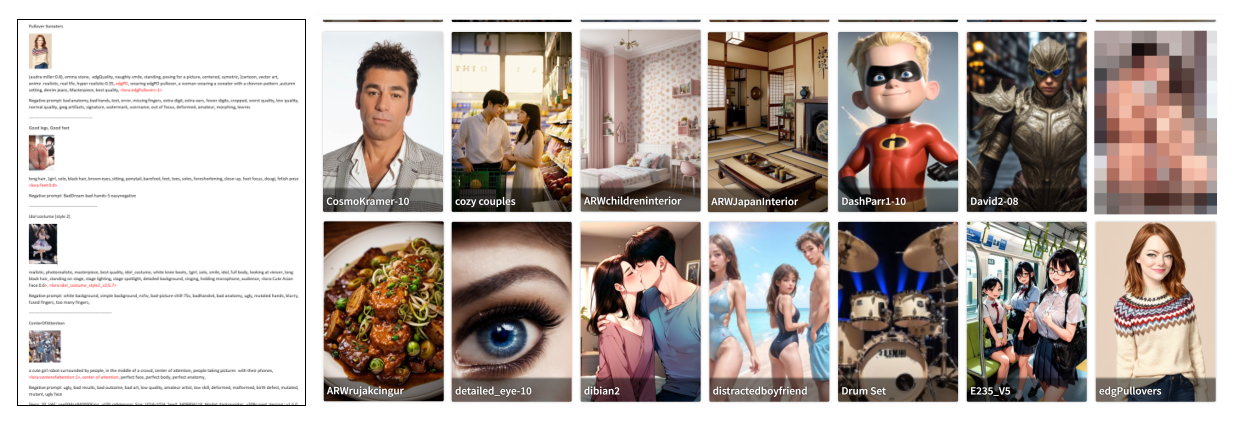 November 5, 2023 at 11:54 PM #2040328
I agree about Sebastion. I inhaled all his tuts and watch for the new ones.
November 6, 2023 at 12:45 PM #2040458Initially, I was completely opposed to AI art; that is, until I realised that - used the right way - it was just another medium with which I could tighten up my workflow and learn new skills, and that I was being as elitist and closed minded as the trad artists who frowned on digital artists over a decade ago, when I first started creating art via Photoshop. I started out with very basic photomanips and was told by more than one trad artist that it wasn't art - I was just cutting and pasting photos.
Despite this, I developed painting and drawing skills and branched out into 3D and, eventually, traditional art. Without Photoshop, I would never have realised that I can actually draw and paint and that the confidence built up using a digital format would, in time, translate to the physical.
I see AI now as yet another tool in the artist's kit. I've used Midjourney, Leonardo, Bing, etc; but now that I've finally downloaded SD, I really hope to learn more. It is quite slow though, but the result from text to image are usually good. It's the image to image format that isn't working our too well for me. Still, it's all trial and error, I suppose. 🙂
November 6, 2023 at 1:16 PM #2040467If you are not sorting stuff at civitai by most downloaded or most populat then you probaly wouldn't have a clue about this.
One of the most downloaded checkpoints "Deliberate 1,2 and 3 have been removed. Also the amazing Reliberate is gone.
If you are a fan of Xpuct the bad news is......well hes gone and all his great stuff is gone as well.
I will share his youtube channel here because he has knowlegde that I would hate to be lost, I think hes one of the best creators out there. He dont speak english so im not sure what the reason was , of why he took off.
I can see his stuff is still on his huggingface page.......for now?So if your a fan of his stuff then, go get what you dont have, just incase
h ttps://www.youtube.com/channel/UC2CiWFIOjQix4E6WrARzDZg
h ttps://huggingface.co/XpucT/Deliberate/tree/mainNovember 6, 2023 at 7:04 PM #2040535@frank22/ Frank I cant see what the text says in the pics, i cant seem to enlarge it.
But I think that what you are doing there can be done in the UI and added to uses and reference back to.
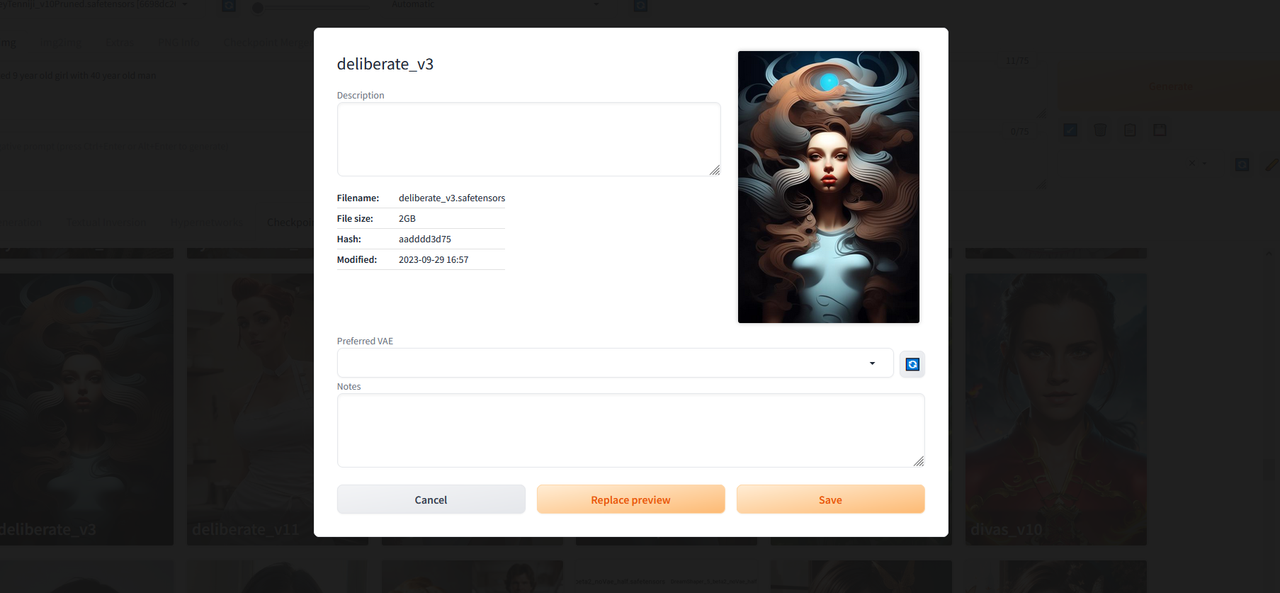
This pic here i have posted for you is of the diliberate model in the interface and has not had any notes or info been added to yet, so in your case this is what you are wanting to do, instead of using note pad :).....this for you is where you put all the stuff you wanna know ..
 November 6, 2023 at 7:40 PM #2040538
Thank you for that. Can you explain a bit more about this? Is this using my stand-alone SD UI or is it done on the Civitai site?
November 7, 2023 at 2:32 AM #2040607Well this is what i do......when you put a checkpoint into you models folder it would display in your checkpoint as an icon saying No Preview on it.......So before you move it there, click the file and copy the name of the file and go to the model civitaai page and chooose a promo pic and click save as........select the loacation to save as your A1111 models folder. and paste the name and then click save. The go to you downloads and drg the checkpoint into your models folder. After refreshing the A1111 ui the checkpoint now shows up with a picture. Now hover you mouse over that checkpoint file and you will see it the top right corner of the checkpoint a symbol of a spanner and a hammer crossed over each other.....like an X..... Ok so move the mouse up to that icon and click it and then that box pops up (like the one i posted)where you can type in the information that you want to use........in the notes on the discription section and then click save......Now when you load up that checpoint you can then click the x on the checkpoint pic and all your info will be there.
November 7, 2023 at 2:47 AM #2040608That's great! and I think it's what Globalrecession was saying. Off to try it out.
-
AuthorPosts













- You must be logged in to reply to this topic.
