Home Page › Forums › General Chat › surface concepts
- This topic has 8 replies, 5 voices, and was last updated 3 years, 8 months ago by
 gts6.
gts6.
-
AuthorPosts
-
February 14, 2023 at 11:04 PM #1927642
There's so many setting in the surface tab, but what is a good resource to learn the concepts behind each of them to learn when to apply what?
The help files and other documents online explain what each setting is, but unless you truly understand the concepts behind each thing, the explanations are a bunch of gibberish.
Where'd some of you folks learn this stuff, any reference to great video series or physical books (remember those things lol). There was a few good things on a site called renderguide that used images to go along with the explanations so I can "see" what it is they are explaining. Any vids or books that use pictures and examples to stuff like that is very helpful to actually learn. But they only touched on some of the concepts.
Doesnt even need to be "DAZ" specific, just the concepts, but if it's based on DAZ and has pictures and examples, even better!
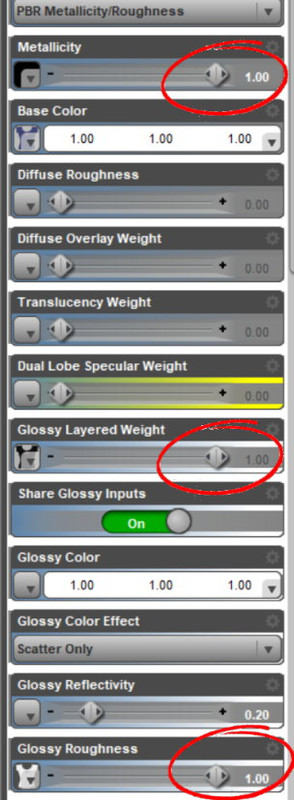
February 14, 2023 at 11:41 PM #1927650I've learned that most clothing comes with has Glossy Layer Weight and/or Glossiness set stupidly high, even with 100% Metallicity FFS. And then use Glossy Roughness at 100% to counteract the overblown shininess. This is the surface setup for the Everyday Shirt.... just stupid. A cotton t-shirt has very minimal shine the last time I looked.
For dForce settings, this set of images (by RGcincy half-way down the page) is a godsend. I refer back to it regularly.
February 15, 2023 at 3:05 AM #1927668February 15, 2023 at 5:02 AM #1927687@frank22 yes, I do look around at a lot of settings for clothes and stuff to get an idea of how things are set, but in this case im not looking for any particular setting, just looking to learn about each setting, and what they really mean. And then when you increase certain settings from 0 to a number, MORE settings open up and become available lol. Theres so much stuff and a giant void of explanation of it all.
@queensknight yes that set of videos is pretty great (just watched them last week), but doesn't have much in the way of surfaces. Until last week I really couldnt even grasp the concept of what translucency REALLY means until just the other day when I came across some info that described it vividly like if you hold a flashlight up to your hand and you can almost see inside it how it glows red. Things with simple explanations and/or pictures make learning things more understandable, id love to find more info like that for all the different settings. Wondering if I take a trip to a bookstore and looking might help, but I dont even know what section of books to begin looking at, I guess this is "art"?February 15, 2023 at 5:31 AM #1927689This is what chatGPT has to say 🙂
Visualized Daz3d Surface Settings
Where can I find visualized concept descriptive explanations that show how surface settings for 3d programs work like Daz3d, including but not limited to textures and materials?
There are several resources available online where you can find visualized concept descriptive explanations of surface settings for 3D programs like Daz3d. Here are a few options:
Daz3d Documentation: The Daz3d website has an extensive documentation section that covers various topics related to the software, including materials and textures. The documentation includes step-by-step tutorials, videos, and helpful visuals that explain the surface settings in detail.
YouTube Tutorials: You can find many video tutorials on YouTube that cover various aspects of Daz3d, including surface settings. Some popular channels that offer Daz3d tutorials include Daz Studio Beginner to Advanced, SickleYield, and Dreamlight.
3D Artist Magazine: The 3D Artist Magazine website has a section dedicated to tutorials, which includes several articles on creating textures and materials using Daz3d. The articles are accompanied by visuals that make it easy to understand the concepts.
Digital-Tutors: Digital-Tutors is an online learning platform that offers video tutorials on various 3D software, including Daz3d. The platform has a section dedicated to materials and textures, which includes step-by-step tutorials with visuals.
Daz3d Community Forums: The Daz3d Community Forums are a great resource to connect with other Daz3d users and get help with specific questions. You can find many threads on materials and textures, where users have shared their experiences and tips.
I hope these resources help you find the visualized concept descriptive explanations you are looking for!
February 15, 2023 at 5:48 AM #1927692@cage Thanks! thats a good amount of places to start, ill check out those sickleyield and dreamlight channels first... ive already looked at the daz site, didnt find what I need there, it only explains how to use the settings. I know how to use them, I just dont know what they truly mean. But thanks, ill try those resources. Its kind of mind boggling that DAZ added an bunch of different types of glossy settings and then top coat glossy and anisotropy and then thin top coat glossy settings .. and then no real explanation of the difference of any of them in the real world, or when and why to use one over the other...
February 15, 2023 at 7:24 AM #1927702One method would be to use DS Iray preview and change the surface settings to see how the appearance changes when you fiddle with the settings. You'd probably learn far more from that than reading tutorials.
February 15, 2023 at 10:57 AM #1927799The Complete Guide To Creating Iray Shaders
Daz Studio and Substance Painter
In part 4 you can see how to setup a PBR material.By the way in V-ray and Corona (the 2 render engines i know better), in the new "physical material" you must set the reflection at 100% everywhere and roughness control the rest.
But in Daz not all the vendors knows how to use roughness map.February 15, 2023 at 4:05 PM #1927925@frank22 Yes, that's kinda what I do now, just fiddle with sliders up and down trying to figure out what to use, but the results are usually less than desirable... and takes a LOT of time just moving sliders, seeing the result and sliding it back. Would be much easier and faster if I truly understand each thing so I would have a better idea which to use right from the start.
@thomasbr Those seem pretty interesting, I wasnt really looking for shader-specific info but these do seem very good so I will check them out in addition to the other stuff im coming across. Thanks -
AuthorPosts








- You must be logged in to reply to this topic.
