Home Page › Forums › General Chat › stable diffusion
- This topic has 104 replies, 7 voices, and was last updated 2 years, 2 months ago by
 gts6.
gts6.
-
AuthorPosts
-
July 12, 2024 at 9:03 PM #2082965
Ok I tested the same dataset on a few more checkpoints. I'm not totally convinced it even matters. The results are so similar across the board.
The major difference I noticed is the amount of steps required between some of the checkpoints, and the differences in between. Some get a particular result much earlier in the steps, some much later. But overall, the same result appears to be achievable in any of the checkpoints, just at a different point in the process.One major thing I did notice during all of this is (that i've never heard mentioned anywhere else ever), is that as the steps(or epochs) go higher to get to the desired look, the ability to adhere to the prompt weakens at render time later. For instance, if you are training a human with almost every source image wearing sneakers. If you render with a lora later, if you used epoch #8(for instance), you might be able to get that human wearing maybe red high heels or something. Theres a chance for that to work (sometimes it will, sometimes it wont). But if you used, perhaps epoch # 13, for instance. You might find it impossible to get those red heel shoes. Maybe youll get red sneakers as output. But you will find it impossible to get the red high heels you requested. At first I thought it was a fluke, but I tested this again and again with all the checkpoints, its across the board. It seems the higher you go, it becomes more and more closer to the images in the dataset, and further and further from customization later. Probably because its trying to be more and more exact of whats in the data images, as the training goes on.
So, ultimately I think I will just train with v1-5-pruned from now on, for 2 reasons.
1) You can use a lot more steps than some of the other checkpoints before the overkill happens. So, yes the train might be longer, but I can have a wider timeline to pick from between qualities. If a model starts beginning to be overdone at step 4000, but doesnt look quite right on step 3000 yet, know what I mean. If you can go much higher steps, you can pinpoint in between much easier (with lots of render tests)
2) I "think" (hard to say because each rendered image is different and not always the case) but most times I think the colors seem more to my liking, a bit more vibrant. Im not even positive about this being true.One thing I will try next is splitting out into different folders with different number of repeats when required. For instance, if I have a human character with 25 full body images, face sometimes visible, sometimes turned, etc. And only 3-5 good face shots. After training, its possible to get a very accurate body lora. But the face might be off. And training longer might get closer to the correct face, but not until after overkill on the body and it starts artifacting. So maybe ill try splitting and giving the body say 1 repeat, and the face shots folder 5 repeats to even it out. I think this is something worth a test and experiment next
July 12, 2024 at 11:19 PM #2082974Last paragraph - that would be a very interesting test. With regard to prompting and captioning, I remove any reference to colour from the captions unless I want, for example, a hair colour to be consistent. Colour names in the captions restrict the loras flexibility to produce a range of other options.
After playing around for the past few weeks I've gone back to using 100 repeats for a 25-30 image dataset and 4 epochs. The forth epoch being almost always accurate and stable about 95% of the time, and very rarely showing signs of under/over fitting. It takes 60-70 minutes with my 4070 for 512x512 images. For this reason I haven't found it productive to produce a ton of ephocs.
"...as the steps(or epochs) go higher to get to the desired look, the ability to adhere to the prompt weakens..." Yep, we're chasing the sweet-spot between the two. It's like playing with the denoising strength in ing2img, the higher you go the less it follows the lora/prompt.
I'm still not sold on the idea of using v1-5-pruned for training. As all ckpts have their own subtleties, surely moving between them, to ones they are not trained on, will not produce accurate or consistent results.
It could be time to show some images. I made this lora of Adèle Exarchopoulos a dew days ago and even though the dataset was poor quality (screen caps) it turned out OK with regard to likeness on 4 ephocs. Would have been much better if I could get my hands on some hi-rez images to work with. I've shown you mine.... 🙂
 July 13, 2024 at 2:43 PM #2083050
I wasnt familiar with that person and had to look her up, that looks pretty good.
Right now my PC is tied up with training, will be until it I am finished with this experimentation to figure out the nuances and whats going on under the hood. I can post some renders then. If you have something in particular in mind, send a link to a batch of images I can train.Ive been testing various checkpoints and settings with the same batch of images (about 20% good quality,50% average, quality, and 20% terrible poor pixelated), im using a lot of poor images on pupose for this test. Then compare always using the same pose image in controlnet in batches of 8, always the same pose image and settings and prompt, etc. Want to make sure to compare apples-to-apples.
I DO like splitting the good close-up face shots in their own folder with more repeats for those. It definitely has made a huge difference.
July 13, 2024 at 9:52 PM #2083113When you get the time you could try this dataset with the same BLIP captions, or use a different method like WD14. A8ele is the prompt trigger word. I haven't used anything other than BLIP myself. As I mentioned, the images are not what I'd call high quality. Because the images aren't that good don't expect close-ups to look very nice. I could only get acceptable renders with full body and cowboy shots. It was trained with epicphotogasm_v31Getwhatyouprompt (1.5) so other ckps may not work very well, probably won't.
I think that including even a few very low quality images could/might have a bad affect on the overall quality of a lora. I've previously tried to improve the quality of dataset images with AI but the lora results have been terrible. Using different folders for images is something I've never tried and it would be great if you could show me how to set that up in Kohya.
July 14, 2024 at 4:18 PM #2083194Ok, i've checked out the images. Once I finish my testing I can try it out. I see they are only face shots. That should be much easier. I've always done full body training, that is the real challenge. Sometimes the face is done at a much different time than the body,depending upon the images. If a face shot is all you are after, you might want to try to use a "face replace" with reactor or faceswap with a good face image. It will be much more consistent and look better most of the time, and no need to waste time training or filling the HD with lora files.
July 14, 2024 at 5:56 PM #2083208Also, in regards to adding multiple folders, its pretty simple really. In the root images folder, have 2 (or more folders instead of 1) Such as: 30_Adele Woman & 50_Adele Woman , and the images in each of the 2 folders would be repeated different number of times based on the name of the folder.
July 14, 2024 at 9:49 PM #2083235There should be one body shot in my set but I think most ckpts have a good understanding of a woman's generic proportions and physique. So unless one wants something particular like a short/tall woman, it's probably not necessary to have a lot of full body shots. But if you're making a lora of Shakira (5'2") for example, I'd definitely included quite a few body shots showing her relative height. [note her companion's head cut off to avoid training that face]. Or if you want to train-in a specific outfit or costume. That's the way I see it.
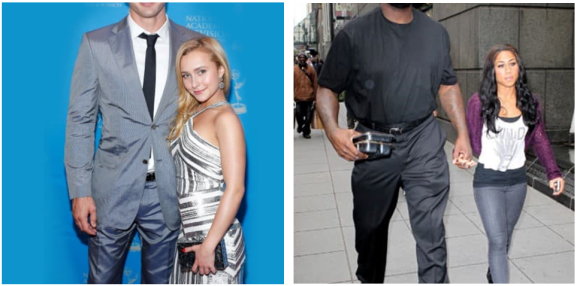
In the past I've had a few issues with slightly disproportionate head/body size which could be due to me not having enough wider shots and/or too many close-ups. A balanced mix of face, cowboy and body shots including profiles would appear to be the best idea.
July 15, 2024 at 12:02 AM #2083246The body shots are more than just height. Everything is taken into account with SD, from muscle tones, shape of each body part, bone structures, longer legs, bigger boned,etc.. And it gets trained very accurately with good datasets. Some people have bigger thighs or legs, more muscular arms, thicker forarms, etc. It can be trained pretty easily, and its easier to become more accurate than the face.
But if I just want a face, my go-to is the reactor/faceswap route. It will be more accurate than a LORA almost all of the time. With a LORA, there are times when you get a perfect render every way except the face is messed up. You can try inpainting or Adetail (which usually doesnt help much, and a lot of times makes it worse). But faceswapping will correct it in less than 2 seconds literally. And when you find yourself doing that often enough, you realize why bother with a face lora at all if youre only going to end up fixing it with a faceswap anyway. SO.. I dont even bother with a strictly face lora. Its literally 3 seconds or less to just do a swap on any image
(side note: this works GREAT on DAZ figures) Daz is capable of doing some very realistic humans with the proper skins and lighting, but you dont realize it because its terrible at rendering the face. A quick 2-second faceswap can turn a daz figure life-like very easily.July 15, 2024 at 12:50 AM #2083251Like with DS most SD people only do portraits with the subject usually looking at viewer, so accurate full-length body-likenesses isn't really a big issue for them. I think I've tried reactor before. I'll give it another try.
July 15, 2024 at 1:41 AM #2083254@gts6 said:
(side note: this works GREAT on DAZ figures) Daz is capable of doing some very realistic humans with the proper skins and lighting, but you dont realize it because its terrible at rendering the face. A quick 2-second faceswap can turn a daz figure life-like very easily.
Can it consistently replicate the same face every time, with specific emotions? From multiple angles, including profile shots, or with the face partially occluded, and control the direction the eyes are facing too? If so I am very interested and would like to learn more about this. I experimented with some SD img2img ai on Daz renders before and it failed miserably with all the above. Often ruining perfectly good shots by mangling the faces and hands beyond human recognition.
I rarely do head-on "looking straight at the camera" portraits so everything above is extremely important for my VN work.
July 15, 2024 at 2:05 AM #2083256@livingpixels For the most part, YES! It can do all of that (with a few small caveats).
For instance, a face partially covered, say wearing a covid mask. You "might" sometimes see a very very feint remnant of the face underneath the surface of the mask (from when the faceswap tried figuring out where the pixels go). If you dont need to do a lot of face coverings, this wont ever be a problem. And when it does happen, its very easily fixable within SD using inpainting mask over the affected area and re-render.
But otherwise, it does all that. For instance if I rendered a few daz images of a character with just the facial expression altered, and ran them in a batch of faceswapping, each of the output images would absolutely have a different expression from each other. They wont be EXACT same expression as the DAZ expression, but usually pretty close, definitely good enough that you know what the feeling of the character is supposed to be, for sure. The faceswap is definitely not just a static cut-and-paste of the source image over top, it is very dynamic and flexible. Theres also a couple of slider controls to alter precisely a number of settings to fine tune things.
July 15, 2024 at 2:09 AM #2083257Also, if the face covered too much, sometimes it wont detect a face in the source image, and it wont perform a swap. Generally,, this is not a problem. Ive sucessfully swapped faces that had the entire bottom half of face covered, up to the tip of the nose, and it worked fine.
July 15, 2024 at 3:12 AM #2083260Ok quick paused the LORA training to quickly generate this sample of a faceswap with reactor.
Took about a total of 4 seconds to do this. As you can see, each of the expressions were represented after the swap, although a few were slightly different, such as eyebrow position, but minor. For what it is, and how quick it took, id say its pretty darn good.
Ive done this often, BTW, in videos also. You can easily replace anyone in a video by doing this frame-by-frame in batch mode. And yes they do animate the facial expressions in video perfectly as well.
Anyway, image 1 here
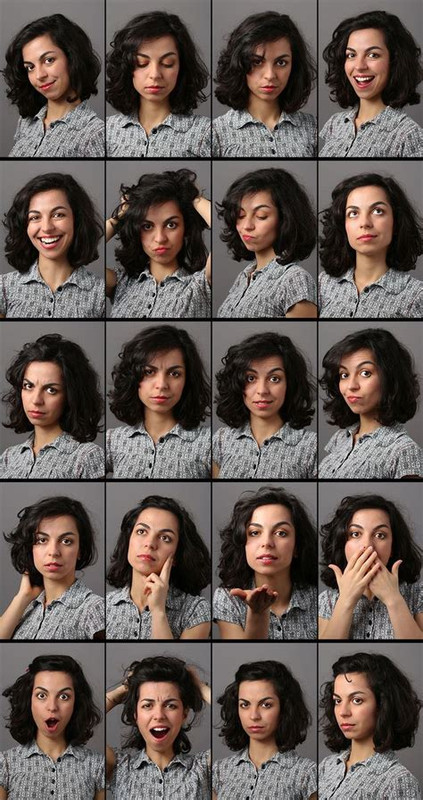 is sample sheet of a woman in a few different facial expressions.
Image 2 here
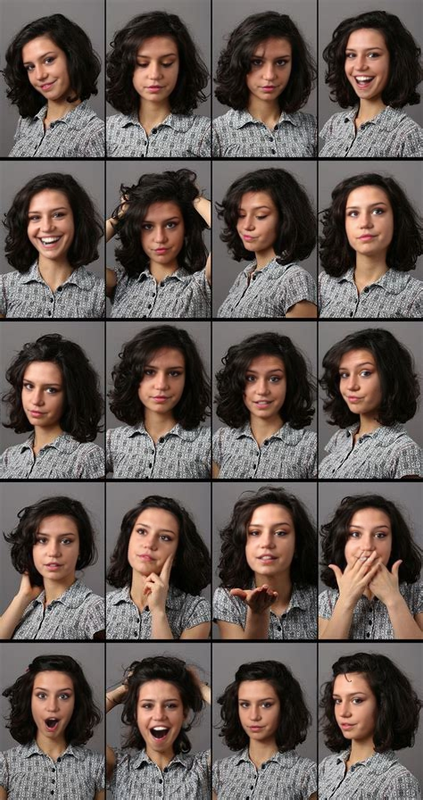 is the same sheet with the faces replaced. Again, took less than 5 seconds. Took much longer to upload the images and type up this post.
Image 3 here
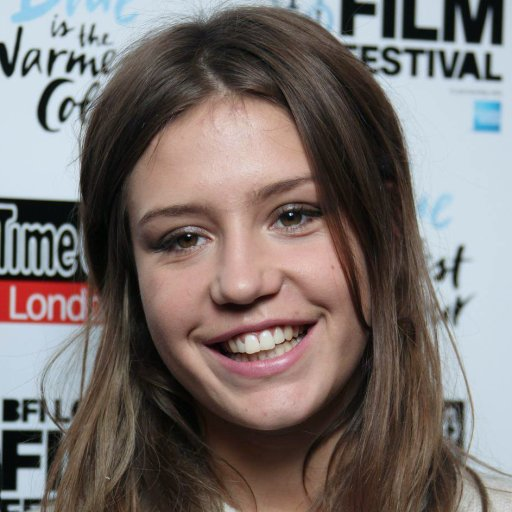 is the image I swapped the face with, its one of the images of Adele that Frank suppliedJuly 15, 2024 at 3:16 AM #2083261
Also, the image used for the sheet was pretty low resolution considering 20 faces. Each one is pretty small and pixelly. If this was a high res HD source image, it would look tons better.
Also notice the one with the hands covering the face, and you can see around the fingers what I mean about some remnants of face within the fingers. Easily fixable, though
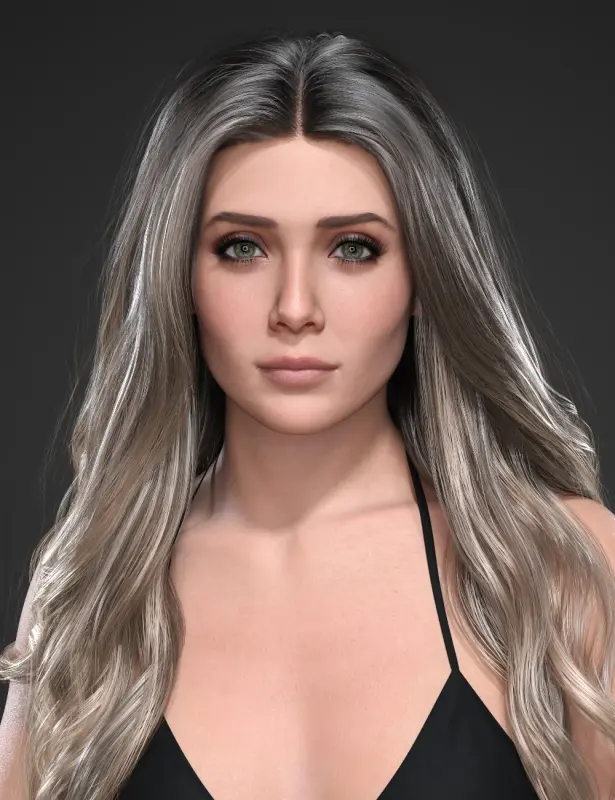
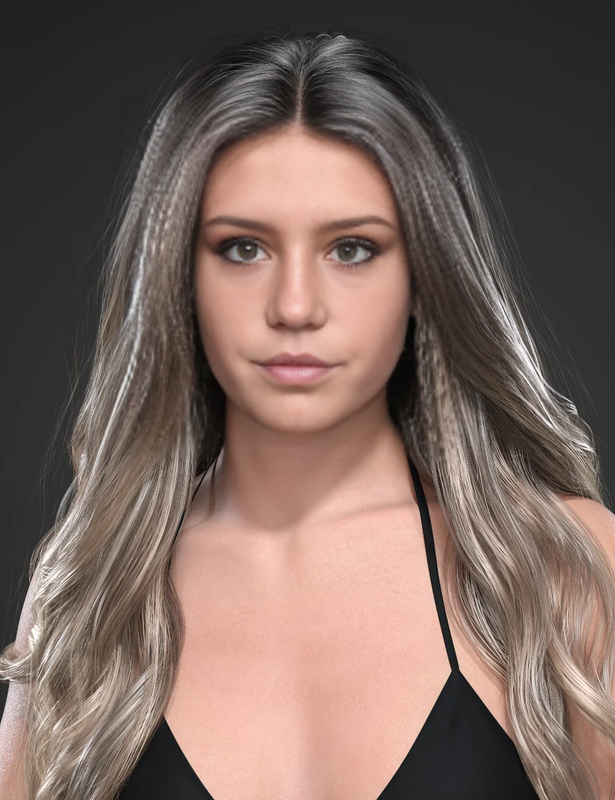
July 15, 2024 at 3:42 AM #2083263And heres one more for the road before I get back to my lora training experiments:
This is DAZ HID Elle for Genesis 9 in image 1, and then face replaced with the Adele photo in photo 2.
-
AuthorPosts




- You must be logged in to reply to this topic.

