Playing around with environment settings

Home Page › Forums › Art Showcase › Playing around with environment settings

Viewing 4 posts - 1 through 4 (of 4 total)
  • Author
    Posts
  • #866291
    Alan
    Participant
    Rank: Rank-1

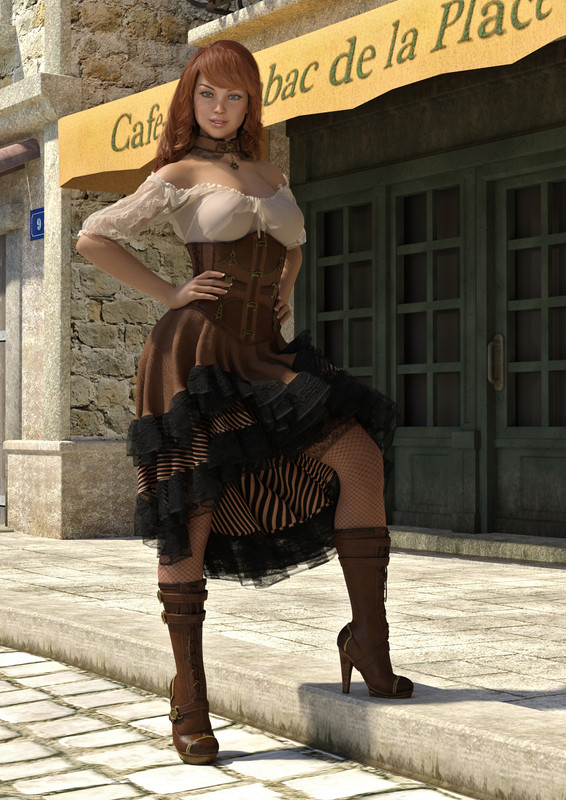
    Still not 100% happy with my attempts at using preset lighting so had a play around with the Environment settings to create bright summer sunlight, then used a single spotlight to brighten up the face and add a catch light in the eyes.

    Odd shadow under her right breast is (I think) from a building which I can't delete from the scene.

    The render left the pavement (sidewalk if your on the other side of the Pond) completely bleached out but I was amazed at how much detail I could recover using Photoshops Highlight and Shadows tool.

    Model is Gen8 Georgina, preset post with a few tweaks to the hands and to raise her right leg.
    #866303
    Alan
    Participant
    Rank: Rank-1

    ........and of course the forum has resized my image and it looks nowhere near as good as it should, render was 2000 pixels high and was cropped very slightly in photoshop.

    #866313
    Kefka
    Participant
    Rank: Rank 3

    Just a suggestion but I think if you use imgur, you won't lose any resolution by right click > view image (in firefox anyway). Also nice work, love the translucency of her blouse. 🙂

    EDIT: I just checked to see if imgur.com maintains resolution. It does.

    #867441
    Alan
    Participant
    Rank: Rank-1

    Thanks for the advice, here it is again using imgur

    null

Viewing 4 posts - 1 through 4 (of 4 total)
  • You must be logged in to reply to this topic.


Post You Might Like