Home Page › Forums › General Chat › OBJ character shape to G8F?
- This topic has 10 replies, 7 voices, and was last updated 3 years, 5 months ago by
 boks180878.
-
AuthorPosts
-
July 11, 2022 at 3:39 AM #1830275
Is there a way to transfer the shape of a non-Genesis model to Genesis 8 (or 8.1)?
I've been trying to get Genesis 8.1 Female to fit this model's (obj) shape
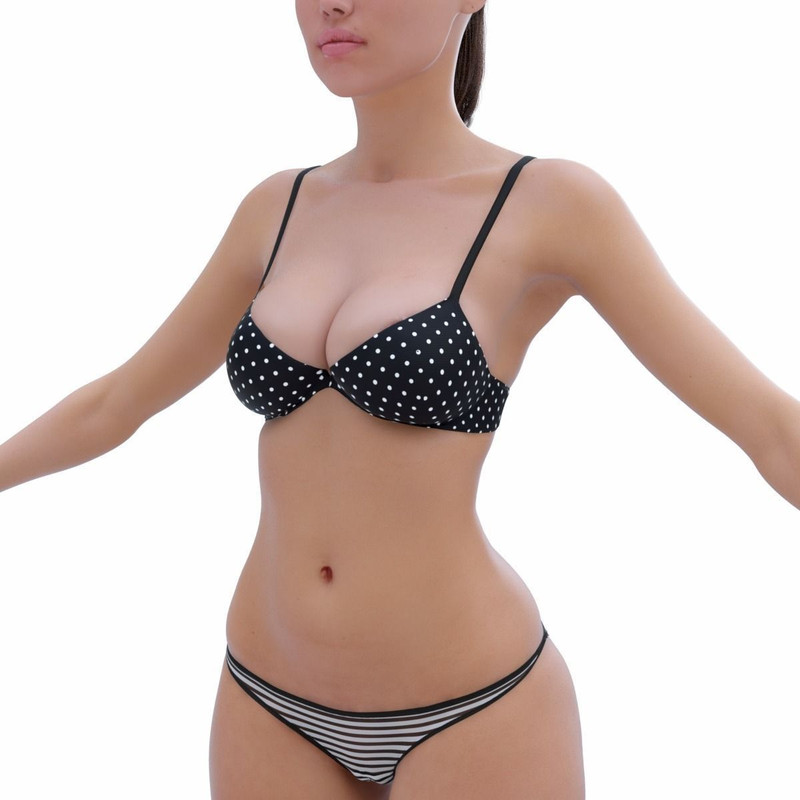
https://www.cgtrader.com/3d-models/character/woman/f-83b8b5fe-b432-4f0d-9456-a372f161e8dfI've uploaded the model to Daz3D Studio, converted it to a figure and even rigged with a G8 skeleton it at one point, even unsuccessfully tried to create a Genesis clone using it but just couldn't. Feels like I've gone through so many youtube videos lol.
I like the shape better than the usual Genesis shape (which after years of using it, are beginning to all look the same to me with only slight variations). I've tried meticulously adjusting the base body but it's time consuming. Also, I'm considering getting more shapes from CG Trader, but there's no point if I can't get G8.1 Female to comply.
July 11, 2022 at 8:49 AM #1830309What is actually different between a 3d human model and a Genesis figure is the Topology (not just the number of polygons, but also their exact shape and positioning, also called "Topology", which is also used for UV mapping) as well as the rigging.
So, in order to convert a human obj to a Genesis Character you need to:
1. Do a topology transfer from Genesis to OBJ ("Retopology")
2. Transfer the rigging from a Genesis to OBJ.
3. Some morph stuff in DAZHere is a tutorial on how to do it [it's in 4 parts].
NOTE: There is a similar, paid add-on in Blender that does retopology, called Softwrap - Dynamics For Retopology (and it seems to be far easier to use).
July 11, 2022 at 11:46 AM #1830341Thank you for the video's and help everyone. I meant to type "OBJ" as in waveform object but I stating obx by mistake (that's what I get for posting past my bedtime).
@littlepleasures I had feared that was the case when I saw "verticies did not match" when experimenting. Which really stinks because I don't want to have to strip a model down to basic and transport it to blender and make only slight adjustments.
@legolas18 Thank you! I've seen Softwrap mentioned in another post for clothing. I'll make sure to grab it, I was also hoping to eventually create original characters in Blender to use in Daz, once I stop gaming and devote the time to learning it ^_^I guess I just now need to figure out what's best for Daz content creation, Zbrush or Blender.
July 11, 2022 at 2:26 PM #1830390July 12, 2022 at 11:41 AM #1830662where did you download this model ? or have you purchased it @ cgtrader ... anyway, i would really like to take a closer look at it 🧐
July 12, 2022 at 5:39 PM #1830775@stachelzelle
You can take a closer look here 😵July 13, 2022 at 5:41 AM #1830902@stachelzelle
You can take a closer look here 😵not really, unless you want to spend 12 bucks for premium 🥴
July 13, 2022 at 6:08 AM #1830905So that the uninitiated know why,
Daz morphs are vertex deltas; therefore the base mesh and the delta mesh must agree exactly in number and order of vertices in order to record each delta (change in position).
This is really no concern anyway, since we always derive a delta mesh by making a copy of the base mesh. There's virtually zero occasion where you have an "outside" mesh being needed to be hammered into a Genesis shape. You will never make a Daz morph from anything other than the base mesh. Just don't be ham-hands and dork up your mesh, be careful! 🙂So then all the devil is in the Shape Key detail.
Anything we want to be a morph will simply be a shape key applied to the delta mesh.
You can use the Shrinkwrap modifier to fit your delta mesh to a complex donor shape, like a character model from a different base mesh. Shrinkwrap gets trickier the more complex a shape you have, but after a bit of back-and-forth you can have a reasonably good shape key to use.July 13, 2022 at 6:56 AM #1830925@amberkat
That's why I gave a link to Wrap3, All models for g8f games - in particular from Shinteo - are all made using this program - up to the transfer of textures.
🙂
@stachelzelle Look here:
clue where to lookAugust 7, 2022 at 7:11 PM #1849269So I tried Softwrap and it absolutely did not work in the end. I was able to create a wrap of the body in Blender (but the head was far from perfect)
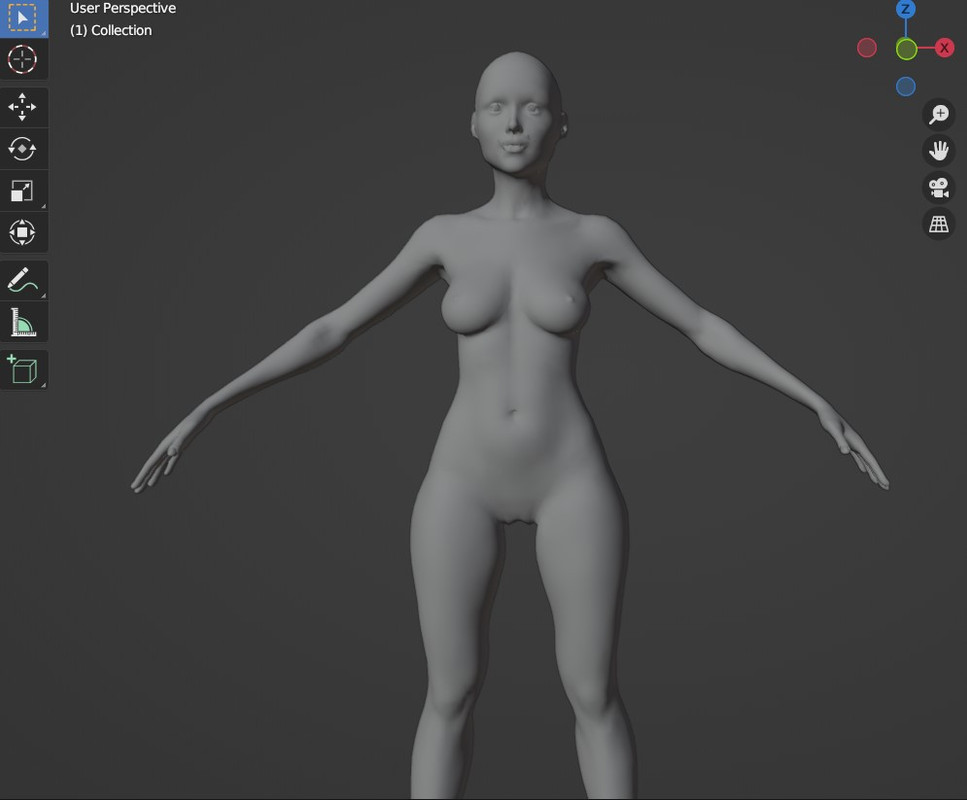
...but when using Figure > Morph Loader Pro (or even Morph Loader Advanced) and applying the morph from the obj I created, I get this monstrosity when applied to GF8.1 Dev Load...
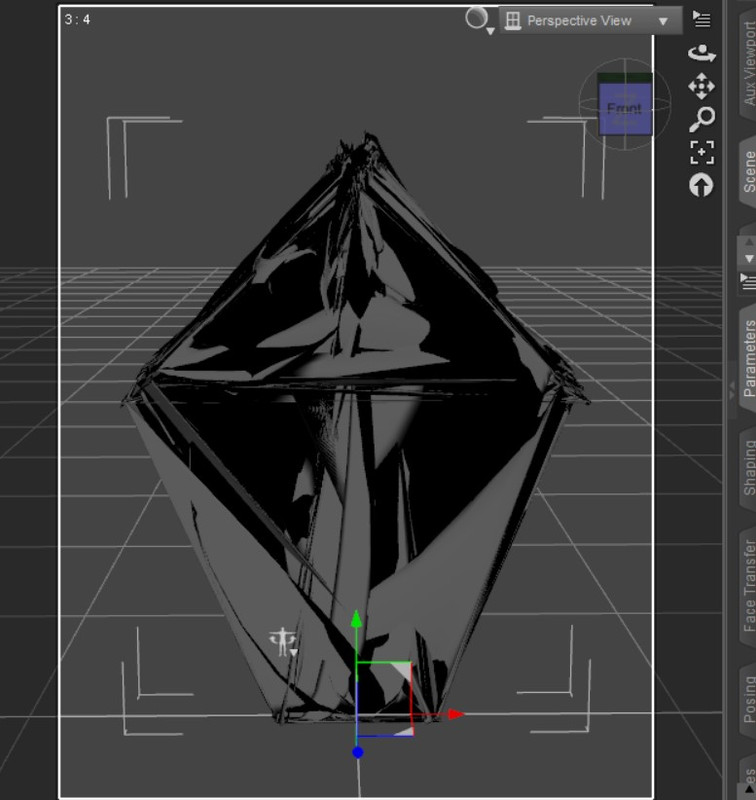
I followed the directions, and I can't get the body shape I want for GF8.1. For a moment it turned into an obsession.
So I'm going into the other threads to offer 10,000pts if someone can successfully morph it and give it to me, I just can't do it.I created a link to the wraps if anyone has any luck with them. Please let me know and 10k pts are yours for the morph (or GF8.1 using the morph)
https://mega.nz/file/EWtT3L4D#0HKxua-GsYXj37Ba6cKvsWO__MKjQ1EuLXeAy-5raJgMay 30, 2023 at 5:42 AM #1978178Morph for Genesis 9
https://mega.nz/file/UMdWGAKS#5gkJJ4pt-naGjRFmCm14DwRY8pRxmxhvJVFDiRagp5s -
AuthorPosts











- You must be logged in to reply to this topic.
