Home Page › Forums › General Chat › Need Help
- This topic has 6 replies, 3 voices, and was last updated 5 years, 2 months ago by
 Grouchy Old Fart.
-
AuthorPosts
-
August 17, 2021 at 9:42 PM #1721513
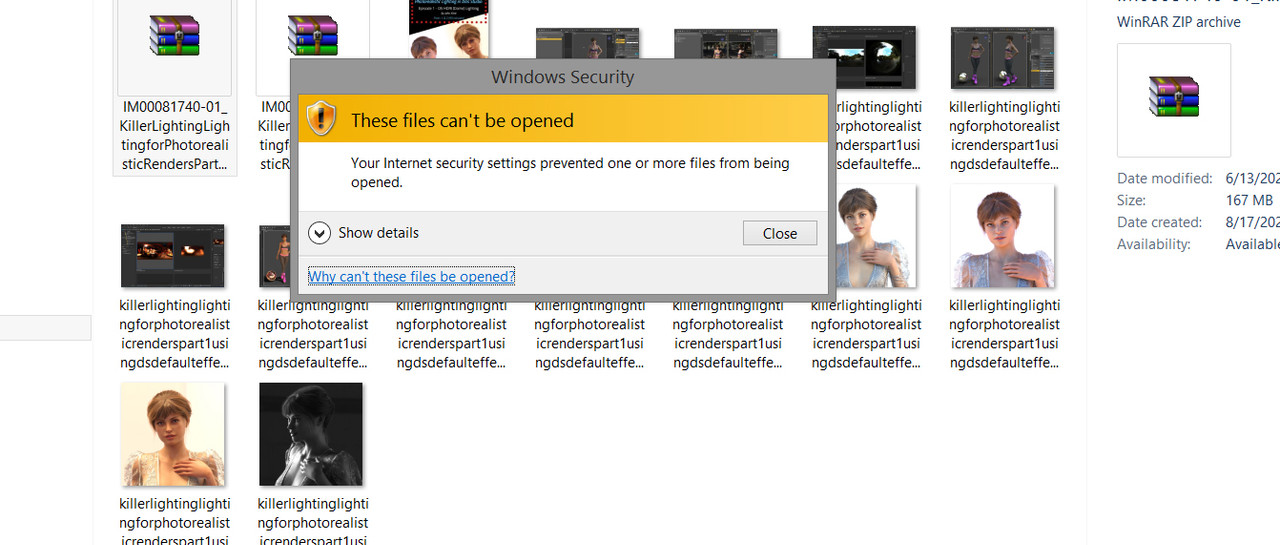
This has never happened before. I grabbed all the 4 "Killer Lighting" posts but I'm unable to extract the zip inside the zip. Says internet security wont allow it. HUH? In over 20 years Ive never seen this before. Any ideas?
UPDATE: I did try other Zips. Everything works fine. Its just these files..
 August 17, 2021 at 11:08 PM #1721529
Do you have Windows Defender looking at .RAR files as VIRUS INFESTED.
They most likely are NOT.
You can tell Windows Defender to IGNORE specific files.
The reason for this is either Windows Updated Defender setting it back to HIGH SECURITY, this has happened to me when Windows Updates stuff and suddenly Defender goes insane. If you use AVG, or another Virus Protection program then you can also set exceptions for folders or files. If you are afraid they are in fact bad, point me to the BLOG entries you downloaded from and I will download them and attempt to open them, and see if they are fine.
AnjaBear
ModeratorAugust 18, 2021 at 4:52 AM #1721581@anjabear -Norton notifies me of issues. But this isnt Norton. Ive never had THIS MESSAGE pop up.
August 18, 2021 at 4:55 AM #1721582@ethiopia I've gotten the path too long message before. But I can shorten the names and see if that helps.
August 18, 2021 at 5:05 AM #1721584August 18, 2021 at 1:24 PM #1721700Occasionally, I find the same issue, but not due to any antivirus warnings, but I chalked it up to Windows' native unzip not understanding the spec, or because nested compressed files sometimes give Windows' native decompression utilities a headache. I solve it by using 7Zip to open the original .rar as usual, then if I find an issue, I use 7Zip again to open the extracted .zip file. 99/100 times, everything works as expected.
August 19, 2021 at 1:09 PM #1721934It could be that as well - good point!
-
AuthorPosts






- You must be logged in to reply to this topic.
