Home Page › Forums › Art Showcase › My showcase
- This topic has 23 replies, 12 voices, and was last updated 7 years, 10 months ago by
Alan.

-
AuthorPosts
-
December 6, 2018 at 6:54 PM #871241
Your girl on the red checked bed made me think of summertime! That's awesome when you can affect me in that way! Great job and Thanks!
December 6, 2018 at 7:31 PM #871288I love the render of the girl on the bed. Does it have a title? An artist should always title his or work. It helps to give it life.
Quick little tip... that smile would look pretty natural if you put braces on her. At her adolescent age, they would be very appropriate.
On the other hand, if a natural smile is what you are going for, I have a couple of suggestions.
Try searching "Signature Smile" in the blogs. The Content Creator for those products has developed three or four characters with a morph for a fairly natural looking smile, and the morph works on any G8 character (assuming you're working with G8). Still, if the morph is not used on the character for which it has been sculpted, it can give you some unexpected results.
Second, do you use Power Pose to make expressions? Also assuming that you use G8, try using the facial controls in Power Pose. There are a ton of handles that can really give you the power to create any facial expression you want and make it look natural.
I agree with previous comments about her weight on the bed. She's a small girl; she wouldn't make the bed compress too much. Great idea to use collision offsets to achieve the effect, looks great! Something to consider if you ever do feel the need to use d-formers on a bed, maybe try push modifiers instead? They give you a lot of control since you are literally "painting" the pressure points rather than trying to manipulate d-former fields. This can often give you a very nice effect.
Keep up the great work!
December 6, 2018 at 8:38 PM #871355Anonymous
InactiveRank:
Not sure how close to "Real" we can come in Daz...
It seems the most realistic images I've seen have been done by a person named 'Haneto' and it appears (from things I've seen in posts by him) that he uses poserpro 2012 and octaneRender to get his realism...December 6, 2018 at 9:14 PM #871394@ultrabald Did you know the head of has dozens of bones that you can manipulate individually?
If you think that your character looks like a wax statue, you can try using that to lift her cheek so it looks like her hand is interacting with it.
If that's not what you mean, sorry.
December 6, 2018 at 10:41 PM #871471I'd like to thank you all for your very instructive feedback. Quick answers :
@eeeooo : You're totally right about the bike picture composition. I didn't even notice that empty space while posing and to be honest I was so obsessed with the bike and biker I just forgot the background.
@robf4g210 : I usually give titles to my "fantasy" renders but not when I pose a "daily casual action" stuff. Why ? Hell I don't really know. Maybe naming this one something like "Cathy doing her homework" would sound kinda obvious ? I should re-think about it. BTW she has braces but the picture was still a bit grainy after a 10 hours render so I de-noised it with photoshop and... well the details went away with the noise.Now about that smile, I'm gonna try to do better taking into consideration all the precious advices I've been given here. For some reason, I always found MUCH easier to pose a suffering/anxiety expression on a character face than a simple smile. There are so many muscles and micro expressions activated when an actual humain smiles... not even to mention a real and big laugh.
Again, thank you all for your feedback.
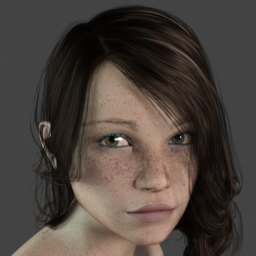
December 7, 2018 at 10:20 AM #872030Talking about smiles, I just tested the "20 Unique Smiles HD for Genesis 8 Female(s)" shared here a few hours ago and I must say I'm quite impressed. I still don't feel it totally realistic and natural but we are close.
Here is a quick and dirty Iray preview, please don't pay attention to grains and glitches :
 December 7, 2018 at 9:56 PM #872634
First one of the two girls is superb, render is also pretty awesome, would love to know what graphics card you used and how long it took.
One comment on the girl on the bike as regards composition, the bike needs to be further to the right, this will give the impression that the bike has somewhere to move into rather than currently looking as if it's about to leave the frame.
December 7, 2018 at 11:11 PM #872700I'd love to answer but I'm not sure which character you're asking about. The one lying on a wooden floor or the one on the bed ? Either way it is CPU render (i5 4th generation) because I use my computer at work to render "casual" scenes for conviniency reasons. It doesn't have any dedidcated graphic card. I always set it to 10 hours max rendering, start the render at 6PM when I leave work and see the result at 8AM when I go back the day after. Most of the time it's long enough, sometimes it isn't and I have to denoise the picture with Photoshop. I have a much stronger computer at home I only use for adult stuff rendering.
About the girl on the bike composition : it is just terrible. I focused on the bike so much I forgot the rest. Will definately do better next time 🙂
December 8, 2018 at 1:03 AM #872782I was referring to the first image in the thread (two girls)
I used to CPU render and just left them overnight, but I got tired of the time took just to do a quick render to see if everything was OK, Swapped a 1.5gig top notch graphics card for and average 6gig and renders have speeded up considerably, cant say the same for games though.
-
AuthorPosts






- You must be logged in to reply to this topic.
