Home Page › Forums › Art Showcase › My first week with Daz Studio (I'm having SO much fun!)
- This topic has 14 replies, 6 voices, and was last updated 4 years, 5 months ago by
 Kefka.
-
AuthorPosts
-
May 23, 2022 at 10:01 AM #1811275
Hey all!
This last week has been fantastic! I found out about DAZ Studio by a friend. Watched some tutorials and tried to make some things myself! Really hoping to get some feedback on some of these! But here goes!
Render 1: My first render
This render was just a test to see how everything works. With a beautiful hacker hideout pack. Didn't need to do much about this scene. The lighting was already setup beautifully!Render 2: Balcony girl
With this render I tried so hard to make it nighttime. It's not great but I think it's good enough for my second render. Her hair is weird because I was impatient and turned down the tesselation on her hair. I wanted a quick render on my GPU. Tesselation 3 made that impossible. Also my first time trying to create a good looking face(pose). I must say I had a hard time trying to get it right...Render 3: The wonderful world of HDRI
I found out about HDRI from a youtube video. And tried it out myself. The DOF isn't great. Ground should be visible by her feet and it is not. Still having trouble with faces haha. I think the lighting is really great! HDRI makes that a LOT easier!Render 4: Popcorn the Goat
I bought a goat on the DAZ shop and wanted to see how it looked rendered. I love that little guy. JUST LOOK AT HOW CUTE HE IS!Render 5: My second HDRI attempt
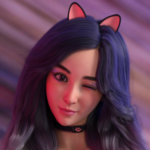
I think this image came out really great. It was also the first time that I was happy with how her face turned out!.Render 6: HDRI.... Starting to sound like a broken record. But I love it
I have made this yesterday evening. This is the one I am the most proud of. The only thing I didn't really like about this one is the dress not resting on her shoulders. I tried to fix it. I failed. Dress exploded with DForce and gave up for now. I will come back to this haha!Let me know if you have some feedback for me! The ZoneGFX community so far has been 10/10!
May 23, 2022 at 10:54 AM #1811301I always get a bit confused with backdrops and HDRI's. People use to threat HDRI's as a whole and that confuses me a lot. And not here, everywhere, haha.
As @ethiopia said I also did my own HDRI's shots for lighting purposes aka reflections on surfaces and skins. In fact there are several videos where you can learn how to create HDRI for lighting reflection purposes:
(This applies to Blender but already did in Cinema 4D, etc.)
And if you want some free great quality sources:
https://polyhaven.com/hdris
(Funny story how some vendors actually rips from these site without even crediting and sell it in the store, lol). But they aren't doing anything wrong cause "Polyhave is Not just free, but CC0, meaning you can use them for absolutely any purpose". That's the cheat.I altered some of my own shots to make then SciFi looking. At that time I was working on a mini commercial project doing some fractals and using them as reflections to make they look "sci-fi".
BTW, I can't forget to comment that most of people starts are way worse than yours and you have some sense of 3D looking at composition, light, etc. Keep them going mate!
May 23, 2022 at 11:16 AM #1811304@ethiopia I've sent you a PM. Really interested in what you have!
@konodioda Oh I will add those video's to my Watch Later list! Thank you. And also thank you so much for the kind words! I do a bit of Photography in real life so that really helped a lot.
May 23, 2022 at 11:36 AM #1811314Hello namanix, in your 5th render make sure your hand poses on your models are touching the waist area and the fingers are positioned well to your character for a more realistic pose. Other than that, great work!
May 23, 2022 at 11:37 AM #1811316@blackbusters Omg I cannot unsee it now. Thank you! I will fix that up and will rerender her!
Thank you for the kind words!
May 23, 2022 at 12:16 PM #1811333Currently rerendering. But it already looks a lot better!
Not 100% there yet. But at least I get this now 😀 (I hadn't done any manual modifications to position yet. But now I have :D)
May 23, 2022 at 10:31 PM #1811480These images are great @Namanix, especially for a beginner, you certainly learn quickly.
I took me months to get a handle on DS and I had been using Poser for a decade+. Maybe I had to unlearn Poser before learning DS LOL.
Good work, keep it up!Edit - forgot to ask, what are your rig specs?
May 24, 2022 at 4:28 AM #1811555Thank you so much @frank21!
My rig. Lemme check
CPU: AMD Ryzen 7 3700X
GPU Nvidia RTX 2070 Super (I'm going to test out 2 of those cards in nvlink this weekend)
RAM: 64 GB of ramMay 24, 2022 at 3:41 PM #1811731Just did a new render. I'm really loving this one.
May 24, 2022 at 4:05 PM #1811737Be sure to keep an eye on the contest page. One gets ran every so often.
May 24, 2022 at 4:07 PM #1811739I will! Thanks 😀
May 25, 2022 at 3:40 AM #1811887I wasn't sure if you can NVLink 2 RTX 2070 Supers. I thought it was only the RTX2090 in the 2000 series but apparently you can. Let us know how it goes.
May 25, 2022 at 4:33 AM #1811892I will! I'm receiving the NVLink bridge today. And have permission to test with my wife's GPU as second RTX 2070 super. If this works I'm buying the second one. I'm really hoping it can pool memory so it's possible to have 16gb of VRAM using these cards.
May 25, 2022 at 4:44 AM #1811893I'm stuck on a single 8Gb 2080 myself but it pretty much does everything I ask of it if I'm careful. Two 2070 supers with the NVLink bridge should pool memory so long as they're both the same. You should also get a decent boost in rendering performance.
https://www.tweaktown.com/articles/9047/nvidia-geforce-rtx-2070-super-nvlink-benchmarked/index.html
May 26, 2022 at 12:31 AM #1812241Wow.. I didn't read everything but if this is your renders at 'newbie' stage, color me impressed.
Maybe you just said you are new to this site.
Anyway, take care.
-
AuthorPosts








- You must be logged in to reply to this topic.
