Home Page › Forums › General Chat › Lighting Help
- This topic has 31 replies, 4 voices, and was last updated 8 years, 4 months ago by
 jason david.
-
AuthorPosts
-
May 28, 2018 at 2:16 PM #620963
Thanks once again @D0GG0D for that link I know Dreamlight are a must in Lighting in Daz and I used some of their lighting especially the Exstreme studio lighting and watching some of their videos has kind of helped me not to lose hope in Daz lighting as the guy is GREAT and very Helpful too... and @EvilMonkey I am trying to get more classic effects as in the paintings I mentioned earlier...So i am going to try a figure in that atmosphere and see what it will yield meanwhile @DOGGOD here is another lighting effect from Daz with help from the GIMP (2.10 )
 May 29, 2018 at 11:31 AM #621975
@DOGGOD and @EvilMonkey Here are the gradations from light to darker of the final work using the GIMP for light retouching


and for sharper eyes

Thanks guys LESSON LEARNTMay 29, 2018 at 1:32 PM #622067Glad you found your groove. I like the top 2. Cool idea on lighting and I like the less dark image better. "I" think the drastic play on the other 2 bottom images would play better on a human subject. If you look at the link provided almost all of them are people.
May 29, 2018 at 8:33 PM #622429Yeah, they all look great but I agree with Adam about the top two being the best, the 3rd one loses a little too much detail and without the light picking up a lot of edges in the top half it looks a little empty.
Again, I can't wait for you to start putting figures in scenes like this, I'd love to see if the effect transfers across to skin tone.
May 30, 2018 at 1:18 PM #623149May 30, 2018 at 5:24 PM #623349@DOGGOD and @EvilMonkey for the last one it was a vignette that hid a bit that passage... Yes skin tones sometimes get great with lighting but sometimes they become like earthen stuff and lose translucency maybe depending on the skin textures and the SSS they contain. I'll use one that has better chances to survive in my LAB...Thanks for the encouragements and the feedback I may need to reconsider the whole scene with human figures because the whole notional space will be drastically different and after all it's LIGHTING that I am after in DAZ
June 4, 2018 at 3:13 PM #629134Finally I got something @DOGGOD and @evilmonkey and I really had to create my 'OWN' lights and stuff because I wanted the light to create some kind of ellipse that encloses around the faces and hands of the characters to create some drama...
 June 4, 2018 at 5:12 PM #629240
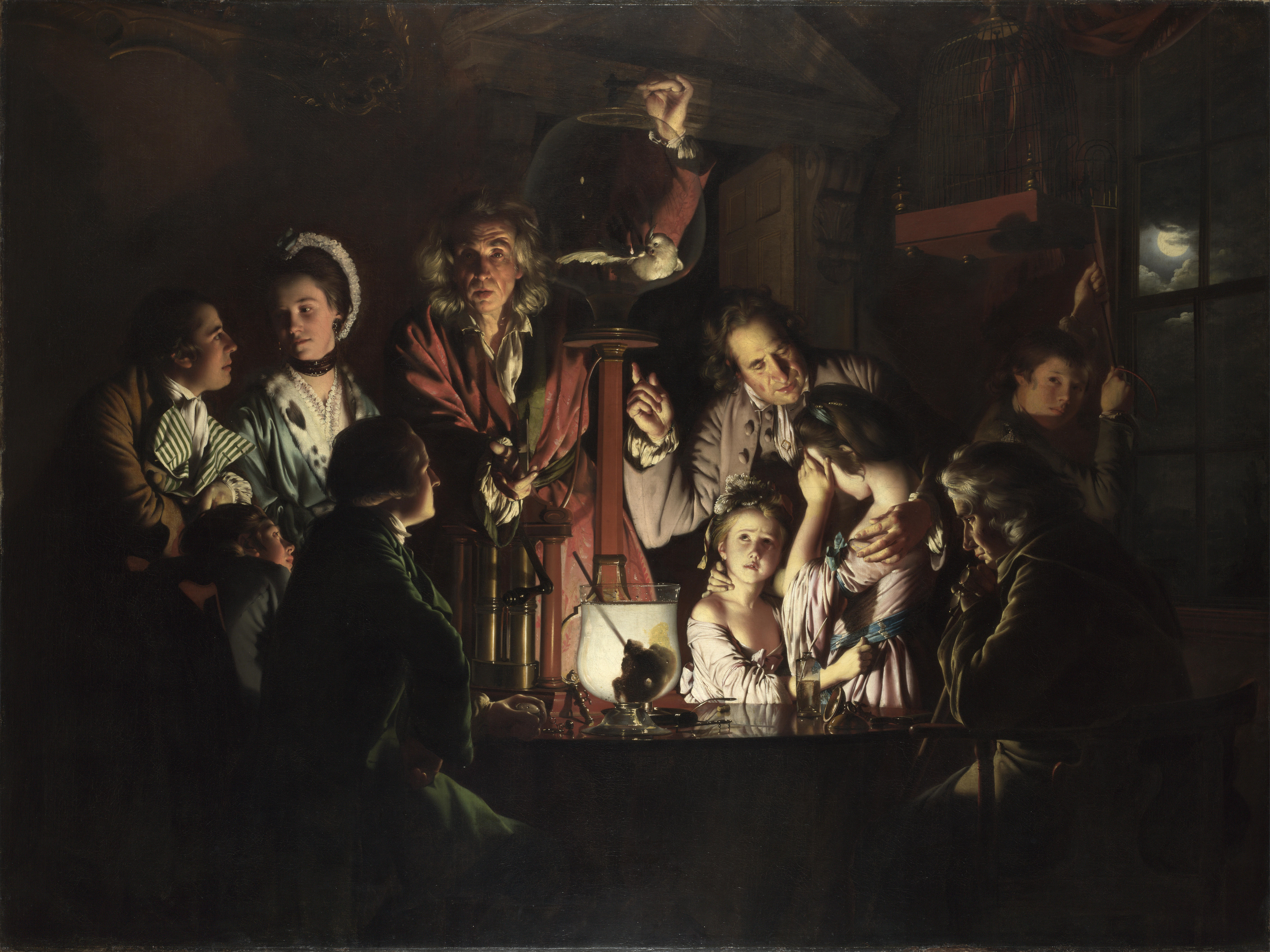
If you're lighting figures in the dark don't be afraid of creating a source of light, a candle or lamp and it could even be hidden behind an object. Such as - https://upload.wikimedia.org/wikipedia/commons/2/22/An_Experiment_on_a_Bird_in_an_Air_Pump_by_Joseph_Wright_of_Derby%2C_1768.jpg or https://pbs.twimg.com/media/CBMVEzKUQAEOdTv.jpg Because all the figures are crowded around the object that's lit it brings out all the details that are needed in the piece.
Also if these figures will be your main focus I would suggest cropping in closer, something like this. I would be interested in seeing the evolution of this piece.
June 4, 2018 at 5:17 PM #629246I like the poses, clothing, layout. Pretty much eveything but, I dont understand the light. It has no source like a candle, flashlight, fire, ect... or close to a window with the moon or outside lamp as a source.
If you zoomed in, it might imply the source is close but unseen however you loose showing the nice outfits and poses.
June 5, 2018 at 4:18 PM #630261Thanks for the feedback very very appreciated @Evilmonkey and @DOGGOD I have created sourceS of light among these one hidden by the sitting lady's arm another one is hidden by the paper scroll and there is also one pointing to the standing lady's left-arm fingers as I want to create the chiaroscuro effect like in this painting

There are gradations of light (chiaro) and shadow (oscuro)
(chiaro oscuro chiaro oscuro chiaro oscuro ) to create a certain rhythm...and usually this is created by strong directed light illuminating key parts of dark scenes through these subtle gradations of dark and light to give form...So it is very difficult with ONE source to do so in DAZ, therefore I have sown these scaled
light sources here and there to this effect of light-dark light-dark as I am indicating here with red (for dark)and green (for light)arrows along the horizontal as well as the vertical axes

Originally I took LAMP5 from the Italian Lighting Set and scaled it to this effect and also changed the light setings in the surface tab I also deleted the cord as it's no use...As I said before this effect is HARD to get with 1 directional light source because you need to illuminate many KEY ELEMENTS in the scene and these elements are not placed on one line or diagonal....I also didn't want to use a candle or lamp as it has been used over and over and would distract from the message here...June 5, 2018 at 7:10 PM #630498Ill have to look better on my laptop. on the cell atm.
The post with 3 guys appears "to me" to be in an outside environment with a strong light source (probably sun) out of frame. However since ive been trying to study light, it looks more like a close flood light. Very bright with strong shadows. the Sun is a HUGE light source VERY far away. That "should" result in shadows having some light and definition.
Its more a style that realism I think.
Imitation is the sincerest form of flattery but, "I" would try to take it a step further to make it my own. Like in the Noir contest. Put some of you in the work rather than trying to exactly duplicate a stlye. All of these styles had to have a person be the first. My goal is the be the first at something people love and thats not easy.
Here is Luke Chewy and Leia
https://m.youtube.com/results?search_query=thundarr+the+barbarian
June 11, 2018 at 7:41 PM #637506Hi again @evilmonkey and @Adam about lighting in daz....It's a bit as if the clichés work sometimes and here I tried to use the candelabra as it happens to spread warmth and secrecy...

Here I am really IMITATING https://en.wikipedia.org/wiki/Susanna_(Book_of_Daniel)
but the lighting is a challenge. Here is the first one.

I don't like how the light strikes the pot bottom right..looks flat..but i like the light striking the lady's left side...the guy sitting or crouching is in shadow but I think this serves the theme...
Here is another render with better results on the pot bottom right and on the whole there are less hard shadows and the core in some shadows is off center on thirds so it's ok...
 June 11, 2018 at 8:23 PM #637535
I really like the addition of the candles. I like the 3rd image better than the second. At least gor now till i get more time to study it.
June 11, 2018 at 9:59 PM #637618@jason, clichés are clichés for a reason. 😉 I like the softer light and the way it pulls attention to the ball of illumination, it centres the scene better in my opinion. I would like to see more shadows cast though but I know Daz and it's light is a difficult bitch to make work.
The second scene, your version of "Susanna", I quite like the scene you've set up and the light in the first picture would be my preference, simply for the harsher shadows. I would suggest a few changes though, turn her head towards us slightly so her face is lit more, move the guy on the left to the right so he's not hidden in shadow and she is actually fending him off and lastly get a pot with a higher poly mesh as the shadow isn't laying smoothly (if that makes sense).
June 17, 2018 at 1:26 PM #644392Here is another render @Adam and @EvilMonkey with much render-time consumption and I am still exploring some lighting packages namely Rembrandt Lighting from RenderStudio and Painter's Lights but need time....
I don't want the guy to be in front to the right because it will put too much focus on him and not on the lady in center.... so I did my best to have him litup abit more and i like the halo behind him and around his arm...I like to have more dark-light transitions in my work I think it gives more depth...Thanks for all your time...


-
AuthorPosts




- You must be logged in to reply to this topic.