Home Page › Forums › General Chat › How long do your renders usually take?
- This topic has 44 replies, 13 voices, and was last updated 4 years, 3 months ago by
 Frank21.
-
AuthorPosts
-
June 24, 2022 at 10:57 AM #1823127
Iray is a derivative of Mental-Ray, from Nvidia, which Autodesk used years ago in its products such as 3ds Max or Maya… It is an OBSOLETE render engine.
well, even if the development of mental ray has stopped, it's still a very good renderer that can easily keep up with much more recent ones in many aspects. i have used mental ray for years workwise (also vray) and i still use it for personal stuff, because there's very less what you can't achive with it. the limiting factor nowadays aren't the renderers anymore (unlike in the 90s when you only had scanline and raytracing without GI), it's the experience/knowledge how to use it. so if you're skilled it simply doesn't matter which of the renderers you use, because all of them can deliver good results if you know how to handle them.
this counts for iray too, even if mental ray wipes its ass with it, so to speak. i've also used iray in commercial projects long time before DAZ saw the light of day and i was never a big fan of it because you have much less control and simply use raw computing power to compensate for missing optimization and features. it works good in specific cases but wehn it comes to more complex stuff it's just not suitable. that's why i rather like to stick with CPU based renderers where you have more options to speed up render times, than buying the next expensive graphic card.
June 24, 2022 at 10:54 PM #1823390The consensus suggests there is basically two methods for faster renders.
1. Brute-force with a godlike GPU
2. Optimise your scenes
I'm on an older GPU so option two is all I have to work with.June 25, 2022 at 6:19 AM #1823436June 25, 2022 at 7:21 AM #1823444Well I was speaking within the Dazniverse which most of us are confined. I spent many years moving Daz/Poser between C4D and Vue and believe me I have no desire to repeat that painful process of tweaking everything to fit DS stuff to non-DS progs, now that DS has Iray.
Animation is a different thing but I don't have the stomach for that in DS or any other program because that's not my thing.June 25, 2022 at 2:56 PM #1823595I have no desire to repeat that painful process of tweaking everything to fit DS stuff to non-DS progs
that's a small price i'm willing to pay for the huge freedom i get thereby. i rarely use anything out of the box anyway, because the quality differs too much and is often not as i want it to be, so i have to touch it anyway ...
July 4, 2022 at 5:29 AM #1827769Less than 6 min for me depending on what is in the scene. Some buildings/houses have bad lighting but I found out that sometimes deleting the roof out can help with lighting and rendering.
July 4, 2022 at 7:49 AM #1827794The Daz forum benchmarking results are unrelated to real-life and only a GUP test.
If you set up your scene right (or wrong) the render times you experience is the real test. If you don't know what the hell you are doing and expect quick results out-of-the-box you may well be in for a big shock. It ain't what you do but the way that you do it.July 4, 2022 at 8:27 AM #1827798Hi There,
I will also share my advice.
My System: Intel Core i5-11600KF, 32GB Ram, Double RTX 3050.
I've used Daz for a long time now, and know what to expect from a lot of things.
I will also share some tips.
Beginning with, Indoor Scenes, like the one you are experiencing issues with.
Indoor scenes (4 walls and a roof with perhaps 1 or 2 windows around a character) will ALWAYS be noisy as opposed to outdoor scenes where nothing in terms of walls is around your character, this is due to the fact much less light can enter, and because it's bouncing around in the scene itself. For Indoor scenes, a HDRI on it's own is not enough, and you will have to use other sources of lightning to. Lights will not fix how noisy an image is, but will result in the noise disolving faster.
For two Settings i can recommend to use in Indoor scenes, Nominal Luminance helps in reducing noise, and depending on situation, you will have to use the denoiser in Daz.
For a product, Iray Ghost Lightning is perfect for indoor scenes.
Another tip i can give, is that you NEVER look at the convergence of Daz ever, depending on the scene and render (And chosen "Quality", Convergence will never, if ever, move (a lot), what you do need to look at is the iterations and how your render looks like. If you look and wait for the convergence to begin moving or wait until it's at 100%, then you will be stuck waiting for litterly hours, maybe even days.
A Lot depends on the scene itself, but anything that reached 5000 iterations and above, should look good, if not, something clearly went wrong.
Noise is something you will never be able to eliminate entirely in indoor scenes (even outdoor scenes, but there it's simply very blended in), as there is a spectrum here. Soft Noise = Detail and a better looking scene, No noise = loss in quality and details, the less noise, the more flatter and smudged out things look.
As examples i can show: https://ibb.co/q7b7Kks Took 20 minutes to render and reach well beyond 5000 iterations
Indoor example: https://cdn.discordapp.com/attachments/991296541304311878/993197873745371157/Isaki_Dojo.jpg - Took around 30 minutes to render
On a further Note, i also grabbed the Mentioned Test scene here, and rendered it out.
https://ibb.co/sVTWR52 - Notice how the Complex and heavy SSS and other problematic areas are completely noiseless compared to default settings?
That's what Nominal Luminance does, And a setting that i learned to use thanks to Octane Render, where this is known as GI Clamp.
And then, the importance of post-working your scenes, is simply because you cannot count on Iray to do everything, but even from a simple test scene like this, i work with what i know, is provided, and that i have.
https://ibb.co/z5tXK7N - brought back some of the light that was initially lost, and slightly reduced the noise that became visible again (as said, you can't eliminate it, and trying to do so will just drive you crazy, at best, you can only use techniques to reduce it and/or make is as less visible as possible with problematic area's)
Noise is important in a scene, to some degree.
Note that those images are post-worked, which is another important thing to balance out the toning and colors in your scene.
Mello
July 5, 2022 at 5:32 PM #1828375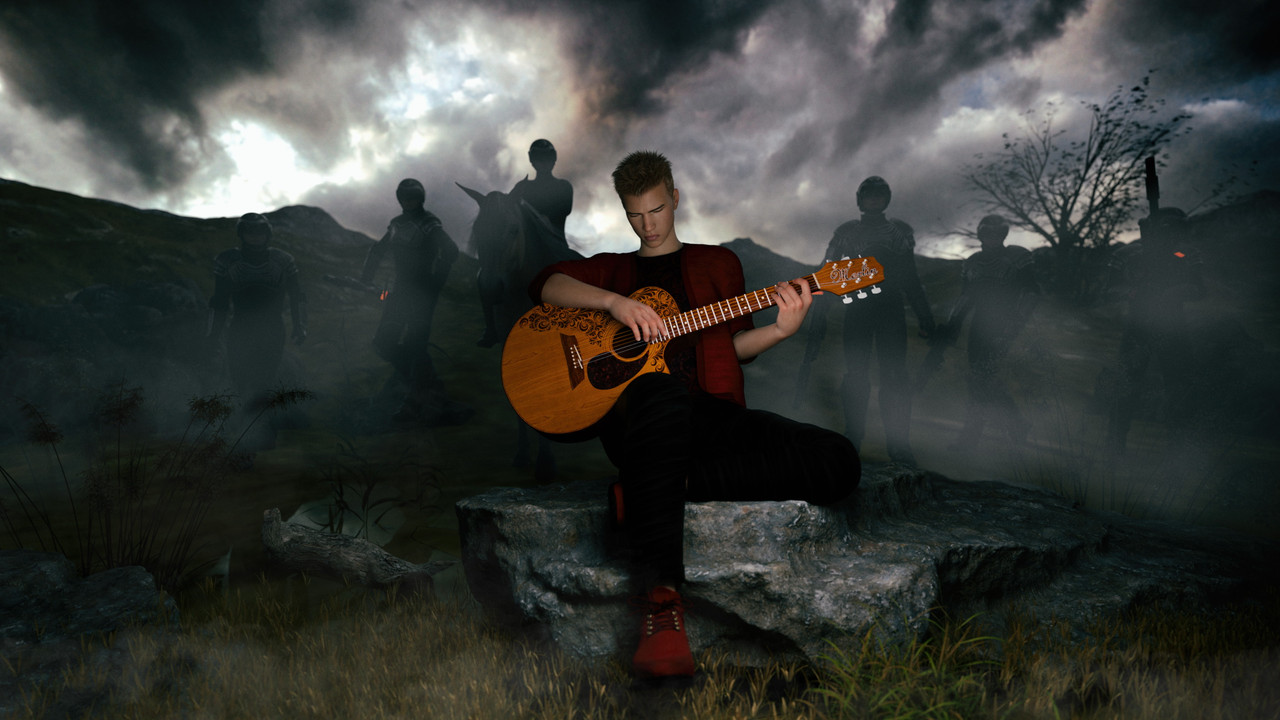
Total Rendering Time 5 minutes 37.71 seconds
Size 2800X1575
Render setting Standard + Post SSIM Available and Enable
Daz Version 420.017System Win 7
Processor I5
32Gig memory
Nvidia GeForce RTX 2080Ti
Nvidia driver Version 473.04Items used:
dForce Togatta Hair for Genesis 8
dForce Pop Style Outfit for Genesis 8 Male(s)
Mountain Lakes and Forests
Highlands
DAZ Horse2
Sci-fi Police Officer Outfit for Genesis 8 Male(s)
Cyberpunk Weapons
Acoustic Guitar by Merlin
6X Luca for genesis 8 male
SY Fantabulous Fog Iray
After glow
Orestes iray hdri skydomes vol 2 dreadful cloudsJuly 5, 2022 at 6:17 PM #1828391@Lucafeelgood Cool render!
I'm surprised it only took five and a half minutes. Using fog or smoke usually adds at least ten minutes to my renders. I must be doing something wrong.
July 6, 2022 at 6:18 AM #1828551I must be doing something wrong.
@enjoyify There are too many parameters playing a roll in the game. It took lots of time and sweat to tune my win7 offline rig, That´s why I never touch my running system. It is hard to find the bottleneck.
In any way.............I don't think you doing something wrongJuly 6, 2022 at 7:29 AM #1828569It's also because there is a difference in non-volumetric fog and volumetric dog (such as the ground and matte fog settings daz has build in)
Anything thats a volumetric and where light passes through will take longer, if its a simple flat prop that creates a foggy effect, then that won't affect the times a lot.
July 6, 2022 at 8:26 AM #1828580My workflow is to set up my scene with lighting first. If it's a dog I do everything I can to get it to render faster and then I'll give up. Never beat a dead horse.
Occasionally you'll get an indoor scene, even low light ones (below), that render inexplicably fast. Save the scene for later and even if you change the props/walls etc. you'll know it's a good "scene", a keeper. With DS there's no real way of predicting render times. Much of how it works defies logic.6.5 minutes

15 minutes
 July 6, 2022 at 7:58 PM #1828799
Perhaps can also make some difference.
USA 110 Volt/60 Hz
EUROPE 230 Volt/50 HzJuly 6, 2022 at 10:35 PM #1828819@Ethiopia ".... the bedroom with the cityscape in the background. It looks familiar, can you remember what it is? Is the lighting just the light coming in threw the window or are there supplementary lights?"
1. Victorian Bedroom (Daz)
2. Lighting is an HDRI (the back wall is shifted a bit) and a Ghost Light at the window
3. The background is my own (Bodleian Library)
@Littlepleasures - 100% correct on both lighting setups -
AuthorPosts









- You must be logged in to reply to this topic.

