Home Page › Forums › General Chat › How long do your renders usually take?
- This topic has 44 replies, 13 voices, and was last updated 4 years, 3 months ago by
 Frank21.
-
AuthorPosts
-
June 17, 2022 at 5:40 PM #1820947
I'm trying to get a frame of reference here, anyone willing to give me some examples?
Currently got one going that's 43% at 5hrs 10mins in and still looks like garabage. I'm ending up with way too many pieces that are too grainy to do anything with...June 17, 2022 at 6:00 PM #1820954Depends on the complexity, resolution, and if there is a lot of noise to begin with, not to mention the power of the computer.
Typically, for a character @2000 x 2000 and quality 500% it will take my pc 30 minutes or so.
At 1.5 hrs I can only think something with vegetation + 1 character @200% quality, at 3800 x 3000
Then again, that's what you can expect with the beefiest pc 😉
June 17, 2022 at 6:21 PM #1820962@legolas18 5rs & 37mins got me this :
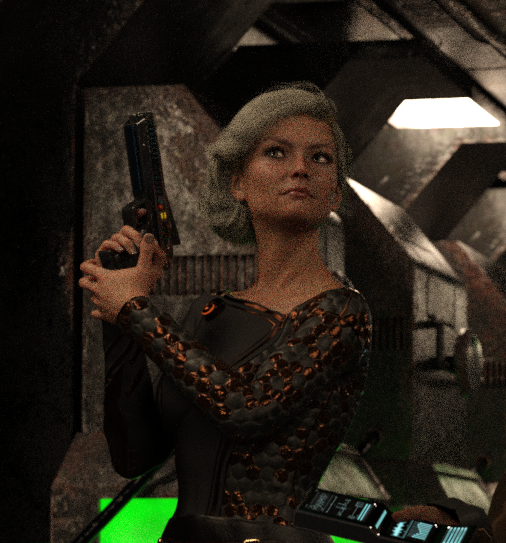
The whole thing was 1600 x 1200.
I've got a 12th Gen Intel(R) Core(TM) i7-12700KF 3.61 GHz cpu and a Geforce RTX 3070 16bg ram.
I've tried using both and just the RTX and still get some of these that just don't wanna render. I tried upping the quality and no improvement. The Long Gallery Ruin is another enviroment that I can never get to render.June 17, 2022 at 7:21 PM #1820978Have you tried hiding geometries that are not in the render?
At that resolution the image should be done quite fast, honestly. 5 hours seems excessive (then again I have a 3090, with 64 gb of system RAM, so your 16 GB might be a bit too few?).
Maybe you have other stuff running in the background?
Are "caustics" on? Sometimes they can make a render much longer. Did you change any other render settings significantly?
I typically only change:
Filtering > Pixel Filter > Mitchell (to make things sharper, Gaussian is super out of focus)
Pixel Filter radius = 1Spectral Rendering ON, rec 709, natural, 1964
And most other things mostly remain untouched.
June 17, 2022 at 10:37 PM #1821056Five and a halve hours at 1600 x 1200 with those good specs? I'd be wondering if the GPU is doing anything at all. It would seem to me you're only using the CPU.
This similar low lit scene took <3 minutes on my 2080 at 2100x1200 so your 3070 is probably sitting idle due to exceeding VRAM. June 18, 2022 at 12:29 AM #1821100
Someone mentioned in the DAZ3D forums that it's a case of not enough lighting. I love to put my models in such situations. Make sure your render engine isn't set up to stop after a while (On a timer)
June 18, 2022 at 12:34 AM #1821102Agree with what everyone else said.
A 3070 should destroy that scene. If I had to guess, I'd say your CPU is doing all the rendering because you maxed out your VRAM. Go into Daz, click the Render tab, then the Advanced tab. UNCHECK both CPU boxes and uncheck "fallback to CPU". Restart and try again. You'll quickly know if your VRAM is maxed because the render will be a black screen and stop rendering after a couple minutes.
Once you find the problem and have this fixed, you can turn your CPU back on if you like. But I personally always leave it off. A 3070 will kick ass on rendering UNLESS you max out it's VRAM by putting too much stuff in the scene or turning the SubD up too high.
June 18, 2022 at 2:47 AM #1821111I'm sure we've all experienced scenes that we thought would render quickly take ages, and also the reverse. Personally anything that takes more than 40 minutes I give up on, or completely re-do the lighting setup, reduce the textures, and as @Enjoyify says make sure SubD is set no more than 2.
Emissive geometry kills render times and it doesn't help that so many PAs feel compelled to use 4K maps on everything.
IMO two essential tools are the free Texture Reducer script and Ghost Lights.June 18, 2022 at 3:27 AM #1821118Love that picture @Joeblow, and a reason why I don't animate with DS. BTW it's probably not a good idea to give your identity away with a link to ArtStation... just saying.
June 18, 2022 at 3:58 AM #1821123I'm betting nobody is using section planes to eliminate unseen vertices from the Iray calculation. Expect significant decrease of render times when using these.
RAM is a primary factor, especially if CPU is forced. having less than about 120% of the scene's weight, above and beyond the system load (~4GB just to load Windows) will increase your render time by orders of magnitude, as the CPU is now spending far more time swapping data RAM<->HDD than actually calculating light.
A moderate set like an apartment, and a couple of G8 figures can easily eat up 15-20GB of RAM. So 120% will be 18-24GB,, plus the 4GB of Windows. The slack space is for other processes on demand, and Iray prefetching and buffer writing, etc which happens in addition to the bare size of the scene.
I learned the hard way, forcing a mere 8GB of RAM to render anything. I found most of the tricks to get it to happen, but it's not pretty. A simple well lit 10GB scene load would take anywhere from `8-24 hours (or much more!!) to even approach 90% convergence. Not to mention, Daz+Iray OWNS your machine for that time. Do NOT expect to click any button anywhere and get a response in the next several hours, or risk crashing your box.I recently had to replace my lappy's battery, so while I did that, I decided to fix the broken keyboard (and upgraded to a nice backlit one) and maxed out my RAM, from 8GB to 32GB.
You would not believe the difference. What took a day or more, takes a few hours, and I can at least click on things without having Satan show up for cocktails.June 18, 2022 at 5:01 AM #1821126Amber, I didn't think that sysRAM had much affect on render times but apparently it does. I've been using 32GB for years and recently went from ddr3 to ddr4 and noticed some improvements, mainly in After Effects.
Ideally data swapping wont happen if your GPU can carry the load so more sysRAM shouldn't make much difference unless the load exceeds GPU VRAM.June 18, 2022 at 7:35 AM #1821166...and load often does exceed vRAM!
Statistically speaking, the vast majority of folks aren't rocking bare minimum 32GB vRAM.
Or any at all! A scary amount of them are also CPU-forced.June 18, 2022 at 5:36 PM #1821328Yeeeeep, after much testing- I have crap Vram and ram -_- 8 and 16.
June 18, 2022 at 9:39 PM #1821383Your Vram is twice mine and I generally don't have a problem with 8Gb if I don't do something stupid.
And Larry @Gelstat, this is how you should link an image-
 June 19, 2022 at 12:45 AM #1821417
@frank21 sorry, my dyslexic behind wrote that backwards, I have 8 vram - 16 regular ram. When I took the CPU off I couldn't get the scene to render at all, so I hid everything that didn't effect the scene and tried again. Still wouldn't render. I switched out the hair for a lower rez. Nothing, So, I started hiding characters until I just had the one, only then did it render. Which I kinda don't fully understand as I've had many scenes with way more characters render just fine. I dunno, I ended up giving up on that scene since it looked like I was going to have to render each character individually and then have to try and compile them. Also, even with it hidden it was trying to render the hair? I had to delete the hair completely.
I also ended up pulling my tower out as it was getting pretty hot.
I'm still a little baffled at this point.
-
AuthorPosts










- You must be logged in to reply to this topic.
