Help with Classic Blowout Hair

Home Page Forums General Chat Help with Classic Blowout Hair

  • This topic has 2 replies, 2 voices, and was last updated 4 years ago by Rui.
Viewing 3 posts - 1 through 3 (of 3 total)
  • Author
    Posts
  • #1861018
    Rui
    Participant
    Rank: Rank-1

    Hey guys, is there a way to optimize this hair: https://www.daz3d.com/dforce-classic-blowout-hair-for-genesis-8-and-81-females

    Changing the mesh resolution to base, scene optimizer or even decimator doesn't seem to help
    My gpu is the 1080gtx 8gb, maybe it can't handle it, I also have the Primavera Hair from the same artist (Linday) but it renders out nicely without doing anything and its a bigger hair.

    Is there anything else I can try? Maybe the hair is poorly optimized?

    #1861156
    Abad
    Participant
    Rank: Rank 5

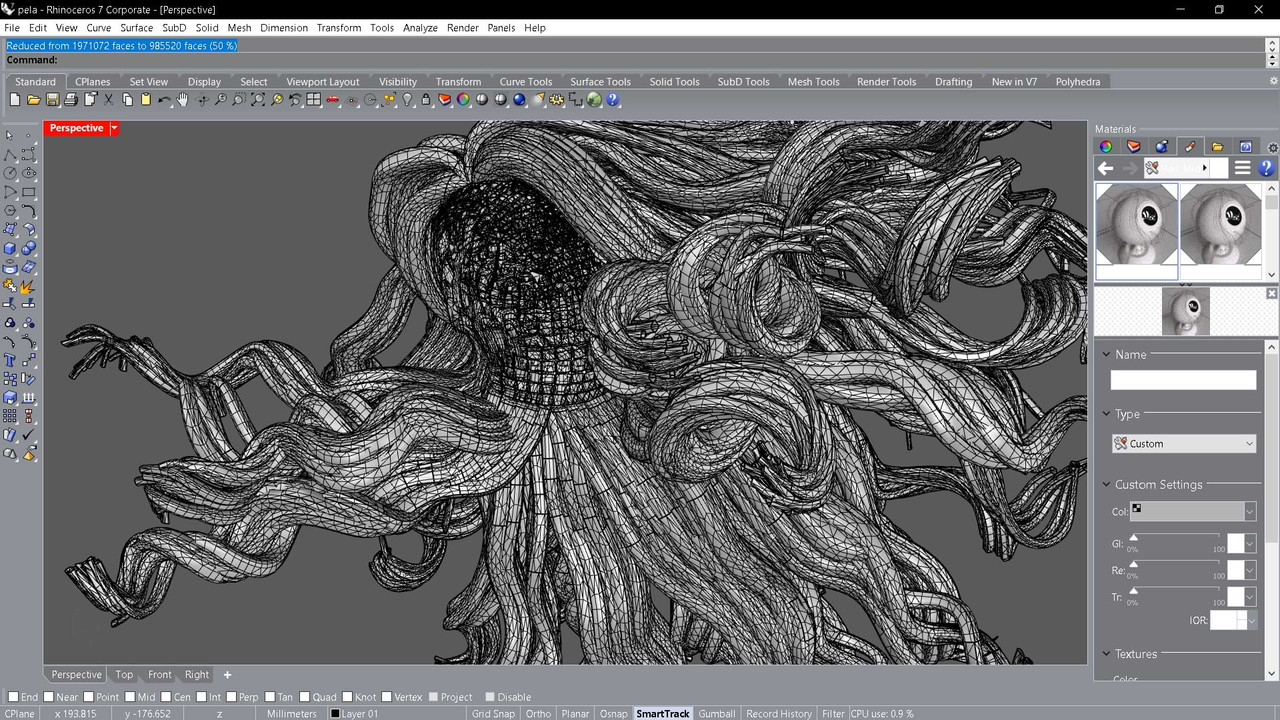
    @ruidx That hair has 1971072 polygons... Simple. I don't think that with the "decimator" plugin you will earn much. In Rhino , at 50% reduction, it still keeps 900 thousand... Try "Dsf Tools", reduce in Blender or Rhino, and create a new dsf.
    Besides, it is full of alpha channel in its textures. Try to compress them. they are in C:\My DAZ 3D Library\Runtime\Textures\Linday\Classic Blowout Hair. Some reach 5Mb...
    All that, added to Iray's slowness..., can become vomiting.
    #1861198
    Rui
    Participant
    Rank: Rank-1

    @Abad @Littlepleasures In short answer I can't run it 😂 but thanks anyway 👍

Viewing 3 posts - 1 through 3 (of 3 total)
  • You must be logged in to reply to this topic.


Post You Might Like
