Home Page › Forums › General Chat › Help Needed with Daz characters
- This topic has 6 replies, 4 voices, and was last updated 3 years, 9 months ago by
 Sheila.
-
AuthorPosts
-
January 23, 2023 at 9:21 PM #1917515
Hello people,
So I am lately trying something with daz characters. Normally I work with standard size models but I am trying to model a character that is blown out of proportions and now I am having to fix some issues, like the one attached below.
How do I make sure I get rid of the intereference and appear everything smooth. I tried the "armpits curve" or "lats size" it solves a bit but not fully. Is there any physics tool or a trick that I do not know of can fix this collision?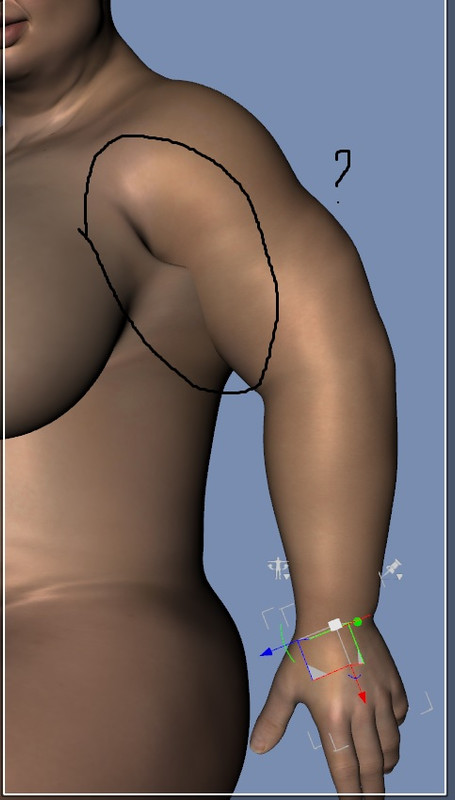
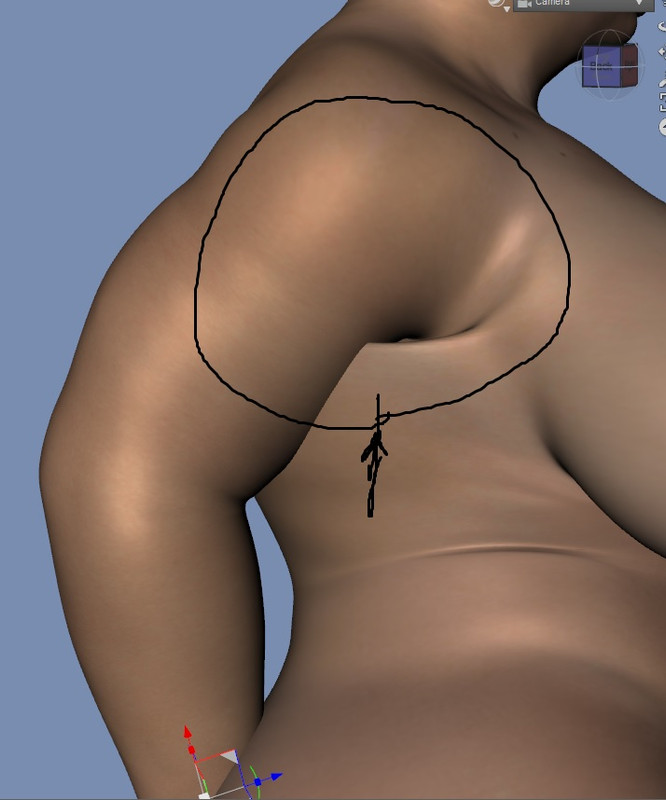
[url=https://postimg.cc/zyZwBHWq][img]https://i.postimg.cc/vZD00WZx/z00.jpg[/img][/url]
[url=https://postimg.cc/Mn77jZbV][img]https://i.postimg.cc/4xMBqmYL/z01.jpg[/img][/url]
https://i.postimg.cc/4xMBqmYL/z01.jpg
https://i.postimg.cc/vZD00WZx/z00.jpg
Thanks
SheilaJanuary 23, 2023 at 9:22 PM #1917516Oh My God and I realised I don't even know how to post images in a post.
I am so sorryJanuary 23, 2023 at 10:42 PM #1917543Try this: https://zonegfx.com/auto-shape-enhancer-for-genesis-8-female/
You have to reload the scene after you add it to your library.
Or you could do enable smoothing on character:
right click scene tab>edit>geometry>add smoothing modifierThis will always work but it will also smooth some things you might not want smoothed.
Hope that helps.
January 24, 2023 at 9:03 AM #1917666@Kefka Thank you so much. The smoothing modifier trick worked. I thought it only worked on clothes. Wow. That was awesome. I set the iterations to 10 and it dissappeared. The only downer though it also smoothed out some facial features I had added, like wrinkles and scars.
Thank you so much.
I downloaded the product you linked but I prefer to use G3 characters, havent migrated to G8 yet and I don't think I will.
Thank you once again
SheilaJanuary 24, 2023 at 12:49 PM #1917798@sheilakatounis, that's a bidding problem. Look at my past post. The best solution is to pass it to Maya, and renew the "biding"...but...
January 24, 2023 at 3:03 PM #1917855Your char's body shape is unique, JCMs cannot work for all the similar cases like what you have. I usually use GoZ or blender to give it a partial moving/smoothing then import back as a delta morph which is quick and effective. Not recommend to add smoothing modifier to the figure. It eliminates details~ 😀
January 25, 2023 at 5:48 PM #1918329@Abad I went through the post and I realised I know little to nothing about 3D programs. Its obvious you come across as someone who knows what they are doing and that you have extensive knowledge of this stuff. I downloaded Blender which is free and then I didn't know what to do from there on. In reality I do simple things in DAZ mostly. Sometimes I do dare to venture into unknown but only just. having said that thank you so much for your post and I am sure I would want to delve more into this. You are a scientist Abad
@windreaver0118 exactly. Adding smoothing feature to the character itself almost dissolved all the facial features (wrinkles, scars etc).To both of you I really dont know some of the terms thats been commonly used like JCM for instance. I mean I might be useing it already but the abbreviation part is a tough nut. I am not stupid but sometimes its hard to remember everything, but then there are days when I am able to crack the code just as easy.
LOL
-
AuthorPosts







- You must be logged in to reply to this topic.
