Home Page › Forums › General Chat › Free AI art...on your PC?
- This topic has 39 replies, 12 voices, and was last updated 3 years, 5 months ago by
 SkippyTheMeh.
-
AuthorPosts
-
May 8, 2023 at 11:54 AM #1967929
This is the extension
https://github.com/jtydhr88/sd-3dmodel-loader
unfortunately only vrm files can be posed but objs can be rotated etc before sending to controlnet either text2img or img2imgMay 9, 2023 at 12:26 AM #1968198"@legolas18 Interesting. I wonder if it’s an 1111 thing. I always get the exact same picture when using NMKD gui, unless I start tweaking the settings in some way."
It appears to me that it depends on the base model you're using. Some seem of make no change if you don't change the prompts while others do. I also learned today that if you make something nice the image isn't "lost" if you copy and save the prompts, settings and seed for it.
What I still don't understand is why just changing the width and/or height generates a completely different image. I think it's related to the size and dimensions the model was trained on, usually 512 x 512.May 9, 2023 at 4:30 PM #1968617I fell into the vortex of SD as well, so much so that I have not opened DAZ or the zone in around 3 months and used SD every day instead. It is an incredibly powerful tool and with the right skills, any sort of image can be generated. True that it is very hard to get what you want, but with patience and watching tutorials one can learn how to get to the desired final image. The sole tragedy and the hardest thing to master are fingers and toes, that's really difficult and surely hope the community will offer some tools to fix it. Inpainting is a nightmare for that as well and it is very hard to actually get good fingers in general, at least that is the only thing I couldn't master at all.
Interesting to read all your information and directions and it is also cool to use basic renders/preview from Daz and import them into SD, I have seen some doing it but still need to try.
May 9, 2023 at 10:56 PM #1968761@Zx96 - ".....use basic renders/preview from Daz and import them into SD.."
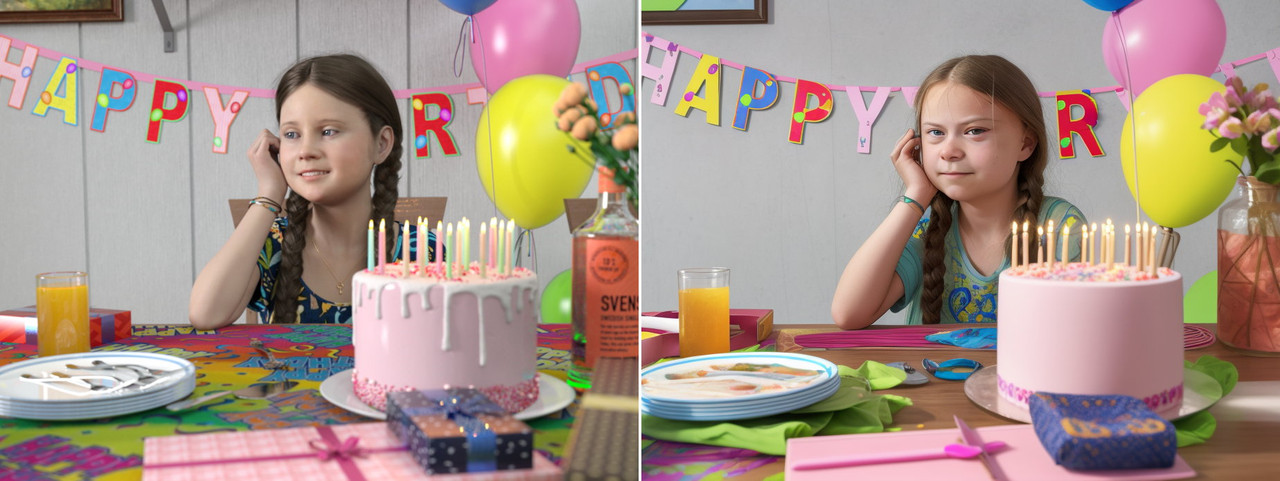
I just gave that a try using an image I made for the art showcase a few months back.
As you can see it is possible but it's also a fine balance between changing too much and not enough. High values of SD denoising strength in img2img will make big changes to the original image and lower values the opposite, right down to no change.
Looking for what's changed is like one of those spot the difference games 😁.May 12, 2023 at 2:27 PM #1970164@Frank21, which of the two images was made in daz ? I actually cannot tell they both look like 3d art..
May 12, 2023 at 8:15 PM #1970290DS one on the left. They both look 3D because one is and the other is generated from a 3D render.
May 12, 2023 at 10:53 PM #1970325ahhh now that you mentioned it, it's clear. Also, I should have looked at the fingers, after a closer look it's easier to understand the one on the right is SD. Cheers!
May 13, 2023 at 9:55 AM #1970565Is Python 3.10.9 the limit, or does the problem start at 3.11?
May 13, 2023 at 1:30 PM #1970664Guess you can use 3.11, but it will warn you that it works well with 3.10.9..
May 14, 2023 at 9:43 AM #1970981One of the not-so-cool-but-really-useful things that I've found AI really useful for is automating /scripting repetitive tasks using ChatGPT.
For example, I'm working on a comic series with a friend where I'm doing the art and they're doing the story. I needed to be able to adjust skin specular and roughness values in Blender. Doing it manually meant selecting each body-part shader and typing in the required values repeatedly. That got old really quickly when I had more than two characters in a scene so I asked ChatGPT to write a python script to do it for me. Now I have an add-on that gives me two sliders for specular and roughness values and those sliders adjust the values for all the skin shaders. I know some very basic Python coding, and could probably have figured it out eventually, but with ChatGPT, it took me a couple of hours.
I've also had it help write a batch file that takes a blender file and renders it in the background at three different scales with some presets to make sure I get consistent images. Again, I could have figured it out myself eventually, but it took me and ChatGPT less than 20 minutes to get it working properly and I'm now working on converting it to Python with a GUI so I can set up batch renders.
-
AuthorPosts









- You must be logged in to reply to this topic.

