Home Page › Forums › General Chat › Flagging (Non)Broken links
- This topic has 9 replies, 4 voices, and was last updated 4 years, 5 months ago by
Anonymous.
-
AuthorPosts
-
May 23, 2022 at 12:20 AM #1811105
I had uploaded content for the Marmalade Outfit and the download link is working perfectly fine. This post has been flagged as a non working link and is right now in the Dead Post section..
The post was flagged by a user called bb1322 and the reason given is "Keeps saying not accessible and to try after 24 hours."
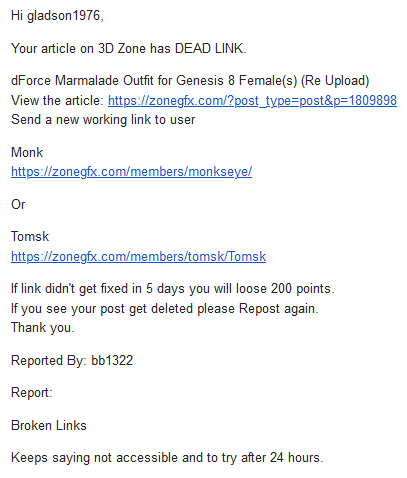
Is there any mechanism to check the validity of the flaggings before the post gets moved to the Dead Post section ?
May 23, 2022 at 12:40 AM #1811113It happens automatically when a post is flagged, I believe.. PM Monk and say what's going on and the post will get unflagged.
I've had whiny people flag mine just because it's a Google Drive link. It's just part of posting
May 23, 2022 at 12:58 AM #1811115PM'd Monk now..
on a side note.. shouldn't the download link be hidden on a Dead Post ?.. all the dead posts have the download part enabled..
May 23, 2022 at 1:16 AM #1811119Are you looking at one of your posts? Your own posts will always have the download link visible
May 23, 2022 at 1:36 AM #1811122Not mine 😀
This is for the other dead posts and they all have the Pay button and when you pay you get the dead link 🙂When its possible to show the "This Post Is Dead - Please Repost It" banner.. it should be possible to hide the button also..
May 23, 2022 at 1:38 AM #1811123@gladson1976
I wouldn't get too worked up about it, frequently a link may not work for someone someplace for reasons, and sometimes less experienced or more impatient downloaders will rush to flag a post because Cloudflare went cattywumpus on them, or maybe their local dictator turned off the internets where the host is... whatever.
Staff are very cool about it and always happy to help, just drop a PM and work it out.Some helpful diagnostics
-use a proxy or VPN to see if an apparent dead link is actually live from some other IP region
-use https://www.isitdownrightnow.com/
They use a variety of automation to quickly determine if the problem is the server or just your link.Also, Marmalade Outfit is your own post, so you will always see the exposed link. That's called "magic purchase" in the world of shopping cart software. No posts in any category have otherwise exposed links, except Freebies, which do not require a purchase.
May 23, 2022 at 1:45 AM #1811125Ha ha.. not much worked up about it.. its just that its a little bit of a hassle fixing it 😀
May 23, 2022 at 1:48 AM #1811126Well cheer up, I just bought it to see, and yes it is indeed live. Google Drive, 119MB, and a cute outfit I didn't have until now. 🙂
May 23, 2022 at 1:59 AM #1811127That was my concern actually.. if it is in the Dead Post and I hadn't started this thread.. you would have lost the opportunity to download this "cute outfit that you didn't have until now" 😀
May 25, 2022 at 6:36 PM #1812175Anonymous
InactiveRank:
I wish there was a way for mods to check the post in question, and if it is indeed dead, and there is a repost, to remove the old "dead one" entirely.
If you search Sexual Yoga, there are 3 post. I have one, which is still working, but somebody must have seen the OTHER DEAD one, and reposted as well...
If only folks would volunteer to help the over worked mods...
oh wait.....sigh....
-
AuthorPosts





- You must be logged in to reply to this topic.
