Home Page › Forums › General Chat › FINALLY! I finally fucking did it!
- This topic has 47 replies, 8 voices, and was last updated 3 years, 5 months ago by
 Nicodemus.
-
AuthorPosts
-
November 5, 2022 at 3:40 AM #1886157
Anonymous
InactiveRank:
Interesting thread guys, thanks for all the info/insight....
So, i've been with with Daz for a couple years now, and sadly have spent more time collecting pirated assets than anything else.
I can make some renders (in daz) that I feel happy with, but would like to try my hand at some animations as well... maybe combine the two in a Virtual Novel etc etc....
What do you suggest my learning path be?
iClone? Blender? ????
I'd hate to waste effort in trying to figure out Daz animation if it is just going to be wasted effort.
Thanks, in advance, for any help!
November 5, 2022 at 10:52 AM #1886261@Redflag, Neither! :D. Iclone and Blender (one paid and the other opensource...), are "entropic systems, or not very compatible with other programs"; Like Daz, they reside in their "small world". If you really want animation, you have to go through Autodesk Maya/Mobu... Perhaps, the Cinema4D environment is more friendly, but it is more focused on post-production or MotionGraphics, (And, truth be told, it has a lot of plugins and different render engines...) The rest is wasting time...
Film director James Cameron, upon hearing that Autodesk wanted to "get rid" of MotionBuilder, called the same boss, and said...: -"No MotionBuilder, no Avatar2...". Maya is an "everything" suite, but Mobu is exclusively for 3D animation; It has many details that Maya lacks...
I think everything has been said, unless you are from Disney/Pixar... 😀
November 5, 2022 at 4:47 PM #1886359@Redflag
Daz is useless for anything other than pinups or as a character creator for other applications. That being said, my suite consists of Maya, Max, Motion Builder and iClone. I use Daz only to export clothing, props and morphs. As a matter of fact, it actually takes up HDD space. I'm in the process of converting everything I have for Daz, over to iClone.
All of these applications have a steep price. However you can get student licenses for Maya and Max - I'm not sure about MB, as I pay for an indie license for all three. For what it is, iClone is EXTREMELY good, but it also has it's problems. You want iRay? Well, it's a plug-in. Digital Human Shaders? Again, an add on. Curve Editor? Another plug-in. Ironically all the decent plugins for iClone, which I paid for, were integrated into iClone 8. If I need to re-target a large number of animations to a specific rig, it's actually faster using 3DXchange (which Reallusion just deprecated), than it is in Motion Builder. However, there's no characterization, no control curves, etc. Reallusion burned a lot of us, as many features in 8 were supposed to be in 7, but they pushed it back and then offered us 7 users a whopping $100 off as an "upgrade price." 8 has a lot of bugs and really isn't ready with prime time. Also, if you're like me, and still on iClone 7, you have to still use the puppeteer in iClone to animate, which is BETTER than the crappy, archaic Daz one, but it's still a pain in the ass. Screen IK animating was supposed to be added at the EOL of 7, but they put it in 8, to get more people to buy it.
C4D is a great app. I've used both the Amiga version and the PC version, but I got cornered onto Maya about 20 years ago and stuck with it. C4D is cheaper than all the others, however.
If you're serious about animating, find ONE application and stick with it. Don't use other applications, unless you have to for a job. Learn to rig using either CAT or HumanIK, first (I can't remember the name of C4D's version or Blender's) and then learn how to make your own rigs. Stick with standards (something Daz3D is NOTORIOUS for not following) and grab tutorials. As many as you can find. Study, study, study.
And seriously, if you're planning on doing serious animations, give up on Daz. I started scrutinizing their Genesis 9 model. It has like 5 full skeletons on it. The main one, brows, eyes, and 2 others, I believe. Waste of bones and calculation times. Causes issues with rigging, too.
Just my 2p.
November 7, 2022 at 11:36 PM #1887286So, I tried Cascadeur. It worked. Even has an "Export to DAZ" function (that doesn't work.) Imported the animation as an fbx manually and it worked fine. No feet sliding.
Then, after I save a pose and load it on a G8M model, it messes up the head skeleton and there is weird feet movement, all over the place.
The skeletal animation, though, is perfect. Just can't attach it to a character, without it jacking up the mesh.
So typical of Daz Studio.....
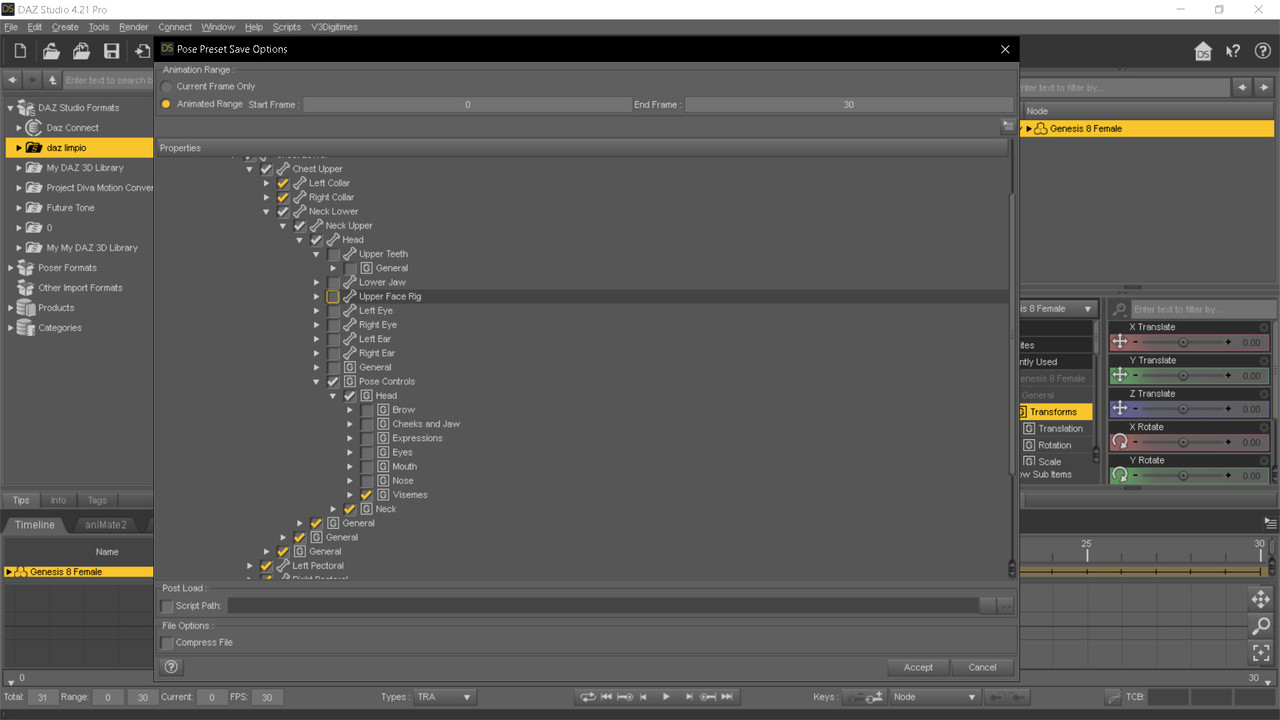
November 8, 2022 at 5:40 AM #1887336Tip: In MOBU, delete the eyes, and all facial bones. The hierarchy as only neck and head (And all the others, of course..) Like a HumanIK rig, or a genesis 1,2... Then, export to bvh, a go to Daz... or the Hell! 😀
Or, try to save the pose as animation without this bones. Just uncheck all de childrens for the master head bone.
 January 9, 2023 at 5:49 PM #1911778
Yeah, too much work for me. Daz Studio really sucks now. I'm at a point, I'm loathe to even have to load it.
January 10, 2023 at 10:59 AM #1912070@methuselas..., is no easy, but the rigth way. No more.
As I have expressed before, only MOBU or Cascadeur can "do something worthy" for conversions of animations fbx. to Daz, (and with great care...). Not Blender, I-Clone or anything...January 10, 2023 at 3:40 PM #1912170Nice thread! Good to get everyone's take on current Daz.
I've been fooling with this render space since early 2000's with Poser, thinking it to be a great asset for painting. Then I made the leap to Daz3D Studio around 2012 or so. Now, I just find myself disenchanted with their storefront and limitations.
Part of me wants to get more into BLender, take a year to learn it and model from scratch. Another part of me wants to dedicate myself to Quill VR because the VR space is starting to majorly expand. I've wanted to get into animation for a while and Daz is just very counterproductive and a pain in the arse. Also, I'm stuck between deciding to waste the time trying to export characters to obj in Daz3D to transfer to Quill, or just sticking with procreate/photoshop/and Quill and leave Daz in the past.
I only ever get items for Daz anymore out of habit. I've been working on a skin for G9 but just not as motivated anymore. Congrats to OP and those still putting up the good fight though.
January 11, 2023 at 10:42 AM #1912443@goblyn Daz Studio it is interesting to make renders for mainstream images, and sell them (At the price of an old whore...) as a poster/affiche for a nightclub, or a theater, even for a porn comic... Even to print a painting for your house. Little more.
People with "serious work" can use the models and costumes as "a starting point", which avoids modeling time, but it is still a complement, not a "final work" for companies. An expressive cartoonist is more interested than a realistic render: For that, today we have digital cameras, even on your mobile. I have worked for more than 25 years in a video company, both as an ENG camera and video editor, post-production in After Effects, etc..., and, I assure you, the "ipso facto" reality of the moment is more narrative than not a "pretty render"...
But, well... they are my philosophies... 😀January 23, 2023 at 5:14 PM #1917421For me, Daz is a glorified character creator. If I use it to make an Avatar, I've already acquiesced to the fact that I'm going to have to bake out maps in Substance before I can even use the Avatar.
Daz does have ONE aspect that it excels at: Environments.
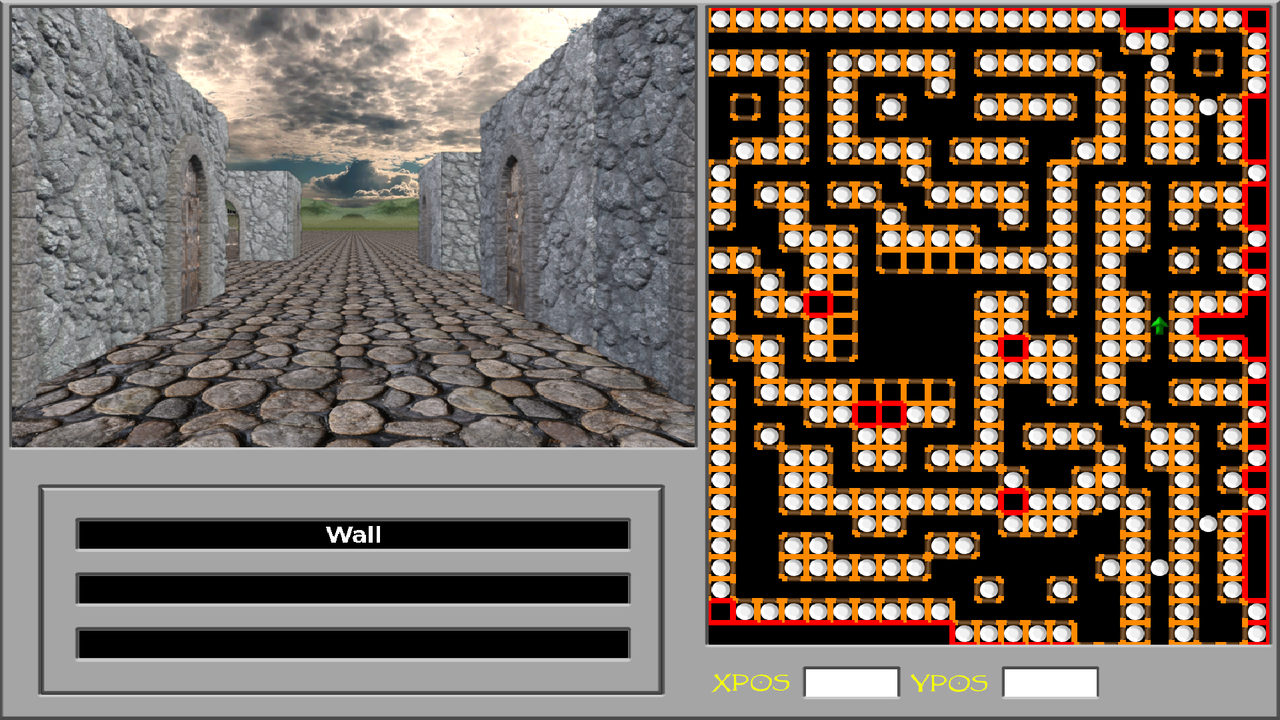
I'm not sure if anyone here remembers the old 2.5D dungeon crawlers from back in the day, but I've been working on a Construction Set Engine for those types of games, for the past 15 years. I'm in the process right now of updating all the graphics to modern standards (the gamescreen used to be 640x400). I create my low poly models in Maya, smooth them to about 200k and then import them into Daz for sprite rendering.
This is where Daz excels for me. 'Cos Daz is ALL about the "feature creep" it has the most ridiculously tweakable PBR render settings I've ever seen. I can take this Wall model I did in Maya and then throw an Iray shader on it, cranking up the render subdivision on that wall to 12, turning that 250k poly wall into a 3 million one and with shaders, I can make some impressive wall sprites.
For example:
 February 10, 2023 at 3:46 PM #1925930
I beat Daz. 😛
Got a near flawless way to import animations now. No feet sliding and minimal cleanup in Daz, using keymate and graphmate. No using MoBu. Straight from iClone to Cascadeur and then into Daz Studio. I'm in the process of converting all my animations again, as we speak.
Oh, you can thank Ruined_Claw for this. If he hadn't pushed me not to give up, we wouldn't be here. 😉
February 17, 2023 at 2:41 PM #1928808Congratulations! Been reading up on this thread, kudos to all the effort that went into it. Every day I read about how difficult it is to animate in Daz, that alone kept me far away from trying it. Blender UI kinda sucked for me, so I never got behind a system yet, besides Daz and my 2D postwork.
What would you guys suggest to a complete noob in animation - C4D ? MOBU ? Iclone ? I'm mainly asking from an UI and UX perspective, not cost, licensing, or hardware requirements.
February 17, 2023 at 3:07 PM #1928822You're going to hate me for saying it, but learn the Blender UI. Yeah, it sucks, but it's free and it's REALLY robust. iClone is awesome, but it's expensive. I snagged it for over 60% off, during the lockdowns, which was the only reason I purchased it. Then, reallusion screwed me over, with upgrading to 8, so they're a no go. Ironically, it was iClone that was the missing link to get Cascadeur to work properly with import animations for Daz Studio. Exports from MoBu and Maya were too problematic to use. I even had a ridiculously long way to do it using Unity, but it required so much clean up in daz, it wasn't worth it.
You can get a maya indie license now, for about 300 a year. That's what I pay for, as I have over 20 years of experience using it and I don't want to switch to another application. But in all seriousness, stick to Blender.
As an aside, Ruined Claw has been helping me test my work, so here's a batch of FBX files I sent him to test and the clean up in Daz is minimal to nothing at all now, with my new pipeline. It also supports Generation 3, Generation 4, G1, G2, G3 and G8 figures. That's why it takes me FOREVER to get anything ready to release. I have a few animsets already converted to FBX, but I want to make them with nice icons for Daz duf files.
https://mega.nz/file/oX5XTRBL#dGuc6pZHcPQOMhKyajjsUCOn-1c5pcyf4N5lxhGpvrc
February 17, 2023 at 7:35 PM #1928962Heh okay, I believe you. So you're saying I can do the animation in Blender if I learn it well enough? Or will I still need Iclone/Mobu/Cascadeur to export from Daz or to rig them before reaching Blender?
February 17, 2023 at 8:29 PM #1928971The only way I've managed to get any animations into Daz, was with Cascadeur and iClone, but if you're using Blender, forego Daz completely. It's not designed for Animations and never was.
-
AuthorPosts






- You must be logged in to reply to this topic.
