Home Page › Forums › General Chat › Asking for help how to install Measure Metric pluging
- This topic has 11 replies, 7 voices, and was last updated 2 years, 5 months ago by
Kazuchin.

-
AuthorPosts
-
February 8, 2020 at 7:24 AM #1462758
Here we go again.
I asked help for that on the forum a looong time ago, got no replies. Other asked help for that too, didn't get any helpfull reply too. I'm trying again today, hopefully a kind soul will finaly take a few of their time to answer and help me.
Because i would really really REALLY love to be able to use and make that plugin work. Just to get some basic data number from the character i use. Nothing more !All i am asking is....how do you install this plugin ????
I'm not asking how to use it, just install it and make it appear in your workspace.If someone can kindly explain in a few step from unzipping the zipped file in the download folder all the way to pointing what file to install and where all the file should go in which directory, it's all i'm asking.
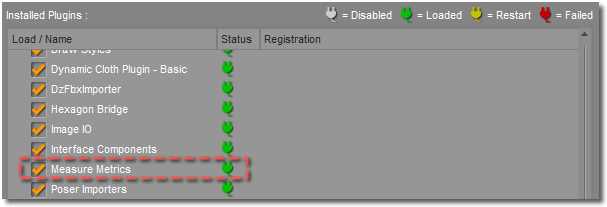
Because right now, i have already download it. Copied/pasted manually a bunch of file in what seemingly seem the right folder for them, and when i start Daz and check the "installed plugin", it doesn't show there. The Measure Metric pane is not there. And when i click on the script in the utility folder in my content librairy, it say "Measure metric need to be installed to use this script"
Clearly, i am missing something. Help please !
P.S: Yes, i am on a PC 64bits.
February 8, 2020 at 8:38 AM #1462840I'll attach an RM I made up for myself when I first installed it.
It is for an early version G2F IIRC, but all that has changed is that the edit function is actuallyy easier to use.Installation
In order to use the plugin, you will need to register it using the serial number copy the number from the page, to avoid typos.
Once the plugin is installed, and the serial number is copied to your clipboard, you will need to do the following:
1)
Launch DAZ Studio
2)
Click “Help”
3)
Click “About Installed Plugins…”
4)
Scroll until you find the Measure Metrics plugin
Click in the text field to the right of the plugin name and paste your serial number. A check mark, to the right of the field, should highlight to let you know that the serial number is valid. Once you've done this, click the “Ok” button, close and then restart the DAZ Studio application. Your plugin should now be active.
http://docs.daz3d.com/lib/exe/fetch.php/public/software/dazstudio/4/referenceguide/plugins/measure_metrics/installation/00_plugin_active.pngWrap-Up
You are now ready to use the Measure Metrics plugin. For further help, please refer to the main section of the plugin's documentation:
Measure MetricsMeasure Metrics .exe must be installed prior to Figure Metrics.
Using the script:1) Select figure to be measured / edited.
2) People > Genesis 2 Female > Measure Metrics , double click icon for Measure Genesis 2 Female-Basic.
3) Measure Metrics Tab gives Hip , Bust , Waist & Height
Units are selectable
To Edit The Figure:
4) Content Library > Scripts > Utilities > Figure Metrics
Stats are shown, but won't be editable yet.
5) G2F 'Configuration' '04 Low Hip Circumference' select V6 or G2F & Actor > PBM Lower HipCircumference
'02 Bust Circumference' select V6 or G2F & Actor > PBM Breasts Size
'03 Waist Circumference select V6 or G2F & Actor > PBM Waist Circumference
6) G3F 'Configuration' '04 Low Hip Circumference' select G3F & Actor > Hip Width 1
'02 Bust Circumference' select G3F & Actor > PBM Breasts Size
'03 Waist Circumference select G3F & Actor > Waist Size
'01 Height select G3F & General > Scale
7) Once they are selected go back to the 'Measurements Tab'.
Now there is a selectable tick box for each parameter.
Type in the required stats and hit accept.February 8, 2020 at 6:03 PM #1463517Thank you @eelgoo for you reply.
Unfortunatly, that's not exactly what i have asked for. 🙁Because my problem is before everything what you said here.
I can't even get to step 1,2,3 & 4.
Like i said above, i can't even see Measure Metrics in the "Installed plugin". Thus, i can't even do those first step.
Can you explain what you do before to install it ? Where to unzip and put all the file in the zipped file ? What .exe to execute ?
February 8, 2020 at 7:02 PM #1463613Actually, now that i'm checking it more carefully.
I understand that this plugin is seperated in two part:
The "figure Metrics" and the "Measure Metric"I've been able with no problem to run and install the "Figure Metric" into my Daz. Has when i'm running the Figure Metric.exe, it's asking for my install path and it install right away at the right place.
It's the Measure Metric.exe that doesn't seem to work for me. 🙁
When i click on the 64bits, the exe lauch (with the little daz logo and all.) But after a few seconde, it pop a box saying it can't find the path to the installation of Daz studio, and the installation with quit. (Closing all the windows.)
What can i do to solve that ?
I never use the install manager, since i install everything manually.
My Daz program is installed to:
C:\Program Files\DAZ 3D
while my content librairy is installed to:
C:\Program Files (x86)\DAZ\Studio\Content
(which is where Figure Metric installed itself by default with no problem)February 8, 2020 at 7:30 PM #1463636OK.
Do you have dzmeasuremetrics.dll in the 'plugins' folder?
There should also be Measure Metrics folder in each of 'Genesis xx ' folder in 'Data' & in 'People'.
Finally there should be figure metrics in the 'Scripts / Utilities' folder.
February 8, 2020 at 7:56 PM #1463655If you are refering to: C:\Program Files\DAZ 3D\DAZStudio4\plugins
than NO, i don't have dzmeasuremetrics.dll in that folder. 🙁
Has for the other two things. (measure metric folder and script utilities folder), yes i do.
February 8, 2020 at 8:01 PM #1463660> it can’t find the path to the installation of Daz studio, and the installation with quit.
Oh, you face the same problem with mine when installing this, the .exe only target Daz Studio installed in whatever their creator set as their default installation path, it suck but many .exe installer also doing this,and you guess it right, it often created problem. Worry not though as it can be solved:
If you encounter "can't find path..." error, do the following steps:
1. Run regedit.exe
2. Under "HKEY_CURRENT_USER\SOFTWARE\DAZ\Studio4", add an string type(REG_SZ) key (how to add: right click > new > string key) : InstallPath-64 (or InstallPath-32)
3. Set key's value to your DAZ installation path (for example: "D:\Daz Studio\DAZ 3D\DAZStudio4")
4. Close regedit, and install the Measure Metric
5. Launch DAZ Studio, go to Help -> About installed plugins
6. Enter the serial number, restart DAZ Studio
7. EnjoyHope this help
February 8, 2020 at 8:01 PM #1463661To fix the "Can't find install path", you need to modify a registry-setting, IIRC - I'm not on Windows right now, so I can't check, but it's a path for installation - IIRC, it's something to do with it looking for a 32bit installer instead of 64bit, or similar (basically, it's looking in the wrong place, and not finding the files it's looking for).
February 8, 2020 at 8:16 PM #1463677HAAAANN!!!!! THAT'S IT!!!!!
THANK YOU @deepedia !!!!!
God ! Why do we have to do all this. >_<
This little step should really be pinned somewhere in this forum. Like a mini-tutorial on "Problem/troubleshooting on how to install a plungin in Daz Studio"
I can't believe i would be the only person that had that problem with a plugin. This kind of message is really truely HELPFULL advice you just can't find anywhere else.
March 26, 2024 at 8:44 PM #2066525Sorry to necropost, but I'm having the same issue, but on a macbook instead.
I downloaded the measure metrics file for the version of daz I have, and I went to run the "DS4_MeasureMetrics_1.11.0.5_Mac64" application, which opens the installer, and follow the prompts only for it to spit out "The installation path for DAZ Studio could not be found. "Measure Metrics DS4 (64bit)" cannot be installed. Setup will now quit."
I already manually placed the .dylib files in the plugin folders, and as far as I can tell, I have daz installed in the default location (Macintosh HD/Applications/Daz 3D/DAZStudio4 64-bit). And where exactly the installer wants or expects Daz to be installed is some nebulous secret because if it at least told me that I could work from there.
Anyone have experience getting it to work on a mac?
March 26, 2024 at 9:37 PM #2066537“That is not dead which can eternal lie,
And with strange aeons even death may die.” -H.P.LovecraftNothing online truly dies
April 28, 2024 at 1:54 PM #2072487>Anyone have experience getting it to work on a mac?
I was able to install it by renaming “DAZStudio4 64-bit” to “DAZStudio4” in the application folder.
You might want to give it a try since it is just a name change. -
AuthorPosts










- You must be logged in to reply to this topic.